OSI Model
Modified 2026-10-11
The OSI (or Open Systems Interconnection) model is a fundamental model used in networking, because tells how all networked devices send, receive and interpret data.
7 Application
Everyday applications GUI, Terminal, but also protocols like DNS (Domain Name System).
6 Presentation
We can make clients different, but data translates to a standard here. Encryption (HTTPS) and compression happens here.
5 Session
The session layer creates a connection with the other computer, synchronizes them, and divides the data up in smaller chunks (packets) before sending them one at a time.
4 Transport
Divides transmission into bite-sized pieces (TCP => segment, UDP => datagrams).
- TCP (Transmission Control Protocol)
reliable, constant connection, error checking, data accuracy
- UDP (User Datagram Protocol)
fast, no synchronization, hope for the best,
3 Network
Routing and re-assembly of data (small to bigger chunks again) AKA packets. Routing figures out the most optimal path. Everything uses and understands IP addresses on this layer.
The router checks if a packet is destined inside it's local network, if it isn't it goes to the default gateway, checks in the routing table of the ISP to see if there's any possible matches there. For example if it finds 1.1.1.0/24 and 1.1.0.0/16 it will prefer the /24 subnet mask as it's more specific.
The ARP (Address Resolution Protocol) operates between L2 and L3 in order to ask around what mac address should be used for a given ip. In case of a remote network, the default gateway is temporarily used as the device ip, and thus this constantly gets unpacked, and repacked with each router jump and replace the mac address to the new router one. Routers are not like regular computers which drop the packet, if the ip doesn't match the mac address. They actually will re-package the packet with a new mac address.
2 Data Link
Receives packets from the network layer, and adds in the physical MAC address of the receiving endpoint of the NIC (Network Interface Card) of a computer. The data becomes a frame. The data link is responsible for formatting the data when sending, and checking for corruption when receiving.
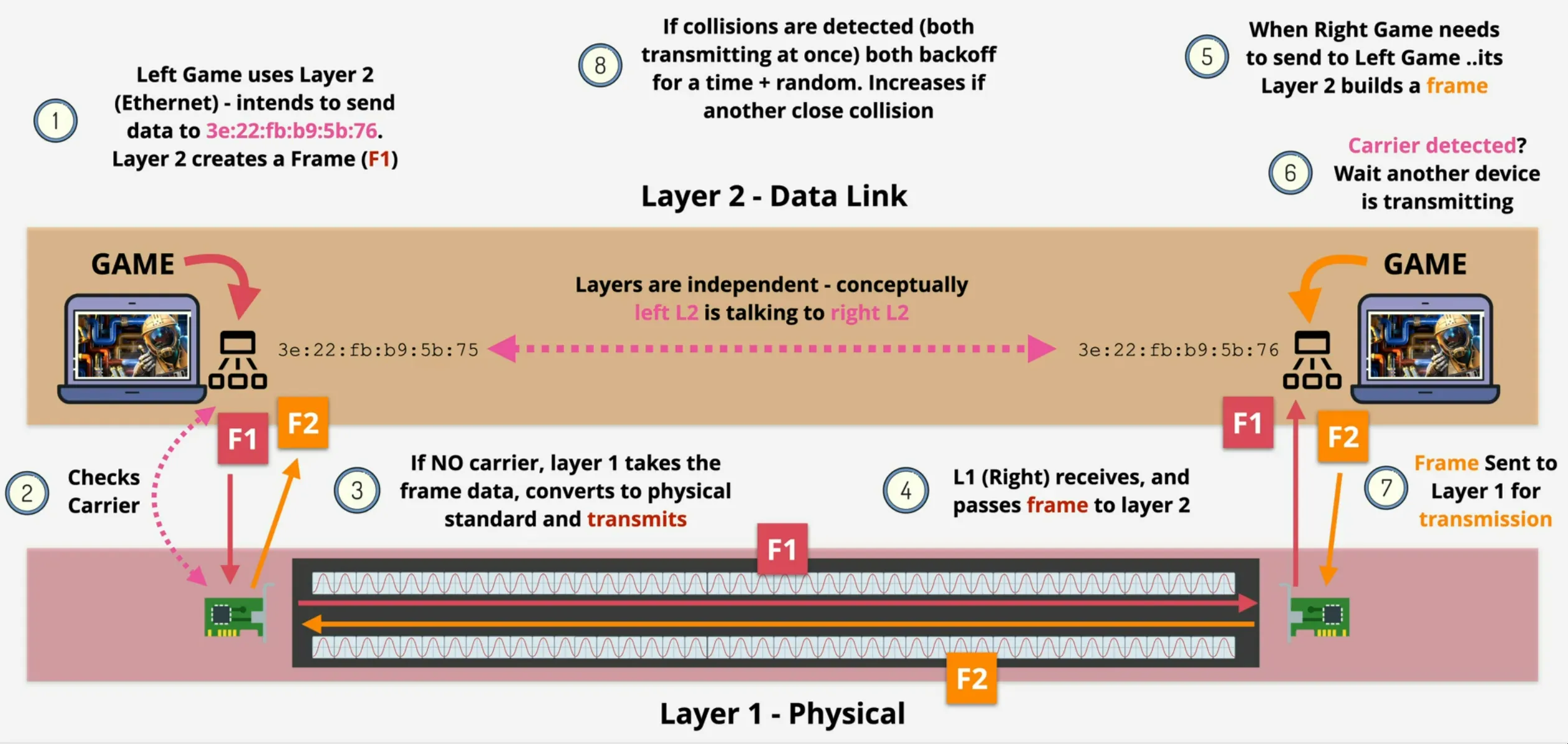
- identifiable (using mac address)
- checks to see if there's an existing transmission (CSMA)
- in case two device try transmitting at the exact time, collection can be detected (CSMA/CD) and the frames are resend at a randomized back-off time in order to prevent transmitting at the same time
- a switch understand L2, means doesn't copy the possible collisions because it can interpret the data, and then the collision only happens between one device and the switch
1 Physical
Ethernet cables, fiber, ... The data becomes a data stream, or bits.
- standards for transmitting/receiving onto/from the medium
- shared medium
- no access control => if two connected device broadcast at the same time, data gets corrupted
- no identifiable device
- hub is dumb, and acts as physical data repeater