Proxmox VE
Modified 2024-07-27
Proxmox VE is a debian based linux distro to manage Virtual Machines (VM's) and Linux Containers (LXC's). The design goal was to make administration easy, whether managing a single node or multiple ones in a cluster.
Installation
- download from Proxmox VE
- (optional) add it to my Ventoy USB
- install on the SSD with
ext4 - use
[email protected]for the email as it sends notifications to it, which gets annoying real fast - make sure the IP address has a static lease on your modem
- replace enterprise repositories
ceph-quincyandpvewith no-subscription ones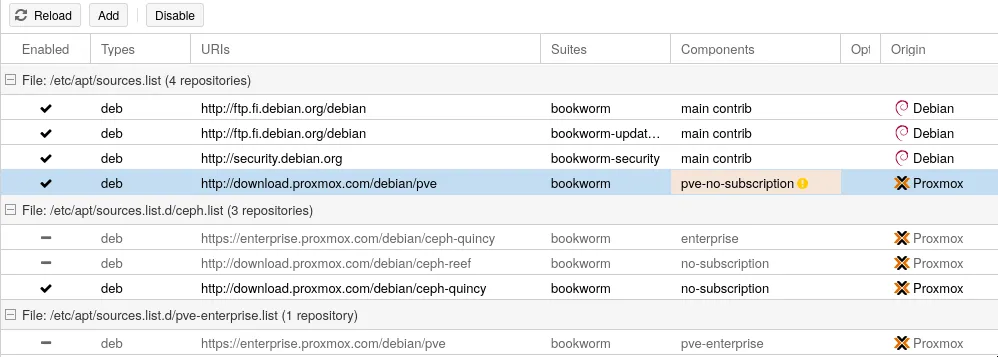
- refresh && upgrade
ZFS
In reality I should be running Proxmox and TrueNAS on separate machines, since having a NAS increases the available of my storage that the services running on Proxmox would need. However, I do not have this separation due to space and hardware limitations.
So currently I need to follow TrueNAS Core on Proxmox VE with Hard Drive Passthrough.
If I'd have a separate machine to run Proxmox on, I need to:
- wipe the disks
- create
zfspool, uselz4compression, mirror, and disableAdd Storage. If this is checked Proxmox will automatically create the storage for the data center and can only be used for container and virtual machines. - check if the pool exists with
zpool listandzfs list create a dataset for backups, the ISO's and virtual machine storage with
zfs
  create name-from-pool/name-from-dataset
, so in my casezfs create tank/backups zfs create tank/software zfs create tank/vm-drives zfs list- go datacenter and storages for:
- software => snippets, ISO image and Container templates
- vm-drives => Disk Image and Containers
- backups => VZDump
- possible configure NFS to connect to an actual NAS