AWS
Modified 2024-11-20
Recommended First Steps
- add MFA for root account
- enable
IAM user and role access to Billing information - receive billing alert via a cost budget
- enable pdf invoices
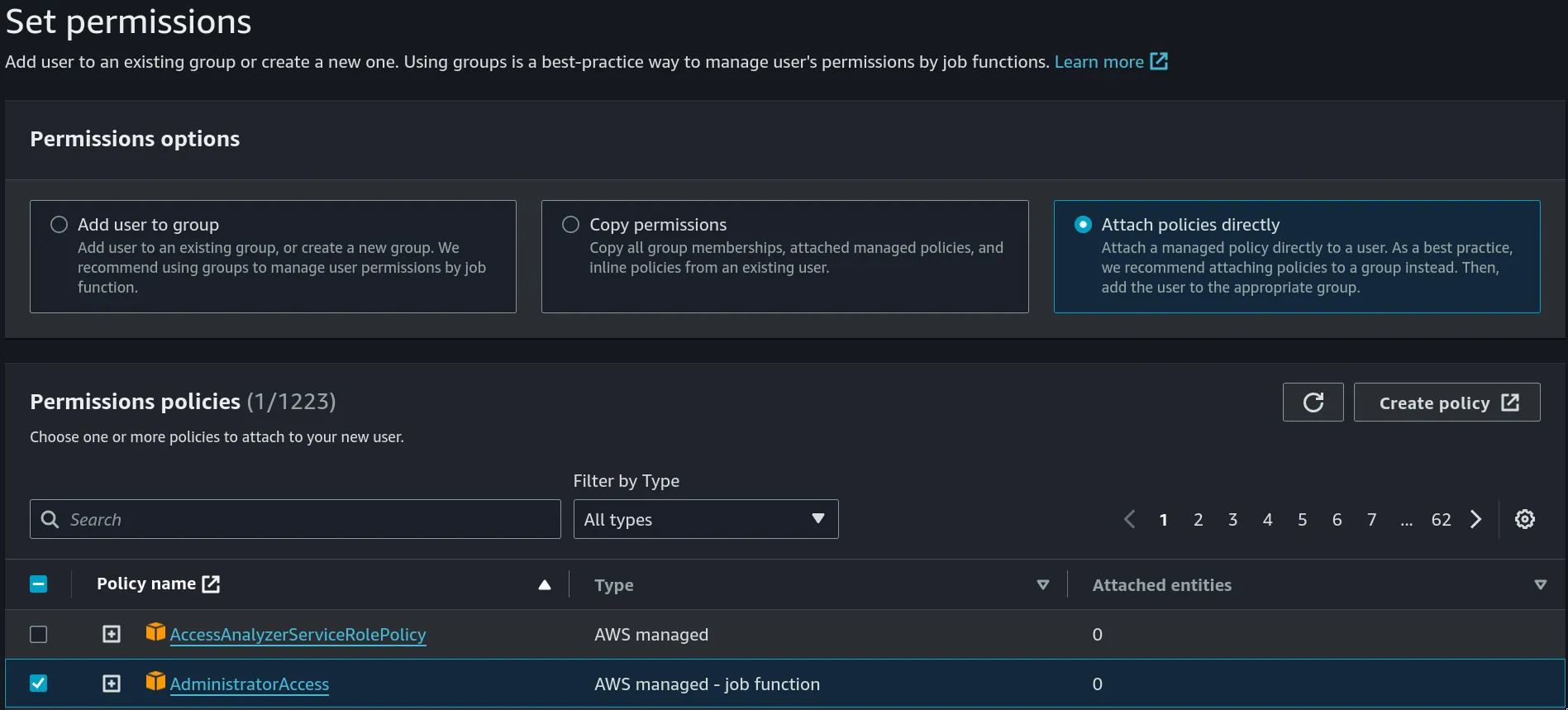
- add an iamadmin user
- add admin policies
- add MFA
- try logging in using this account, instead of root account
- add admin policies
General Concepts
AWS Global Infrastructure
https://aws.amazon.com/about-aws/global-infrastructure
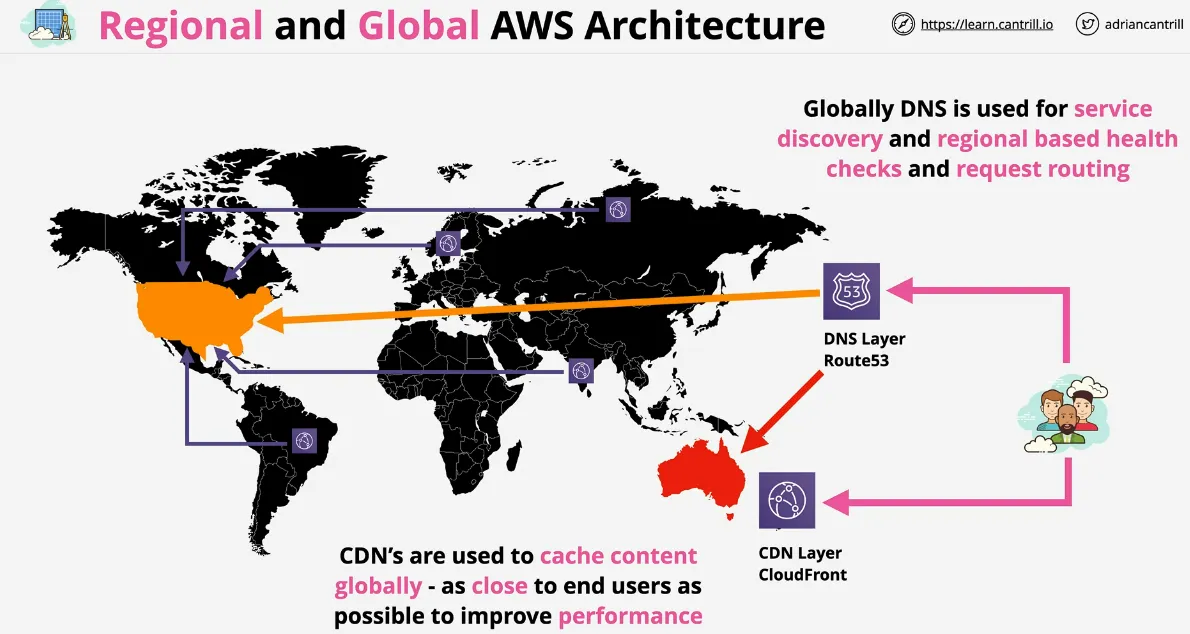
AWS Regions
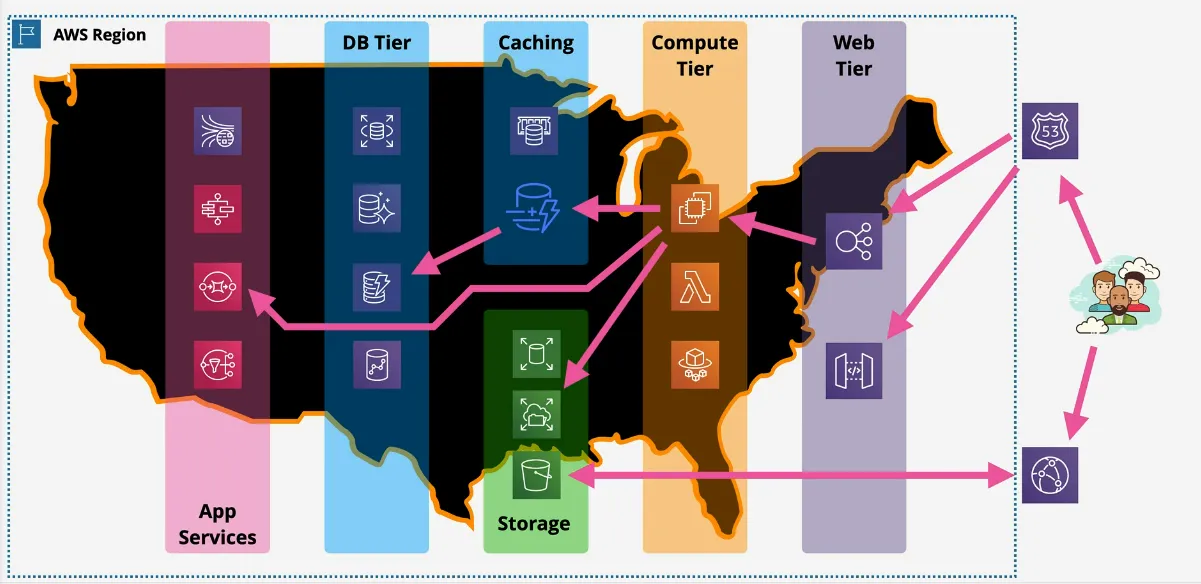
- geographic separation => isolated fault domain
- geopolitical separation => different governments
- location control => performance
- for example: ap-southeast
AWS Edge Location
- local distribution points, such as Content Distribution Services
- edge computing
- useful for fast data transfer, usually content is distributed to the edge, while the services are managed by the regions
AWS Availability Zones (AZ)
- logical difference, can be a datacenter, but 1 AZ can also be multiple
- AWS doesn't say what it actually is
- except that it is separated from the other AZ's
- for example: ap-southeast-2
- some services can span all the AZ's in a Region (such as VPC)
Resilience
- global resilience: IAM, Route 53
- region resilience: replicate data to multiple AZ's in the region
- AZ resilience: inside the AZ's AWS still has redundancy in case individual machines fail though
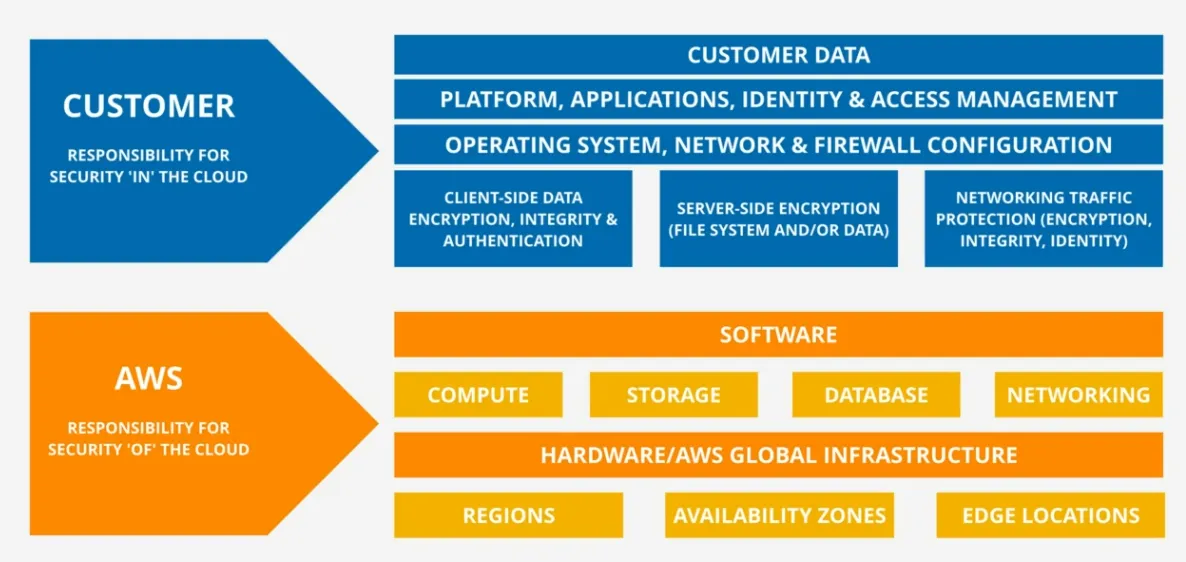
Shared Responsibility Model
- aws is responsible for security of the cloud, you responsible for in the cloud: hardware/aws global infrastructure, regions, compute, storage, database, networking, and any software that is used to provide these services
- you are responsible for client-side data encryption, auth, server-side encryption (SSL) and/or filesystems, networking traffic
- you are responsible for operating system, network and firewall configuration
- you are responsible for platform, applications, identity and access management
you are responsible for customer data
Public vs Private Services on AWS
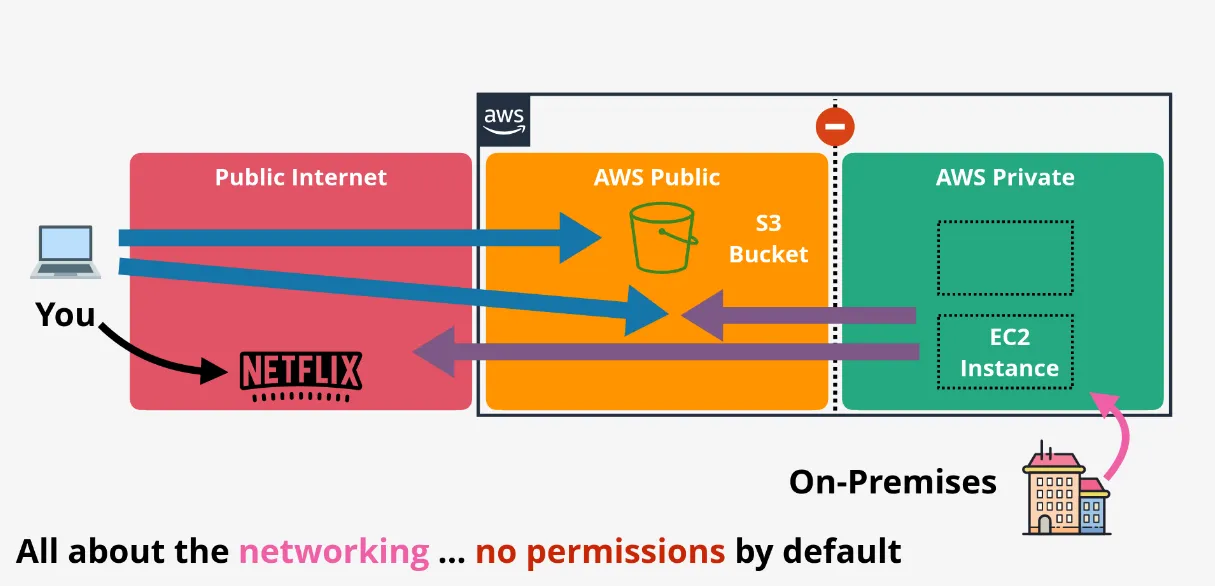
- public zones are:
- accessible via the internet
- doesn't mean you are authorized to access them
- private zones are:
- the different VPC's (Virtual Private Cloud)
- by default have no access to the internet
- in order to make an EC2 instance publicly available we need to configure a default gateway, and map the private ip with an external one
- things outside AWS can only connect via VPN or Direct Connect
ARN (Amazon Resource Name)
- uniquely identifies resources across any AWS account
- format:
arn:partition:service:region:accountid:resourcetype(optional):(or/)resourceid - using
:::means nothing needs to be named to unique identify the resource, which is different than:*::where the*means that any of the possibilities should be included - possible mistakes with buckets:
arn:aws:s3:::catgifsreferences the bucket, some actions only apply to bucketsarn:aws:s3:::catgifs/*references the objects INSIDE the bucket, not the bucket itself, some actions only apply to objects in buckets- so, s3 buckets are globally unique which means region, and accountid doesn't need to be included to uniquely identify the resource
AWS CLI
The environment variables are configured based on a precedence. So for example,
running a command with --region has precedence over assuming a role which has
the region defined.
IAM (Identity and Access Management)
- can do almost as much as the root user
- all data is secure across all regions and all services
- every account has their own dedicated instance of IAM
- no costs
IAMcan't control external accounts and users, but can assume IAM Roles
IAM Identity Policies
- security statement which grants/denies access to products and features
- only in effect when attached to something
IAM Policy Documentis written in JSON, which has fields:Sid(Statement Id) describes what the statement does- The
Effect(Allow/Deny) is only applied when it matches theActionand theResource. Lists and wildcards are accepted. - Order of Importance:
- Explicit DENY => nothing can overrule this
- Explicit Allow => take effect, unless 1.
- Default Deny => except for root and admin users
- Multiple policies are merged into one document, and evaluated like above
- managed policies are:
- reusable
- created separately
- low management overhead
- => customer + aws managed policies
- inline policies are:
- special or exceptional allow/deny
- in case one specific person from a team needs access
IAM Users
- long-term access identities: humans, singular applications, ...
- principle (unknown thing) makes a request to IAM to access resources
- principle needs to prove (authenticate) they are an identity
- principle becomes an authenticated identity
- authenticated identity performs an action, and IAM checks if they are authorized to perform those actions based on the identity policies
- max. 10 groups per IAM User
- max. 5000 IAM Users per account
- large scale internet application, or massive businesses are recommended to use IAM Roles or Identity Federation instead of managing individual IAM Users
Access Keys
- max. 2 access keys
- useful when you need to rotate keys
- more would be a security risk
- possible states: created, deleted, active, or inactive
- defined by an access key id (public), and a secret key (private)
- only IAM Users can have them, not groups, not roles
useful for interacting with the AWS CLI
nix shell nixpkgs#awscli2
aws configure --profile iamadmin-general
aws s3 ls --profile iamadmin-general
IAM Groups
- containers for IAM Users
- no credentials => so you can't login using a group
- groups can have inline and managed groups, just like IAM Users
- and does not prevent IAM Users from having their own
- no limit of members (except the 5000 IAM User limit per account)
- no default
AllUsersgroup, need to manage it yourself - max. 300 groups per account
- remember, groups are not identities, so resources can't reference groups based on an ARN (Amazon Resource Name)
- groups have actually LESS features than IAM Users, NOT more
IAM Roles
- second type of identity (just like IAM Users)
- useful for an unknown number of users, services, etc
- temporary (constantly need to re-verify)
- IAM Roles are assumed (you become that role) which means:
- it only represents a level of access, not a something
- permissions are borrowed
- attaches
Trust PolicyandPermissions Policy- trust policy generates temporary permissions for allowed identities
- permissions policy defines which resources are accessible for the role
- IAM Roles, unlike IAM Groups, CAN be accessed in
Resource Policies, because it's an actual identity
When to use IAM Roles (scenario based)?
- unknown number of lambda functions need access to certain features in AWS in order to properly execute the function (can spawn 1000's of them)
- team of (readonly) support engineers who temporarily need to restart an EC2 instance can assume an emergency role
- when you already have existing identities, such as Microsoft AD
- million user application where users can login using Facebook, Twitter, etc
- cross-organizations
- partner wants to process data and makes it available in their S3 bucket
- partner sets up roles
- we can use these roles, with our own identities
- these roles can be given to the whole account, or individual somethings
Service-linked Roles
- predefined by a service
- provides permissions to a service in order to access other resources
- might create/delete the role
- or allow you to during setup within IAM
- can't delete the role, unless it's not required anymore
- useful for people who shouldn't be able to access resources directly, but can create resources through CloudFormation (passing the role)
Organizations
- need to use an existing AWS account to transform to an organization
- becomes the management (or master (or payer)) account
- max. 1 account
- can invite standard aws accounts to become members
- can create new member accounts
- becomes the management (or master (or payer)) account
- can create a hierarchy
- organization root, can include
- management account
- member accounts
- organizational units (OU), can include all three to create further nesting
- organization root, can include
- consolidated billing, members don't do billing
- consolidated reservations => buying things in bulk
- different best practice regarding access control
- no need for many IAM Users in every account
- usage of IAM Roles to assume roles, while only using 1 of the accounts for
the actual login (called role switch)
- in case you invite existing accounts, you need to setup this role switching yourself
- restrict accounts using Service Control Policies (SCP)
Service Control Policies (SCP)
- policy document written in JSON
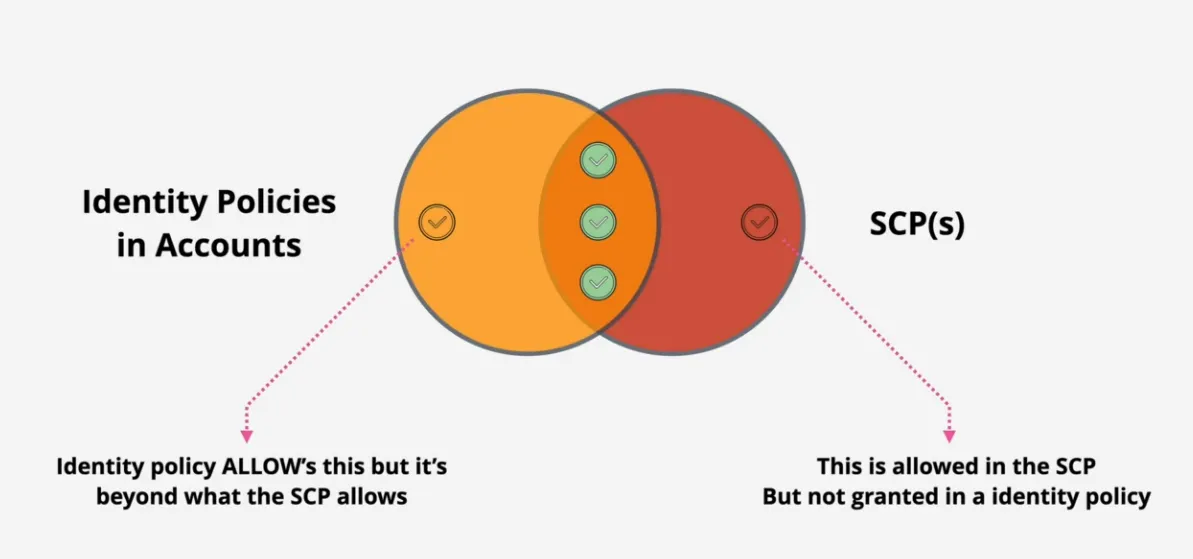
- account permission boundaries
- limit what an account can do (includes root users implicitly), the root user can't be restricted directly, but can restrict what an account can do, and thus indirectly restrict
- for example, restrict an account to only use 1 region
- limits the kind of permissions than can be assigned to identities, but can't set individual permission
- does NOT grant permissions, only sets boundaries
- the management account is never affected by these policies
- by default acts as a deny list (called
FullAWSAccessgiven to all accounts)- DENY / ALLOW / DENY principle
- easier to maintain
- removing the
FullAWSAccesschanges this to an allow list where:- every service needs to be explicitly allowed
- more secure
- but more management overhead
- generally used are deny list
- in order for someone to access a resource the Service Control Policy ANDDDD the Identity Policy needs to allow it
CloudWatch
- collects and manages operation data, any data generated from services, logging, ...
- collection, monitoring and actions from AWS products, service or on-premise
based on:
- metrics (CloudWatch)
- logs (CloudWatch Logs)
- events (CloudWatch Events) => also scheduling (cron jobs)
CloudWatch (metrics)
- namespaces are used to group metrics
- can't use AWS namespaces (for example
AWS/EC2) - contain related metrics, time ordered set of data points
- timestamp
- data collected
- sometimes other things
- can't use AWS namespaces (for example
- dimensions separate datapoints within the same metric
- for example seeing cpu% per machine
- metric on it's own doesn't care if it's one or many, dimensions do
- alarms can be configured to use SNS (Simple Notification Service), or execute an action based on certain criteria
CloudWatch Logs (logs)
- store, monitor and access logging data
- public AWS service (hosted in the AWS public zone)
- regional
- integration with other services is already built-in
- security via IAM Roles
- a lot of services can log directly
- custom applications can via the
Unified CloudWatch Agent
- generate metrics based on logs (using metric filters)
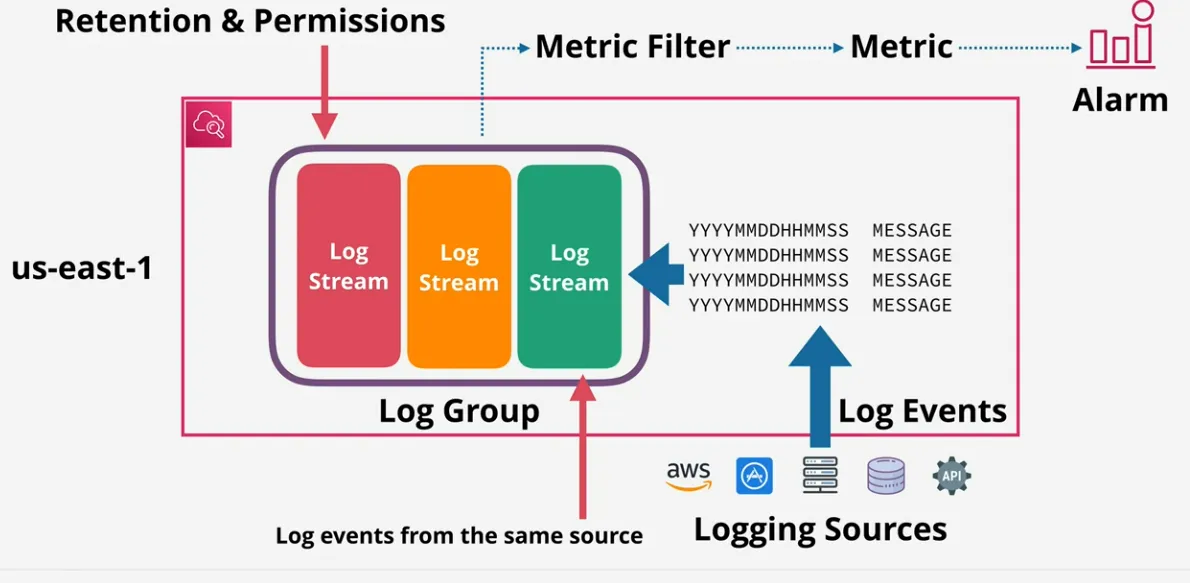
- sources sent event logs to CloudWatch
- event logs are stored inside a Log Stream
- are events from the same source
- each resource has their own stream
- log groups are
- containers of Log Streams
- for example
/var/logmessages for all EC2 instances - where you store the configuration (like retention settings)
- metric filters are defined on the group
- these hold a state, and can thus increment when another log comes in
- define alarm, based on these "metrics"
CloudWatch Events and EventBridge
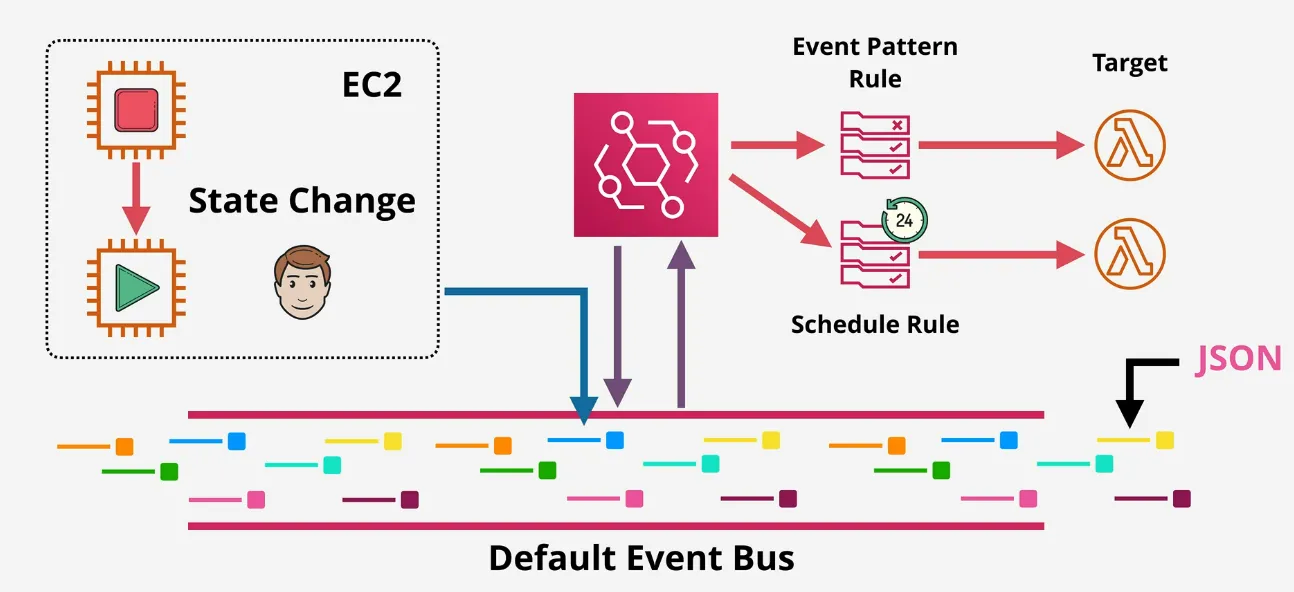
- useful for AWS Lambda
- EventBridge = superset of CloudWatch Events, essentially CloudWatch Events v2
- use EventBridge by default
- if X happens, or at Y times, do Z
- default Event Bus for the account
- EventBridge can create additional event busses, CloudWatch Events can only use the default bus
- rule match incoming events (or schedules), and routed to 1+ targets
CloudTrail
- logs API calls and accounts activities as a CloudTrail Event
- by default stored for 90 days in Event History (at no cost)
- in case you want to save these in an S3 Bucket, need to add a Custom Trail (which is not free + S3 Bucket is also not free)
- possible to store in CloudWatch Logs to search the logs, and interact with
- three type of events:
- management events are about creating things, like EC2 instances
- data events are about resource operations performed on or in resources (uploading things to S3)
- insight events
- regional service, but can be set up to log event from ALL regions
- sometimes this is required, because event from global services (like IAM)
are logged to
us-east1
- sometimes this is required, because event from global services (like IAM)
are logged to
- if set up from the management account in an organization, it can store ALL information from ALL accounts in that organization
- do not use this for real-time logging (sometimes 15min delay)
Control Tower
- quick and easy setup of multi-account environments
- uses Organizations, IAM Identity Center, CloudFormation, Config, etc to achieve organizational automation
- don't worry if this is the only information about control tower
- if it's important for the exam, more will come
- if not, then this is all you need for now
- it's product you should use, in order to fully understand
- the
Foundational OU(or Security OU) has anAudit Accountand aLog Archive Account- the archive implements AWS Config and CloudTrail to provide a readonly access for logs
- the audit account implements SNS and CloudWatch to monitor
- the
Custom OU(or Sandbox OU) provides Provisioned Accounts with the help of CloudFormation, Config and pre-defined Account Factories- automated way to create accounts
- have things configured in them
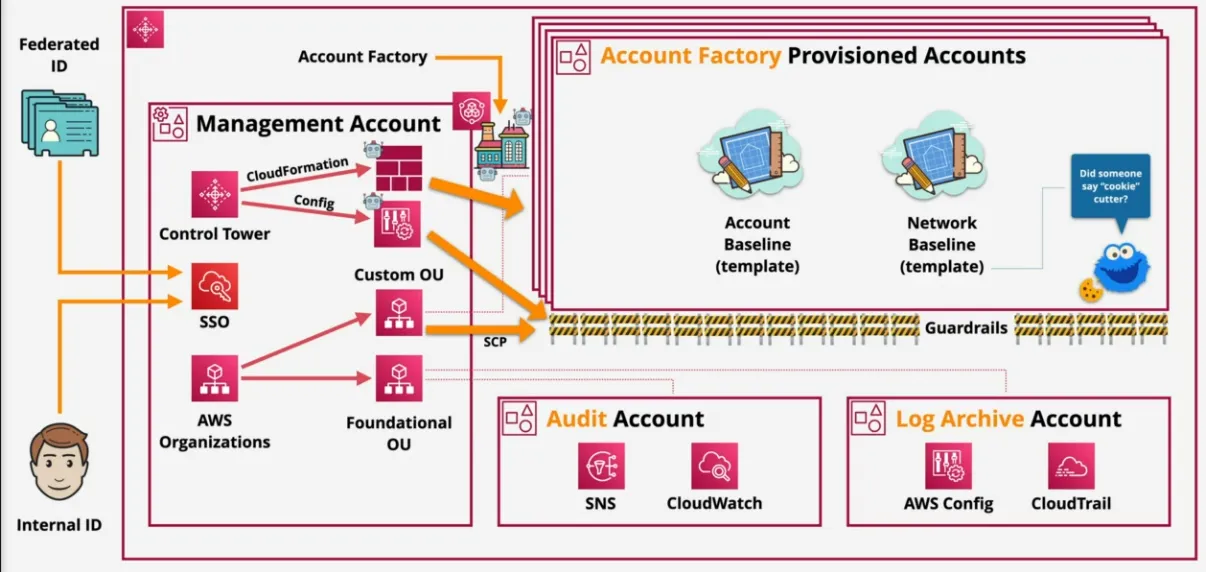
Landing Zone
- like organization, but with superpowers
- built with AWS Organization, Config, CloudFormation
- use IAM Identity Center to provide SSO, multiple-accounts or use ID federation
- monitoring and notifications with CloudWatch and SNS
- End User account provisioning via Service Catalog
Guard Rails
- rules for multi-account governance
- mandatory, strongly recommended, or elective
- preventive guard rails stop you from doing things (AWS ORG SCP)
- either enforced or not enabled
- i.e. allow or deny regions
- detective rails are compliance checks (AWS Config Rules)
- clear, in violation, or not enabled
- for example: detect if CloudTrail is enabled, or if EC2 has Public IPv4
Account Factory
- automated account provisioning
- cloud admin or end users (with correct perms)
- includes automatically adding guardrails
- makes it possible for each employee, to effectively create their own account, and be admin of their own account, if the company allows the employees to have their own sandbox environments
- comes with templates, so for example VPC could be already pre-configured in order to prevent ip address collisions.
- can be used to temporarily setup an environment for a client, testing, etc
- possible to close accounts, or repurpose them
S3
- global storage platform, despite not being able to select a region
- regional resilience
- object storage => not possible to mount or use as a network storage
- public service
- economical storage for unlimited data and multi-user, should be used as the default starting point for storage
- delivers buckets and objects
- great for offloading data
S3 Objects
- conceptually they are files
- key => the filename
- using the bucket + key we can retrieve the object
- value
- content being stored
- anything from 0 bytes to 5TB
- some other properties like version id, metadata, access control, subresources...
- key => the filename
- objects can be encrypted with different encryption settings, not buckets
S3 Storage Classes
- S3 Standard
- 11 9's of durability => in 10k objects, 1 object loss per 10k years
- replicates object across the region
- Content-MD5 Checksums and Cyclic Redundancy Checks (CRCs) to detect data corruption
- 200 OK, means S3 stored the object durably
- no specific retrieval fee, no minimum duration, no minum size
- pricing
- data storage: GB/m fee
- transfer OUT: $ per GB, tranfer IN: free, and price is 1000 requests
- when?
- default
- frequently accessed important data
- non replaceable
- need data instantly, and multiple times per week
- S3 Standard-IA
- architecture is similar to S3 standard
- storage cost is half the cost of S3 standard
- but has a retrieval fee
- basically cost wins are obliterate when you access too frequently
- minimum duration of 30 days (so you be charged for at least 30 days)
- minimum capacity charge of 128KB => not good for super small data
- when?
- long-lived data, which is important
- infrequent access
- don;t use for small files
- need data instantly, but maybe once a month
- S3 One Zone-IA
- similar to S3 Standard-IA
- difference is that data is only stored in 1 AZ
- when?
- long-lived data, infrequent access
- non-critical/replacable data
- S3 Glacier - Instance
- like S3 Standard-IA, but
- cheaper storage
- more expensive retrieval
- minimum storage charge of 90 days
- when?
- need data instantly, but only accessible once every quarter
- like S3 Standard-IA, but
- S3 Glacier - Flexible (previously S3 Glacier)
- 1/6 cost of S3 standard
- 40KB min size
- min 90 days billed
- objects can't be made publicly accessible
- data access requires retrieval
- they get stored on S3 Standard-IA, access them, and they get removed
- expedited: 1-5 minutes wait
- standard: 3-5 hours
- bulk: 5-12 hours
- => faster, more expensive
- when?
- need data once per year, and can wait for it's
- S3 Glacier - Deep Archive
- more restrictive version of S3 Galcier - Flexible
- 40KB minimum
- 180 day minimum billed
- standard: 12 hours
- bulk up to 48 hours
- when?
- archival data
- secondary long term backups
- legal or regulation data storage
- S3 Intelligent-Tiering
- automatically moves the objects between the tiers
- archive, and deep archive, need separate api's tho
- when?
- long-lived data with changing or unknown access patterns
S3 Buckets
- has a primary home region, never leaves, unless configured
- blast radius = region
- accessed through public internet
- bucket name required to be globally unique name
- permissions are set on bucket level
- aren't encrypted, files objects are
- storage has:
- unlimited amount of objects
- flat structure, folders are just prefixes
- requirements
- 3-63 characters, lower case and no underscores
- start with lowercase or number
- can't be formatted as an ip
- max. 100 soft limit, 1000 hard limit per account
S3 Lifecycle Configuration
- is a set of rules, and rules consist of
- actions on a bucket or group of objects
- transition actions (moving on object to another tier)
- expiration actions (cleans up objects)
- affects versions
- affects objects
- actions on a bucket or group of objects
- can't be based on frequency of access (that's intelligent tiering)
- could transition buckets from a regular bucket to intelligent tiering tho
- minimum of 30 day perion that on object needs to stay in standard before moving to another (when using these lifecycles)
- and if you move to Standard-IA or One Zone-IA, then you need to wait another 30 days before they can transition to the Glacier ones (possible to have a second rule to skip, and go straight from standard to glacier tho)
S3 Replication
- two types:
- Cross-Region Replication (CRR)
- Same-Region Replication (SRR)
- replication configuration is applied to the source bucket
- encrypted with SSL
- assume a certain IAM Role
- if you want to replicate to a different account, you need to apply a bucket policy to the destination bucket t allow the IAM Role of the source bucket to place stuff in there
- options
- all objects, or a subset
- storage class (default is to keep the same one)
- ownership (default is the source account)
- replication time control (RTC) => keeps bucket in sync within 15min
- considerations
- versioning needs to be on
- by default not retroactive (so doesn't replicate older objects)
- use batch replication to replicate existing ones
- by default one-way replication (source => destination)
- unencrypted, SSE-S3 & SSE-KMS (with extra config), SSE-C
- source bucket owner needs permissions to objects
- doesn't replicate system events, Glacier or Glacier Deep Archive
- by default deletes are not replicated
- can use
DeleteMarkerReplication
- can use
- why us it?
- SRR (mostly used to sync with another account)
- log aggregation
- syncing test account with prod
- resilience with strict sovereignty => providing account level isolation (like readonly things)
- CRR
- global resilience improvements
- reducing latency
- SRR (mostly used to sync with another account)
S3 Server-Side Encryption (SSE)
- the connection between the machine and S3 is always secure (even in client-side encryption)
- data is only encrypted and scrambled after reaching S3
- if you can't let S3 know what the data is, then Client-Side Encryption
- but that means a lot of overhead, managing keys, making sure it's encrypted
- a couple options for SSE (now mandatory), and depends on what part of Amazon
you trust to do the right thing
Server-Side Encryption with Amazon S3-Managed Key (SSE-S3) => AES-256, this is default
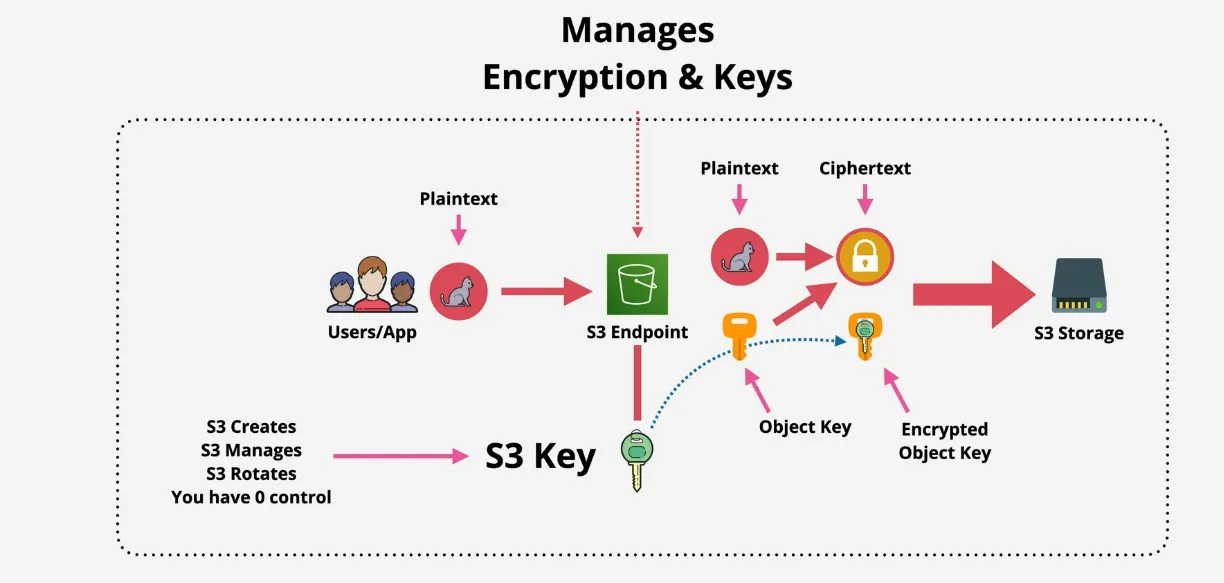
- S3 manages key generation AND the encryption
- generates a key for every object
- S3 is managed internally, and isn't visible in the UI
- AWS rotates internally
- heavy regulated environments are not suitable for this
- S3 Full Administrator can decrypt the data, so it's kind of open => for example a SysAdmin needs to handle infra, but not be able to decrypt the content => solved with SSE-KMS
- Server-Side Encryption with Customer Provided Keys (SSE-C)
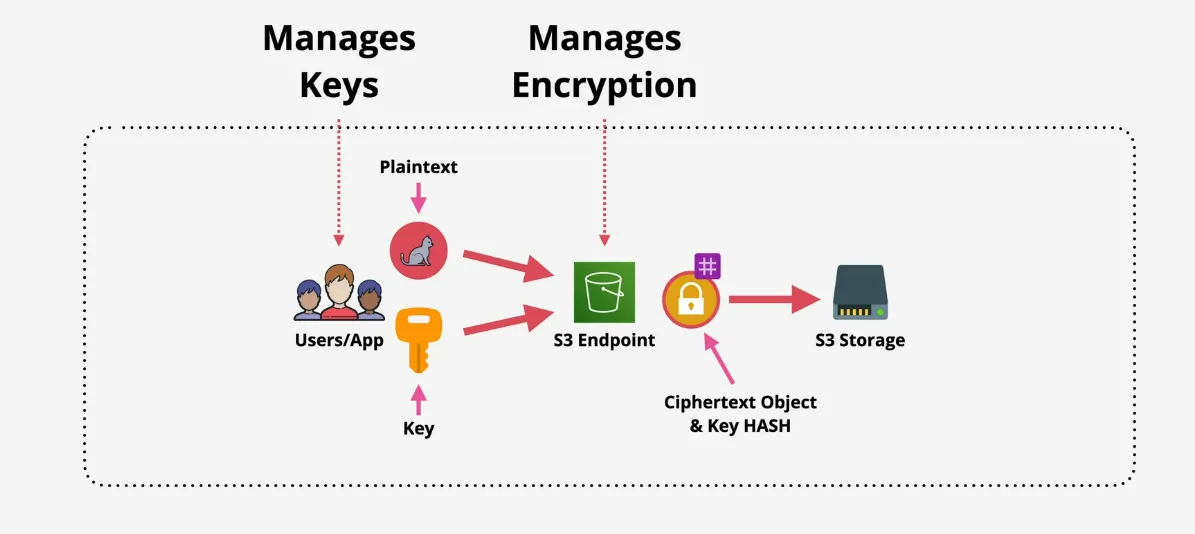
- offloading CPU cycles to S3
- customer is responsible for managing the keys
- S3 manages the encryption
- S3 throws away the key once encrypted at S3 Endpoint
- depends on you trusting S3 to discard the key
- in compliance heavy customers this is important
- plaintext + key is still secured by HTTPS tho
- not the same as client-side
- Server-Side Encryption with KMS KEYS Stored in AWS Key Management Service
(or SSE-KMS)
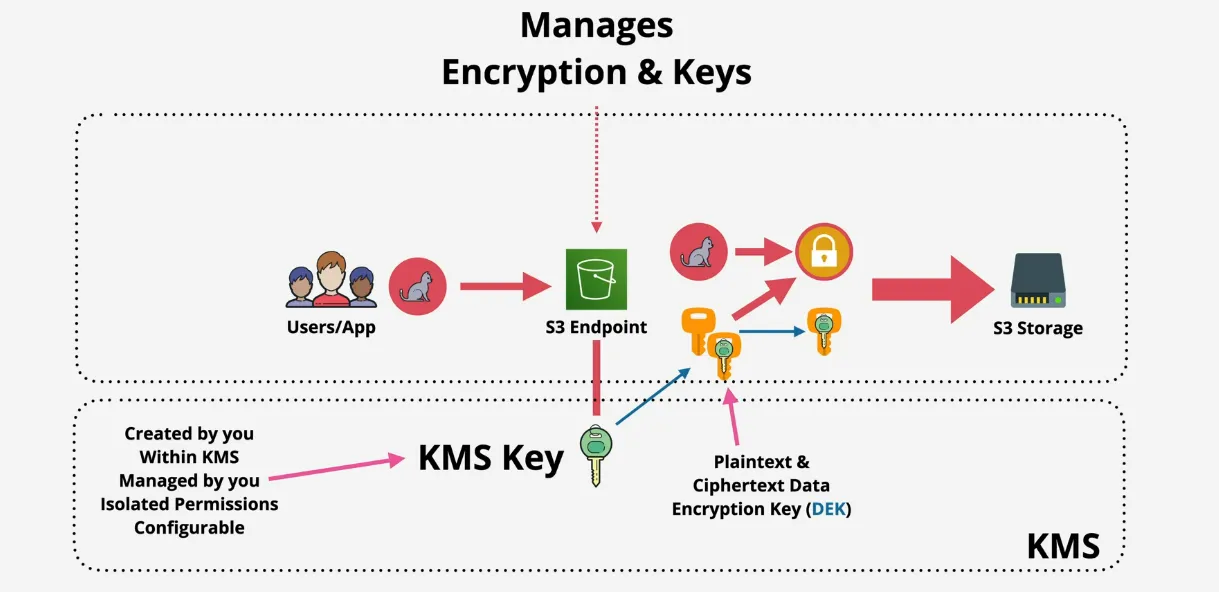
- key is created in KMS, managed by you in isolated environment, and used by S3 as it's key to make the cryptographic operations on an S3 Object
- it asks for a new Data Encryption key to be used for each Object, and KMS delivers the plaintext key and the cyphered key and uses the plaintext one to encrypt the data
- isolated permissions are configurable
- if you don't have access to KMS, you don't have access to the key
- meaning you can't decrypt the individual objects
- good for separation who can actually decrypt the data
- so people can administer S3, but still can't access the individual objects
- auditing and logging
- key rotation possible
- S3 manages key generation AND the encryption
S3 Bucket Keys
- KMS generates a time limited bucket key used to generate the DEKs within S3
- calls to KMS have a cost
- certain levels results in throttling 5500, 10000 or 50000 p/s across regions
- normally has to generate DEKs in KMS
- S3 still stores the data similarly as before
- increased scalability && reducing cost
- logs will show the bucket, not objects anymore
- when replicating
- generally preserve object encryption
- plaintext object can be encrypted in the replication side (ETAG changes)
S3 Security
- private by default (except for the admin, or root user), but explicitly
granting access via:
- S3 bucket policy (form of resource policy)
- tells which identities can access the resource
- allow/deny rules for some or different accounts (identity policies are only possible inside an account)
- allow/deny anonymous principals (opening it up to the world)
- possible to have conditions that apply the statement when true
- Access Control Lists (ACLs) => not recommended anymore (legacy)
- applied on buckets and objects
- subresource
- inflexible & simple permissions (no conditions)
- Block Public Access
- acts as a fail-safe
- blocks the public access (anonymous principals), regardless of the identity and/or resource policies
- S3 bucket policy (form of resource policy)
- use identity polcies when
- controlling different resources (because not all have resource policies)
- you prefer manage policies in a single place => IAM
- if you only work within the same account
- use resource policies
- if you just want to control S3, not the identities
- if you want to control anonymous or externals users
- ACLs => never
Presigned URLs
- gives access to another person or application inside a bucket, using your own credential safely
- if unauthenticated user needs access there's 3 options, which kinda suck:
- give an AWS Identity (too much effort)
- share AWS Credentials (security risk)
- make bucket public (not ideal)
- someone with S3 access can generate a presignedURL from S3 Bucket by providing:
- own credentials
- bucket name
- object key
- expiry date
- and how the object will be accessed
- unauthenticated user can use the url until it expires, and looks like it's the requested IAM User which generated when accessing the bucket
- can be used for download and upload
- can be used by remote workers who don't have access to S3
- generally you'd have an IAM User for an application, who can generate a presignedURL and give that URL to the users of the application so they can download the object
- facts
- you CAN create a URL for an object you do NOT have access to
- the permissions of the URL match the identity of the identity which created the presignedURL
- access denied can mean the generating ID NEVER had access, or doesn't have
access NOW
- permissions generally don't change for IAM Role of an application
- but don't generate URLs based on Role, the URL stops working when the Role credentials expire
Static Website Hosting
- normal S3 usage is via AWS APIs
- feature allows access via HTTP e.g. Blogs
- index and error documents are set
- creates a static website endpoint (name is autogenerated)
- custom domain via R53 (bucket name needs to be the same, absolute annoying, but required!)
- useful for out-of-band pages (in case an EC2 instance) experiences issues => serve an alternatively hosted support page from S3
- pricing
- storage (per GB data fee)
- data transfer fee (adding data is free, taking data out is not, per GB)
- operation fee (different operations have different costs per 1000 operations)
- usually it should be quite low for a simple static site (around 10 cents)
Object Versioning
- by default disabled
- can be enabled, but from then on, can't be disabled
- can only be suspended, and then enabled again, but it can never be disabled
- store multiple versions of objects within a bucket, operations that modify an
object generate a new version
- key stays the same
- id changes when a modify operation happens
- deleting creates a delete marker, and you can also delete a delete marker to undelete it
- in case you really want to delete, you need to target the id
- space is consumed by all versions, and thus also billed
- only way is to delete the bucket, or all versions
- possible to enable MFA delete, which makes MFA required for:
- changing bucket versioning state
- deleting versions (not objects)
- pass the serial number (MFA) + the code it generated through API calls
Performance Optimizations
- single PUT upload
- max 5GB
- single data stream
- if this single stream fails, the whole upload fails => needs full restart
- shitty speeds and reliability
- multipart Upload
- data is broken up
- minimum size is 100MB, no single PUT upload is worth after this size
- max 10 000 parts, and each part is between 5MB and 5GB
- last part can be smaller
- parts can fail, and be restarted
- better transfer rate, better speeds
- S3 Accelerated Transfer (default off)
- uses AWS Edge Locations
- bucket can't have dots, and dns compatible for the name
- uses AWS Edge Locations
S3/Glacier Select
- S3 can store huge objects (up to 5TB)
- often want to retrieve entire object, which might take time
- filtering at client side, means throwing away data you don't need
- S3/Glacier Select let's you use SQL like statements for part of the object
- used on CSV, JSON, Parquet, BZip2 compression for CSV and JSON
- up to 400% faster, and 80% cheaper
S3 Events
- configured with event notification config applied on the bucket
- notification generated when events occur in a bucket
- an be delivered to SNS, SQS and Lambda Functions
- Object Created (Put, Post, Copy, CompleteMultipartUpload), can generate pixel art from it
- Object Delete (*, Delete, DeleteMarkerCreated)
- Object Restare (Post (Initiated), Completed)
- Replication (OperationMissedThreshold, OperationReplicatedAfterThreshold, OperationNotTracked, OperationFailedReplication)
- EventBridge might be a better alternative though
S3 Access Logs
- enabled on a source bucket, and you need a target buckt where the files will be stored
- S3 Log Delivery Group delivers logs into tha Target Bucket after a few hours
(best effort), if the group has access to the target bucket
- bucket ACL needs to allow S3 Log Delivery Group
- Log Files consist of Log Records
- Log Records are newline-delimited, Attributes space-delimited
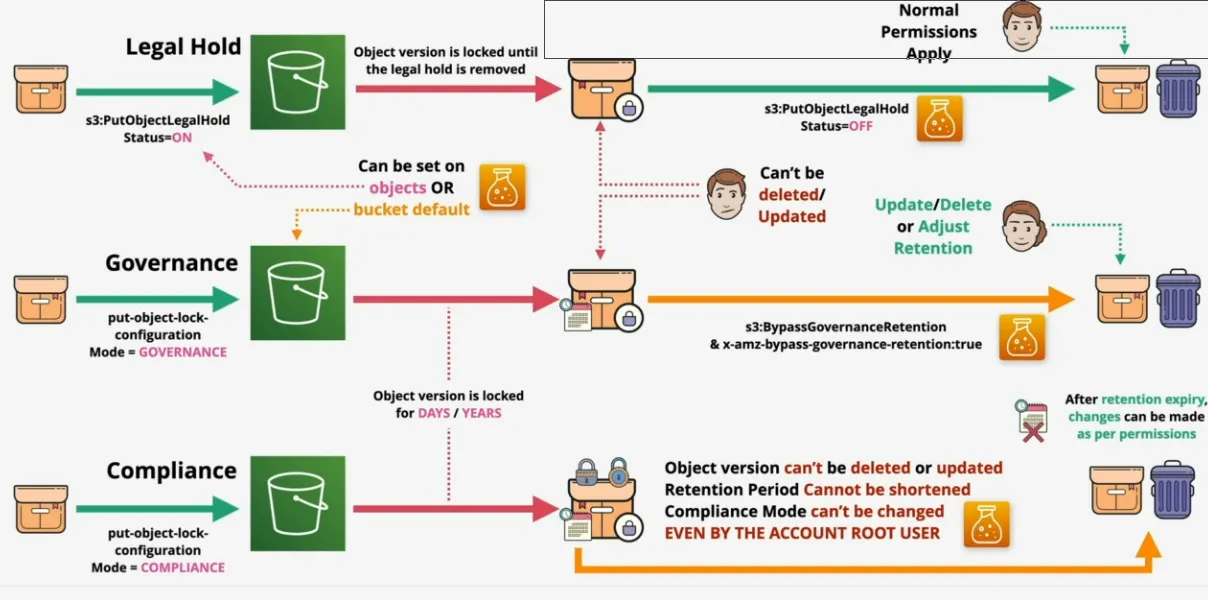
S3 Object Lock
- can only enable on "new" buckets (unless you contact support)
- Write-Once-Read-Many (WORM) => No delete, No Overwrite
- requires versioning
- individual versions are locked
- retention period
- legal hold
- both, one of them, or none
- defined on Object level, or as a default on the Bucket
- S3 Object Lock - Retention
- specify in days and years
- compliance mode
- can't delete, adjust or overwrite
- rention period and mode can't be adjusted
- event the root user
- most strict form of object lock
- governance mode
- similar to compliance mode, but can grant special permissions to allow
changing the lock settings
- add s3:BypassGovernanceRention permissions to identity
- and x-amz-bypass-governance-retention:true (as a header) (default in the console)
- these two need to be applied before the permissions can be changed
- prevent accidental deletion
- as a test before going to compliance mode
- similar to compliance mode, but can grant special permissions to allow
changing the lock settings
- S3 Object Lock - Legal Hold
- on concept of rentention
- if enabled
- no deletes or changes until disabled
- s3:PutObjectLegalHold is required to add or move
- prevent accidental deletion of critical object versions
S3 Access Points
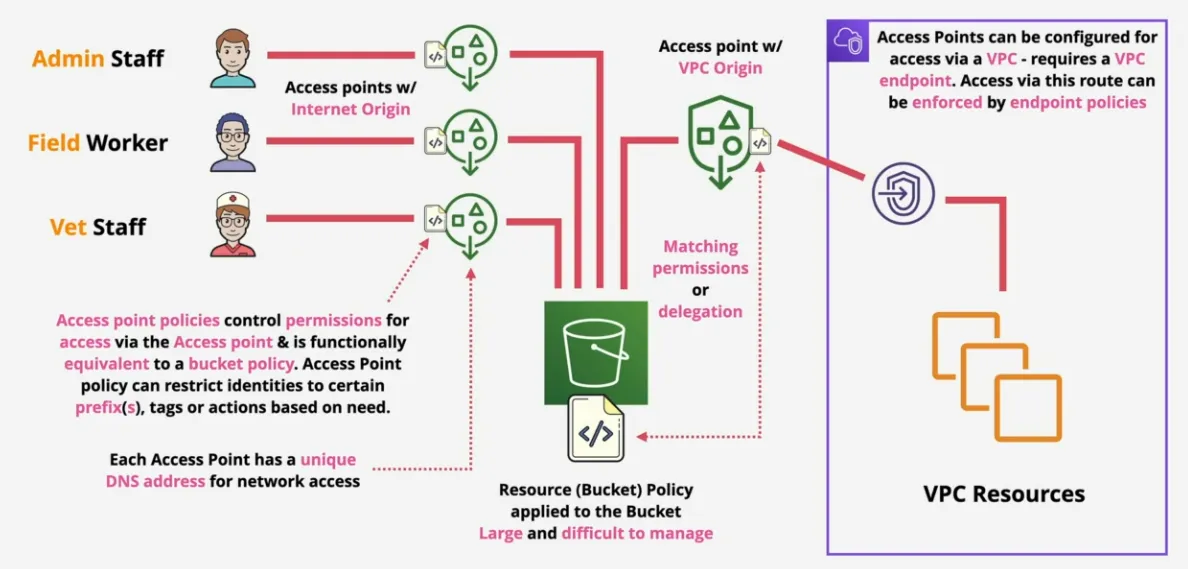
- simplify managing access to S3 Bucket/Object
- imagine having millions of objects, accessed by multiple teams, and has multiple prefixes
- by default you have 1 bucket, with 1 bucket policy => hard to manage
- using access points when can conceptually split this
- each with different policies
- each with different network access controls
- each with own endpoint address
- conceptually, these are mini-buckets
- created via Console, or
aws s3control create-access-point --name secretcats --acount-id 123 --bukcket catpics - the VPC access requires an VPC endpoint, this access point either needs to match the permissions of the bucket, or keep it wide open and delegate
Key Management Service (KMS)
- regional & public service
- create, store and manage keys
- symmetric and asymmetric keys
- cryptographic operation (encrypt, decrypt, ..)
- never leave KMS
- all operations happen inside KMS
- creating the key, encrypting, decrypting, etc
- provides a FIPS 140-2 (L2) compliant service
- KMS Keys are
- logical (ID, data, policy, description and state)
- backed by physical key material
- generated or imported
- used for up to 4KB of data (usually used on small bits of data, or to generate other keys) => data encryption keys for larger files
- data encryption keys
GenerateDataKeygive back- plaintext key (used immediately to encrypt the data)
- discard the plaintext key
- ciphertext version of the key
- store with encrypted data
- decrypt the data encryption key using KMS
- then decrypt the data with the plaintext data encryption key
- S3 for example create a data encryption key for every object
- plaintext key (used immediately to encrypt the data)
- AWS Owned and Customer Owned keys
- AWS Owned are generated by the services
- Customer owned can be:
- AWS Managed (managed by AWS service, such as S3)
- Customer Managed (used for an application or service)
- support rotation
- contain backing key
- previous backing keys
- meaning you can safely decrypt data that was encrypted by an older key
- supports aliases
- key policies & securities
- trusting an account can only be done using the key policy (resource)
- unlike other services, KMS has to be explicitly told to trust the account
they are contained in
- in high security environment you might not even want to trust the account, but only certain identities
- then use identity policies to let users interact with the keys
- also possible to interact using grants (but currently didn't go deeper)
Virtual Private Cloud (VPC)
read: https://d1.awsstatic.com/whitepapers/aws-amazon-vpc-connectivity-options.pdf
Basics
- vpc is a virtual network inside AWS
- within 1 account, and 1 region
- by default private and isolated, and only devices inside it can communicate with each other
- two types: default VPC and custom VPC
- 1 default VPC per region (almost no configuration options)
- unlimited custom VPCs (100% private by default, and need to be configured completely)
Default VPC
- one per region, can be removed & recreated
- default VPC CIDR 172.31.0.0/16, not changeable
- /20 subnet for each AZ in the region, for example: 172.31.0.0/20, 172.31.16.0/20 and 172.31.32.0/20
- provided an Internet Gateway (IGW), Security Group (SG) & Network ACL
- subnets assign public ip addresses
Custom VPCs
- regional service, operates from all AZ's in that region
- isolated networks
- nothing goes in or out, without explicit configuration
- flexible config => simple or multi-tier
- hybrid networking => other cloud & on-premise networks
- default, or dedicated tenancy
- dedicated tenancy comes at a huge cost
- just pick default, unless you know you need it
- main communication through IPv4 private CIDR Blocks, or Public IPs
- each VPC has 1 mandatory primary private IPv4 CIDR Block
- min /28 (16IPs)
- max /16 (65536 IPs)
- optional secondary CIDR Blocks (max 5, or increased by a support ticket)
- optional single assigned IPv6 /56 CIDR Block
- can't pick a block
- no concept of private addresses
VPC Subnets
- by default private
- AZ resilient => subnetwork of a VPC within a particular AZ's
- if the AZ fails, so does that subnet, so does anything in that subnet
- a subnet can only exist in 1 AZ
- but an AZ can have multiple subnets
- IPV4 CIDR is a subset of the VPC CIDR (within the range)
- can't overlap with other subnets
- optional IPv6 CIDR /64 Block (in case IPv6 was enabled on the VPC)
- subnets can, by default, communicate with other subnets in the VPC
- there's 5 reservered IP addresses in each subnet
- for example 10.16.16.0/20 (10.16.16.0 => 10.16.32.255)
- network address (10.16.16.0) => not just for AWS
- network +1 => in AWS used by the VPC Router
- network +2 => in AWS reserved for (DNS*)
- network +3 => in AWS reserver for future use
- Broadcast Address (10.16.31.255) => last ip in subnet
- not supported in VPC's
- but this last address is reserved in every subnet regardless (not AWS specific)
- the minimum 16 IP's per subnet, then means that you can actually use only 11 useable IPs
- configuration object applied to it
- called DHCP (Dynamic Host Configuration Protocol) Options Set
- 1 option set applied to a VPC at one time, and flows through all subnets
- possible to auto assign public ipv4 address
- possible to auto assign ipv6 address
DNS
- fully featured and provided by Route 53
- available on base IP +2 address
- VPC IP 10.0.0.0 => DNS IP 10.0.0.2
- enableDnsHostnames => gives instances public DNS Names
- enableDnsSupport => enables DNS resolution in VPC
- if enabled instances in the VPC can use the DNS IP address
- these two settings are important if you have DNS problems
- if enabled instances in the VPC can use the DNS IP address
Considerations
- size of the VPC (every service uses 1 or multiple ip's)
- any other networks we can't use
- overlapping/duplicate range will make network communication annoying
- ranges from other VPCs, cloud, on-premise, partners & vendors
- try to predict the future
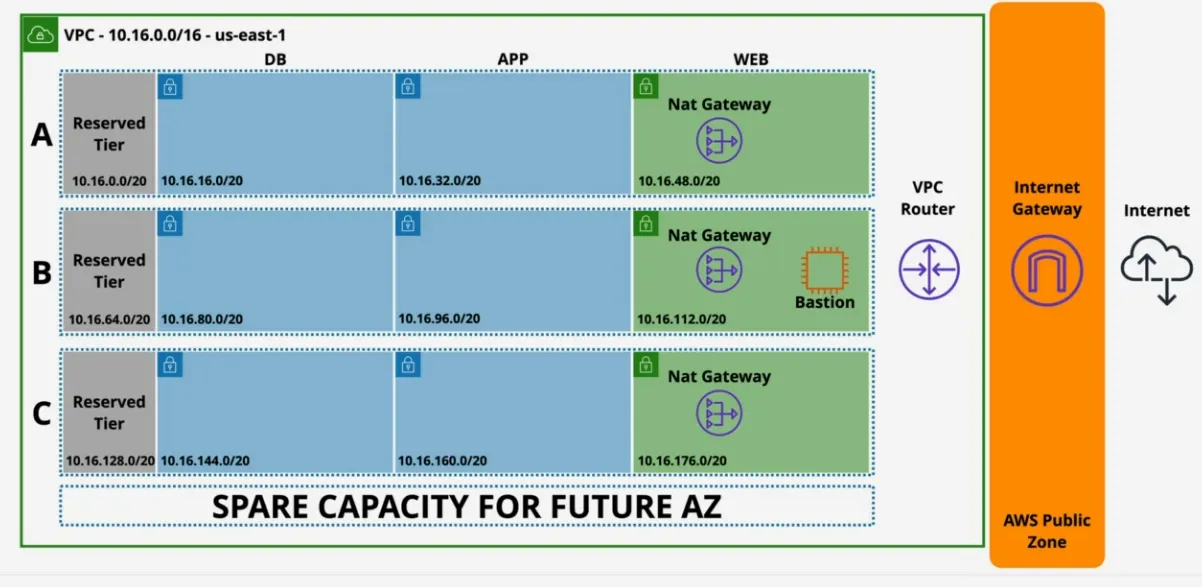
- VPC structure
- tiers: web, application, database
- idea is to separate public facing (web), from internal applications, and keep the databases even further away => applies different security groups
- read: https://stratus10.com/blog/aws-best-practices-components-3-tier-infrastructure
- resiliency: AZs
- tiers: web, application, database
- demo company uses:
- on-premise: 192.168.10.0/24
- aws pilot: 10.0.0.0/16
- azure pilot: 172.32.0.0/16 => default VPC for AWS actually
- additionally the business has partners with:
- london: 192.168.15.0/24
- new york: 192.168.20.0/24
- seattle: 192.168.25.0/24
- previous vendor can't say which ip ranges they use, but use default GCP ranges: 10.128.0.0/9 => huge network
- can't use any of these if you want to be safe
- VPC minimum /28 (16 IPs), maximum /16 (65536 IPs)
- personal preference for 10.x.y.z range
- avoid common range 10.0.x.x, 10.1.x.x, 10.10.x.x, etc
- let's plan
- reserve 2+ networks per region being used per account (in the example Adrian uses 4 networks per region)
- 3 US, Europe, Australia, assume 4 accounts
- totally of ideally 80 ip ranges /16
- so let's say 10.16.x.x us-east1, 10.32.x.x us-west1, etc
- 4 VPC's and 4 account => 16 /16 CIDR's
- how many subnets?
- 3 AZ + 1 spare, that means we have to split the VPC in at 4 smaller subnets, so if we had a /16 network, we would now have a 4 /18's
- we also need tiers (web,app,db and spare), so that means 4 /20's for each AZ
- => 16 subnets for each /16 VPC network
- => 4091 ips per /20 subnet
- means it uses 4 VPCs (4 networks per region) for 4 accounts (16 VPC's per region)
VPC Routing and Internet Gateway
- every VPC has a VPC Router - highly available (all AZ's)
- in every subnet at network+1 address
- routes traffic between subnets
- controlled by route tables (each subnet has one)
- controls what to do with traffic when it leaves a subnet
- VPC has a main route table in the subnet, but
- if a custom route table is defined, the main one is disassociated
- one route table can be associated with many subnets
- the destination route (higher /number => more specific => higher priority)
- the target can be a specific ip, or in this case "local", which means the whole range of the VPC
- local routes:
- are always there
- matches the whole VPC IPv4 or 6 CIDR range
- any more specific range take priority
- default route, is when nothing else matches
- internet gateway (IGW) are
- region resilient attached to the a VPC
- IGW can be created without being attached to a VPC
- but each VPC can only attach 1 IGW at max, or none
- then valid in all AZ's
- gateways traffic between VPC and the internet (or AWS Public Zone, like S3, SQS etc)
- managed (AWS handles performance)
- once it's attached, it can be targetted in a custom route table
- using default routes
- by allocating a subnet IPv4
- then this subnet is classified as a public subnet
- an IPv4 instance doesn't have a public IP configured to it, instead the IGW
keeps a record of which public IP corresponds with which private IP
- there are exam questions that will try to trip you up by assuming that an instance is configured with a public ipv4 address, which can't cause that's the IGW task
- an update packet, will leave the instance with a private source address,
then the IGW will see that it uses a private source address, and re-packages
it with a public source ip address, then forwards that to e Linux Update
Server
- and the reverse happens, when the update server send back a packet
- public IP address belongs to the IGW
- instance thus does NOT know about it's own public ip address, it just has a private ip directly configured to an OS
- for Ipv6 the IGW doesn't do any translation
- bastion hosts / jump boxes
- an instance in a public subnet
- incoming management connections arrive there
- once connected have access to internal VPC resources
- often to ONLY WAY inside a private VPC
- can be configured to:
- only accept ip addresses from certain ranges
- only use identities from on-premise services
- use ssh
- there are other options now, but they still will be featured in the exam
Stateless vs Statefull Firewalls
- stateless firewall
- sees the request and response as 2 separate things
- server needs 2 rules in the firewall (1 IN, 1 OUT) per connection
- more management overhead
- in case the server becomes the client (when itself needs updating for example), you need an extra 2 rules to cover the request from your app, and the response towards our app
- inbound rules can be both request or response
- outbound rules can be both request or response
- the request is always going to be sent to a well-known port (for example 443)
- firewall needs to all a full range of ports (ephemeral ports when requesting data from a server)
- makes security people cringe
- statefull firewalls
- is intelligent enough to identify the request and response components of a connection as being related
- allowing the request (inbound or outbound), means the response (inbound or outbound) is automatically allowed => no more opening the wide range of ephemeral ports
- for example when a server allows 443 inbound, the client will allow the ephemeral port temporarily to be opened, server responds back on port 443, and since it's intelligent enough to understand this is a response, it will also allow a response on this same port, while then the client accepts the inbound response as it recognizes it as part of the initial request
- lower admin overhead
Network Access Control Lists (NACL)
- traditional firewall available in AWS VPCs
- scope of an NACL is bound by the subnet
- controls what goes in out of the subnet
- connections within a subnet aren't impacted by NACLs
- inbound & outbound rules => doesn't always match request/response
- stateless
- needs an IN and OUT rule for both RESPONSE and REQUEST
- allow explicit deny or allow based on a match
- rule number determines order
- if two rules would match and deny/allow, it will use the first one based of the rule number
is a catch all, and is evaluated last
- default NACL
- allows all ports
- so the NACL itself has no effect in it's default config
- custom NACLs
- created for a specific VPC and are initially associated with no subnets
- default catchall deny
- all traffic will not be able to communicate
- explicit deny is unique to NACL, and is useful to block specific ips or ip ranges (something you can't do with security groups)
- NACLs can only be assigned to subnets, not AWS Resources
- can't logical resource, can only use IPs/CIDR, Ports and Protocols to do the filtering
- used together with security groups (usually you allow with security groups), and deny bad actor's ips
- each subnet has 1 NACL (either Default or Custom)
- 1 NACL can be associated with many subnets though
VPC Security Groups (SG)
- statefull - meaning they detect response traffic automatically
- allowed (IN or OUT) request = allowed response
- server can accept 443 request, and then automatically allow ephemeral port for the reponse
- NO EXPLICIT DENY, only ALLOW or Implicit Deny
- can't block specific bad actors
- typically used together with NACLs
- higher in OSI model than NACL, so they support IP/CIDR, but also reference
logical resources such as other security groups and ITSELF
- referencing another security group, means that any instances applying this security group will be allowed to communicate
- so it scales better than using ip ranges
- can be selfreferenced in other to allow inter group communication
- ip changes are automatically handled
- useful for auto scaling
- not attached to instances
- not attached to subnets
- attached to ENI's = Elastic Network Interface (even if the UI shows it attached to an instance), in the ui you attach the SG to an instance, but in reality it's the network interface of the instance
NAT (Network Address Translation) & NAT Gateways
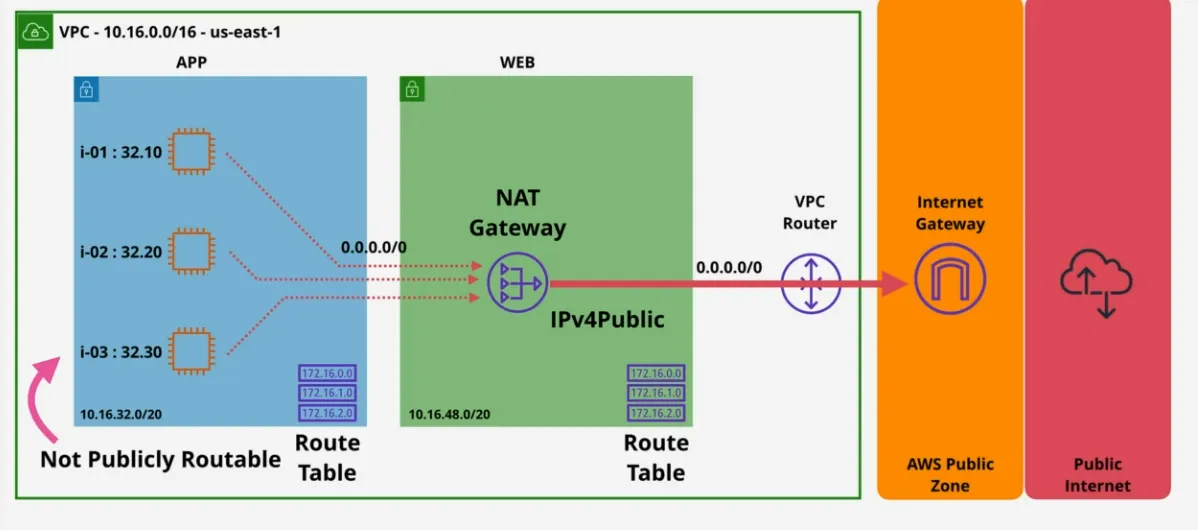
- process of giving a private only resource access to outgoing traffic to the internet
- NAT Gateway is the AWS implementation of it
- set of processes which can remap SRC or DST IPs
- IGW or internet gateway does static NAT, so is similar
- also known as IP masquerading => hiding CIDR Blocks behind 1 IP
- due to IPv4 addresses running out
- nat is NOT required for IPv6
- nat doesn't even woth with ipv6
- ::/0 Route + IGW => bi-directional routing
- ::/0 + Egress-Only IGW => Outbound traffic only
- gives private CIDR range outgoing interne spVPCt access
- they can receive response data
- but can't initiate a communication FROM internet to a private IP if NAT is used
- configured via an EC2 instance
- need to disable source/destination checks
- fails when the EC2 fails
- significantly cheaper
- can be used for bastion hosts
- can do port forwarding
- supports NACLs and Security Groups
- or via and AWS managed service, if you value
- availability
- bandwidth
- low maintenance
- high performance
- only supports NACLs
- doesn't support Security Group (exam question)
- runs from a public subnet, implies you already need:
- IGW
- subnets need to be allowed public ipv4 addresses
- default route pointing to the IGW
- use Elastic IPs
- AZ resilient, meaning
- for region resilience, NATGW in each AZ
- RT for each AZ, with the NATGW as the target
- managed, scales to 45 Gbps (if you need more bandwidth, you can add more NATGW), $ Duration (hourly charge) and Data Volume (data processing)
- remember, needs to be deployed in each AZ to have region resilience
VPC Flow Logs
- capture metadata (NOT contents)
- source/destination ip
- source/destination port
- packet sizes
- everything that can observed from outside
- attached to either
- VPC => all ENIs in that VPC
- subnet => all ENIs in the subnet
- or ENIs directly
- not realtime
- log destinations to S3 (for 3rd party integrations) or CloudWatch Logs
- ... or Athena for querying
- configured to capture ACCEPTED, REJECTED or ALL metadata
- flow log records
- if there's an ACCEPT and REJECT with similar source/destination ip's it might an indication that a security group + ACL is used
- doesn't record requests to/from the metadata (169.254.169.254) and timeseries (169.254.169.123) service, DHCP, Amazon DNS Server and Amazon Windows license requests are not recorded
Egress-Only Internet Gateway
- with ipv4 addresses are private or public
- NAT allows private IPs to access public networks
- without allowing externally initiated connections (IN)
- with ivp6 addresses, all addresses are public
- meaning all IPs are allowed to go IN and OUT
- Egress-Only is to allow outbound connections only for ipv6, so you can still have ips that wont't respond
- architecture wise the Egress-Only IGW works the same as an IGW
VPC Endpoints
- Gateway Endspoints
- provides two use-cases:
- private access to S3 and DynamoDB
- prevent leaky buckets by preventing any other access except through the IGW
- if there's a private VPC, then in order to access S3 you'd need to have public access, or have a hybrid model
- gateway endpoint allows access to these public services, without exposing the private subnet
- adding a gateway endpoint doesn't live inside the private VPC, but rather once assigned it adds a Prefix List to the route table which points to the gateway endpoint
- HA across all AZs in a region by default
- endpoint policy is used to control what it can access (for example subset of S3 buckets)
- regional => can't access cross-region service
- not accessible outside the VPC it was created in
- provides two use-cases:
- Interface Endpoints
- provide
- private access to AWS Public Services
- historically, anything not S3 or DynamoDB (S3 is now supported tho)
- added to specific subnets => meaning an ENI, meaning not HA
- for HA, add one endpoint, to one subnet, per AZ used in the VPC
- network access controlled via security groups
- also possible to use endpoint policies
- TCP and IPv4 is supported only
- behind the scenes use PrivateLink (allows external service to be injected into the VPC)
- DNS based, as opposed to using a Prefix List
- provides a new service endpoint DNS
- for example vpce-bla.sns.us-east1.amazon.aws.com
- via regional DNS
- or each interface gets it's own DNS (Zonal DNS)
- applications can optionally use these, or can use
- PrivateDNS to associate a private Hosted Zone to a service, essentially overriding the default DNS for services
- for example EC2 Instance Connect needs access to a public IP in order to connect to it, unless you use an EC2 Instance Connect Endpoint, which is an Interface Endpoint
- provide
VPC Peering
- direct encrypted network link between 2 VPCs (no more than 2)
- works in same/cross-region and same/cross-account
- optionally public hostnames resolve to private IPs
- when in same region SG's, can reference SG's (security groups)
- cross-region, you need to work with ips, not logical groups like sg's
- doesn't support transitive peering => can't route through interconnected VPCs
- what actually happens when creating a peer is that a gateway object gets
created in both VPC's
- route tables needs to be configured
- the router in VPC A knows, that in order to go VPC B, it needs to send data to the peer gateway object
- SGs & NACLs can filter
- route tables needs to be configured
- can't establish peering connection if CIDR ranges of VPCs overlap
- don't use the same address ranges in multiple VPCs
- encrypted
- and uses AWS global network when using cross-region peering connections
Elastic Compute Cloud (EC2)
- IAAS => provides virtual machines (instances)
- private service by default => uses VPC networking
- AZ resilient, instance fails if AZ fails
- choice between different sizes and capabilities
- on-demand billing, per second
- local on-host storage, or Elastic Block Store (EBS)
- possible to protect an instance from terminating, by disallowing terminating
the instance
- role separation
- junior ahs rights to terminate, but can be prevented from accidentally deleting instances
- senior can disable the termination protection, in case the instance really needs to be gone
Connecting to EC2
- Windows: use SSH key to gain access to the RDP, to then login
- Linux: access via SSH key
- import ssh key pair
- select the pair when provisioning the instance
- when removing terminating ec2 instances, also remove associated security groups
- if you only allow SSH for your own IP, then the EC2 Instance Connect won't connect as this goes via the IP addresses from Amazon
Virtualization 101
- emulated virtualization: software binary translation (slow)
- para-virtualization: modifying the guest OS's to run kernel things in user mode
- hardware assisted virtualization: cpu is aware of virtualization, so when guest OS requires cpu, the cpu redirects it to the hypervisor, which then accesses the cpu
- SR-IOV (Single-Root IO Virtualization): network (or addon card) separates itself into mini cards, so as far as the guest os's are concerned they are fully separate card => in EC2 this is Enhanced Networking => low latency, less CPU usage
Architecture
- EC2 instances are virtual machines (OS + Resources)
- EC2 instances run on EC2 Hosts (hardware managed by AWS)
- shared (based on instances), or dedicated hosts (you pay for entire host), don't pay for the individual instances
- AZ resilience => AZ Fails, Host Failts, Instances Fail
- network, storage, etc are all based in 1 AZ
- can't move between AZ's except copying one from another
- can't cross AZ's
- why used?
- traditional OS + Application
- long-running compute
- classic server style applications
- either burst or steady-state load
- monolithic application stacks
- migrated application workloads
- disaster recovery
- default compute workload (great first option)
Instance Types
- differ based on:
- raw cpu, memory, storage & type
- resource ratios (more cpu, less memory)
- network bandwidth
- system architecture / vendor
- additional features and capabilities
- 5 main categories:
- general purpose (default): diverse workloads, equal resource ratio
- compute optimized: media processing, HPC, scientific modelling, gaming, ML => generally more CPU
- memory optimized: large in-memory datasets, some database workloads
- accelerated computing: hardware gpu, field programmable gate arrays (fpga)
- storage optimized (sequential and ramdom io): transactional databases, data warehousing, elasticsearch, analytics workloads
- decoding EC2 Types
- R5dn.8xlarge
instance type
- R
family
- 5
generation
- 8xlarge
size
Instance Lifecycle
- running: cpu, memory, storage and network is being charged
- stopped: storage is being charged, even when the machine isn't running
- terminated: no charges, but not reversible
Storage Refresher
- direct (local) attached storage => instance store => storage on EC2 host
- super fast
- data be lost when migrating ec2 instance, if the instance fails, or if the storage fails
- network attached storage => volumes delivered over the network
- ISCSI, or fiber (on-premise)
- Elastic Block Store - EBS (aws)
- highly resilient
- separate from EC2 hardware
- Ephemeral storage => temporary storage
- for example direct local attached storage
- Persistent Storage => permanent
- lives on past the lifetime of the instance
- for example: EBS
- storage categories
- block storage (EBS)
- volume presented to the OS as blocks
- no structure
- mountable
- bootable
- OS creates a file system on top of the storage
- either physical hardware, or using the network
- file storage
- presented as a file share
- has structure
- mountable
- not bootable
- object storage (S3)
- abstract, flat structure
- collection of objects & metadata
- objects can be anything
- not mountable
- nor bootable
- scaleable => can be accessed by 1000's of people at the same time
- block storage (EBS)
- storage performance
- io (block size) * IOPS (io/per second) = throughput
- 16K blocks * amount of blocks per second = XX MB/s
EBS
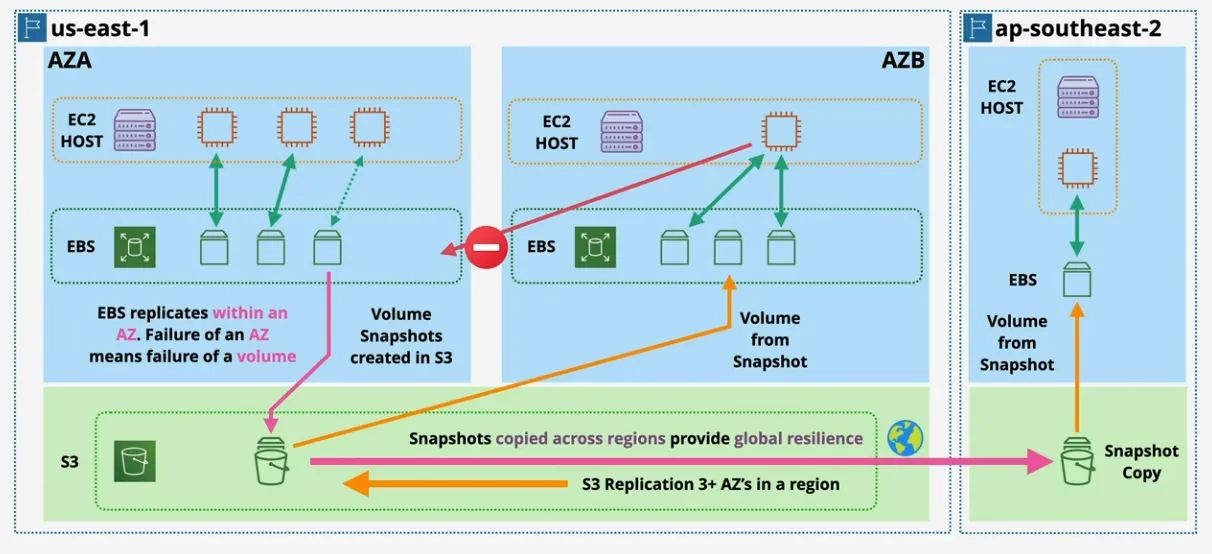
- block storage
- raw disk allocations (volumes)
- can be encrypted
- AZ service, resilient within the AZ
- attached to (generally) 1 instance or other service via storage network
- detached, and attached
- persistent
- snapshot (backup) to as S3 (region resilience)
- from this snapshot you can create an EBS in a different AZ
- so I guess you can't migrate to another AZ
- different storage types, sizes, and performance profiles
- billed per GB/month (and in some cases performance)
- can't communicate cross AZ with storage
GP2 - General Purpose SSD
- high performance for fairly low price
- range from 1G to 16TB
- credit based
- 1 IO Credit = 16 KB1OPS
- IOPS assume 16KB
- if not credit available => no operations are possible
- starts capacity of 5.4 million IO Credits
- fills at minimum 100 IO credits/second regardless of size
- fills at baseline performance rate
- 3 IO Credits/second per GB of volume
- volumes larger than 1TB => baseline is above burst workload
- possible to burst up to 3000 IOPS
- meaning you can burst up to 30min => good for initial workloads
- great for
- boot volumes
- low-latency interactive apps
- dev & test
GP3 - General Purpose SSD
- 3000 IOPS & 125 MiB/s (standard)
- range from 1GB => 16 TB
- if you only intend to use up to 3000 IOPS => pick GP3
- extra cost for up to 16 000 IOPS, or 1000 MiB/s => usually still cheaper than GP2 and 4x faster max throughput than GPS2
- GP3 is like GP2 and IO1 had a baby
- use-cases are the same as GP2
IO1/2 - Provisioned IOPS SSD
- IOPS can be adjusted independently of size
- 64k IOPS per volume
- max 256k IOPS with Block Express
- 1000 MiB/s throughput
- max 4000 MiB/s with Block Express
- 4GB-16TB
- or 4GB-64TB for Block Express
- there's a cap on the size/performance ratio
- io1: 50 IOPS/GB
- io2: 500 IOPS/GB
- BlackExpress: 1000 IOPS/GB
- there's a per instance maximum
- only possible when using multiple volume
- and certain instance types
- io1: 260K IOPS & 7500 MiB/s
- io2: 160 IOPS & 4750 MiB/s
- io2 Block Express: 260K IOPS & 7500 MiB/s
- not useful to know the numbers by hard, but just in relation to each other, in order to architect a proper solution
- when?
- consistent low latency & jitter
- small, performant volumes
ST1 - Throughput Optimized HDD
- sequential data access (so not RAM (Random Access Memory))
- cheap
- 125 GB - 16 TB
- max 500 IOPS
- measured in 1 MB
- similar credit system as GP2, but based on MB
- 40 MB/s/TB Base
- 250 MB/s/TB Burst
- when?
- frequent access
- throughput intensive
- sequential
- => Big Data, Data Warehouses, log processing
SC1 - Cold HDD
- cheaper
- max 250 IOPS, at 1MB IO Size
- max 250 MB/s
- similar credit system as ST1
- 12MB/s/TB Base
- 80MB/s/TB Burst
- same size as ST1
- when?
- cold data
- requiring few scans per day
- if you can tolerate the trade-off, just use SC1
Snapshots
- incremental volumes copies to S3
- first is a full copy of data on the volume
- future snapshots store the difference between snapshot and volume
- each snapshot is self-sufficient in AWS => meaning if you delete one it will figure it out and still work
- data becomes region resilient
- volumes can be created (restored) from snapshots
- snapshots can be copied to another region
- new EBS Volume => full performance immediately
- snapshots restore lazily
- fetch gradually
- requested blocks are fetched immediately
- force a read on all of the data with dd, if you want it immediately available before moving the volume to production
- fast snapshot restore (FSR)
- up to 50 snaps / region
- configured on snapshot and AZ
- costly
- billing is
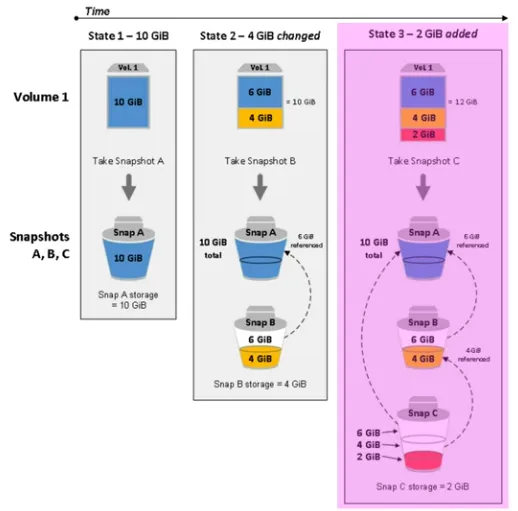
- based on gigabyte/month
- only billed for used data, not allocated data
Encryption
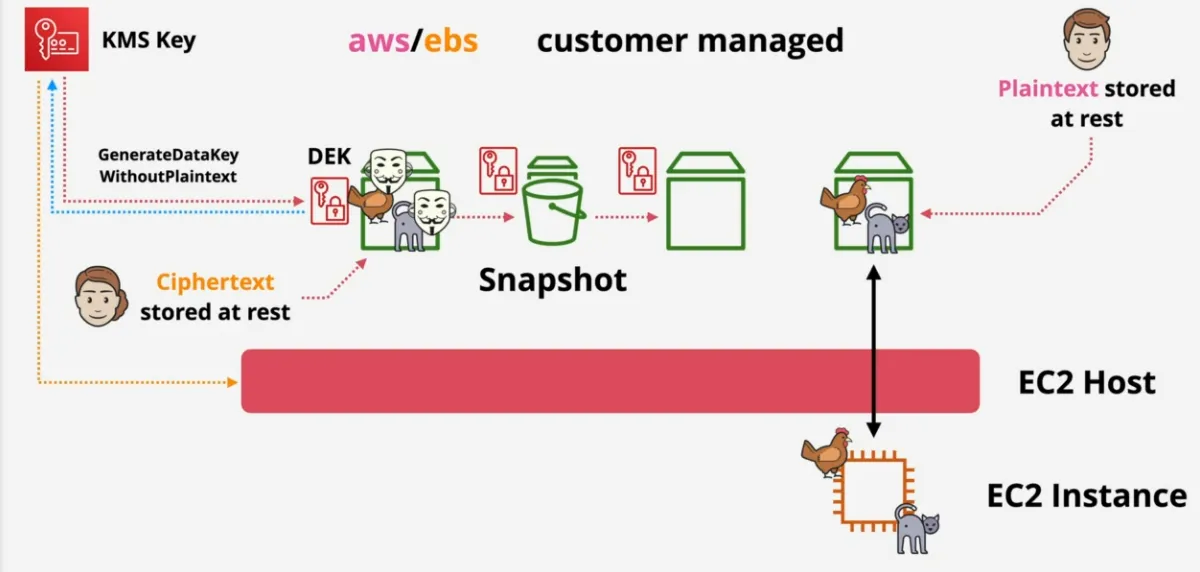
- uses a KMS key (either aws/ebs managed, or customer managed)
- generate a data encryption key (DEKA) is stored with the volume
- ebs ask kms if the current person can decrypt the drive
- store decrypted key in memory on ec2 host
- host uses the key to encrypt/decrypt between instance and ebs volume
- if instance moves from one host to another, this key is discarded
- doesn't cost anything to use, should used by default
- remember KMS uses the key to generate a Data Encryption Key, it doesn't use the KMS key itself to encrypt the data
- each volume uses 1 unique DEK
- snapshots & future volume's use the same DEK
- can't change the volume to not be encrypted
- OS isn't aware of the encryption
- no performance loss
- just sees plaintext
- encryption happens between EC2 Host and the Volume
Network Interfaces, Instance IPs and DNS
- network interfaces
- mac-address (used for software licensing)
- all sorts of ips
- primary ipv4 private ip
- 0 or more secondary IPs
- 0 or 1 Public Ipv4 Address
- 1 elastic IP per private IPv4 address
- if enabled removes the public IPv4 address when done on the primary interface
- 0 or more IPv6 addresses
- security groups
- source/destination check (this needs to be disabled for NAT instances to work, otherwise it'll drop the data)
- secondary ENI's (secondary network interfaces)
- similar to primary interfaces
- except you can detach them and move to another instance
- for software licensing, because then you can move these to another instance
- separate management & data through different interfaces, because each interface has a security group
- the OS doesn't see the IPv4 address, is configured on the ENI
- IPv6 yes
- public IPv4 are dynamic (stop & start => ip change)
- => assign an elastic address
- Public DNS = private INSIDE the VPC, public everywhere else
- so even if you want to communicate between two public instances using public DNS, as long as they are in the same VPC, they will use private ips and never go outside the network
Instance Store Volume
- block storage device
- local, not over the network
- physically connected to one EC2 Host
- instances on that host can access them
- highest storage performance in AWS
- included in the price => use it or lose it
- attached at launch (can't do it after)
- data is lost when an instance moves from host to another (when stopped or re-started), or when AWS needs to do maintenance on that host, or when the hardware fails
- treat them as temporary data
- some instance types don't implement theses
- D3 => 4.6GB/s throughput
- I3 16GB/second of sequential throughput
- => so very much faster than EBS => highest performance
- but again, very much temporary
Choosing Between Instance Store & EBS
- persistence => avoid Instance Store
- resilience => avoid Instance Store
- backups to S3 possible...
- isolate storage from instance lifecycle => use EBS
- useful when you want to attach and re-attach to other/same instances
- resilience w/ app in-built replication => it depends
- high performance needs => it depends
- super high performance => Instance Store
- cost => Instance Store (price is often included with instance)
- if exam questions are like EBS and main concern is:
- cost => ST1 or SC1
- throughput... streaming => ST1
- boot => don't use ST1 and SC1
- IOPS
- GP2/3 (max 16 000 IOPS)
- IO1/2 (max 64 000 IOPS)
- IO2 BlockExpress (max 256 000 IOPS)
- RAID0 + EBS (max 260 000 IOPS => using the largest size EC2 instance)
- more than 260 000 IOPS => instance store
- remember these numbers
Amazon Machine Image (AMI)
- either used to put on an EC2 instance, or created from an EC2 instance
- aws, community provided or commercial software
- regional, and unique id's
- can be copied between regions
- but effectively this creates two AMI's, 1 for each region, are not synced with each other
- data is the same, but conceptually they are different objects
- contains attached permissions: public, implicit (only for owner), explicit
(specific accounts are allowed)
- default = your account
- contains the boot volume of the instance
- block device mapping: which volume is the boot, which volume is the data volume, this maps the volumes to device id's
- lifecycle
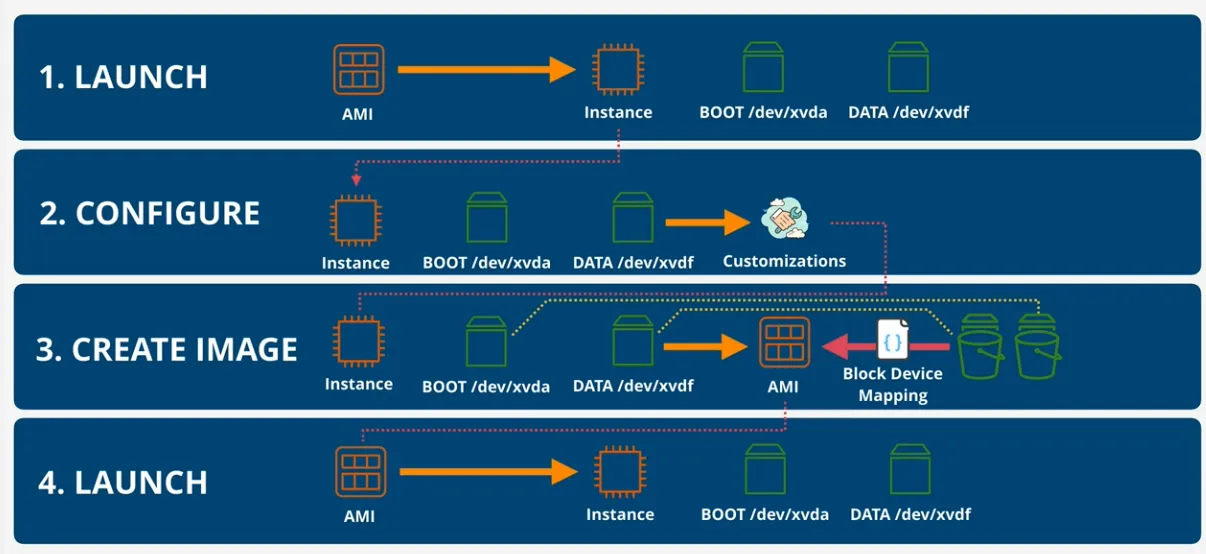
- AMI Backing
creating an AMI from a configured instance + application
- AMI can't be edited => launch instance, update config, create a new AMI
- cost
- based on the cost of the snapshots from the EBS stored in S3
- Shared AMI usage
Purchase Options (Launch Types)
- on-demand (default)
- isolated
- shared hardware
- different sizes run on the same host
- when?
- no interruptions
- no capacity reservation
- predictable pricing
- no upfront cost
- no discount
- short-term workloads
- unknown workloads
- apps which can't be interrupted
- spot
- aws sells unused EC2 host capacity
- up to 90% discounts
- aws can increase the spot price, and if your maximum doesn't accept that, your instance will be terminated
- when?
- not time critical
- anything which can be re-run
- stateless
- cost-sensitive workloads
- bursty capacity needs
- don't use for business critical workloads
- standard reserved
- reduced per second price
- when you don't wanna pay upfront or no p/s price
- for cash flow reasons
- no per second price
- when you pay everything upfront
- greatest discount
- there's is also partially upfront
- unused reservation is still billed
- partial coverage of larger instance
- if you want a slightly larger instance, you are partially covered
- when?
- long-term consumption
- reduced per second price
- scheduled reserved
- long-term requirements
- don't run constantly
- for example: daily for 5 hours, starting from 23:00
- doesn't support all instance types or regions
- minimum 1200 hours per year & 1 year minimum contract
- 100 hours/month
- dedicated hosts
- docs
- pay for the host itself
- no instance charges
- useful for software licensed based on sockets/cores
- need to manage the instances yourself to see if they are underutilized or not
- pay on-demand, or reserved
- hardware has physical sockets and cores (so there's hard limitations and the amount of app you can use)
- older hosts can only use a fixed size of instances
- the new nitro hosts can have a different sizes of the instances (flexible)
- limitations
- AMI limits: RHEL, SUSE Linux and Windows are not supported
- Amazon RDS instances are not supported
- Placement Group are not supported
- features
- Host can be shared with ORG Account, using RAM (Resource Access Manager)
- owner can see the instances running, but can't control them
- account using these hosts only see their own instances running
- Host can be shared with ORG Account, using RAM (Resource Access Manager)
- dedicated instances
- aws pledges to not run other instances on the same host
- pay 1 off hourly fee per region + for the instances themselves
- similar to shared, as in you don't have to manage the capacity, but the host itself isn't shared
- when?
- certain industries with super strict requirements, like not sharing infrastructure
- capacity reservations
- don't need to worry about 1y to 3y commitments, but you still pay the full price, except you get priority as you've reserved the capacity
- if capacity reservations are consistent => use standard reserved instances
- regional reservations
- launch instances in that region
- billing discounts
- don't reserve capacity within an AZ (so you have the same on-demand priority), which can be a problem during major faults when capacity is limited
- zonal reservation
- same billing discounts as regional, and you get capacity reservations
- only in 1 AZ
- if you launch in instance in another AZ, you pay full price, and no capacity reservation
- on-demand capacity in AZ
- can be booked
- launching an instance isn't risky, because we reserved the capacity
- billed for the capacity wether consumed or not
- savings plan
- hourly commitment for 1 or 3 year term
- products have an on-demand rate, and a savings plan rate
- reservation of general compute $ amounts ($20 per hour for 3 years)
- save up to 66% of regular on-demand
- ec2, fargate, lambda
- beyond commitment => normal on-demand rate
- power feature to incur cost savings when an organization or team moves away from 1 architecture (EC2), to for example serverless
- ec2 savings plan
- flexible in size & OS
- better savings, up to 72%
Status Checks
- system status
- loss of system power, network connectivity of host
- software or hardware issues on host
- instance status
- corrupt files system
- incorrect networking
- OS Kernel issues
- possible to create an alarm, that automatically recovers in case status checks don't succeed
Horizontal & Vertical Scaling
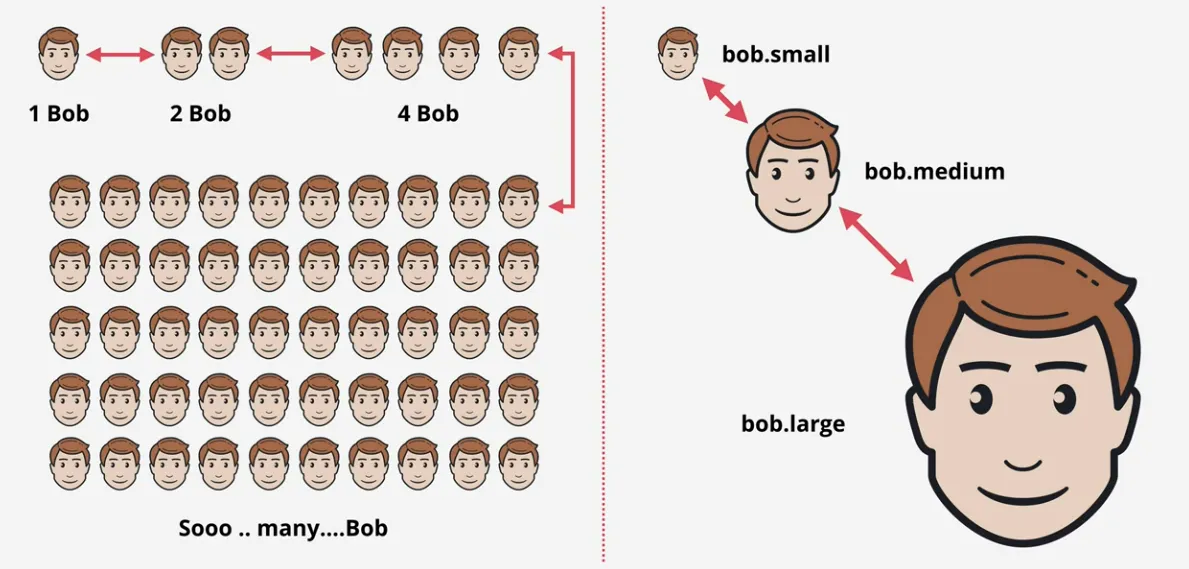
- vertical scaling
- resizing an instance
- require reboot => disruption
- larger instance carry a $ premium
- upper cap on performance (instance size)
- simple => no appliction modifications
- works for all applications (even monoliths)
- horizontal scaling
- adds more of the same size instances
- might have 1000 copies of the same application
- load balancer distributes customers across all instances
- sessions, sessions, sessions
- you can switch between instances within 2min
- needs application support or off-host sessions
- otherwise the sessions from an instance to another can't be shared
- stateless instances
- no disruption when scaling
- no real limits to scaling (except money)
- less expensive (no large instance premium)
- more granular
- adding 1 instance, to an existing 5 is a 20% increase
- while switching from large to xlarge is double the performance (vertical scaling)
- so the steps are smaller in horizontal scaling
Instance Metadata
- often comes in exams
- EC2 Service provides data to instances
- accessible inside ALL instances
- http://169.254.169.254/latest/meta-data (remember the IP)
- allows the instance to query anything about the instance
- or the environment the instance is in
- the networking configuration
- authentication information
- passing in temporary SSH keys (used by EC2 instance connect)
- granting access to user data
- NOT AUTHENTICATED or ENCRYPTED
- anyone who connect to the instance, and has access to a linux shell will be able to query this data, by default
- can be restricted with local firewall, but that's extra admin overhead
- there's also a cli tool
wget http://s3.amazonaws.com/ec2metadata/ec2-metadata
chmod u+x ec2-metadata
Instance Roles
- are roles that an instance can assume, and are of the best ways in terms of security as you don't need to provide long term credentials
- based on IAM Roles, which has permissions attached to it
- in order to wrap the instance together with the IAM Role, we use InstanceProfile to configured an EC2 instance to use a set IAM Role
- profile is attached to to instance
- the temporary credentials are delivered via the instance meta-data, AWS always makes sure these credentials are valid, and auto-renew when they are about to expire
- instances need to periodically purge the cache, in order to get the new credentials
- preferred way VS providing access keys to an instance
- CLI tools will use ROLE credential automatically
System and Application Logging on EC2
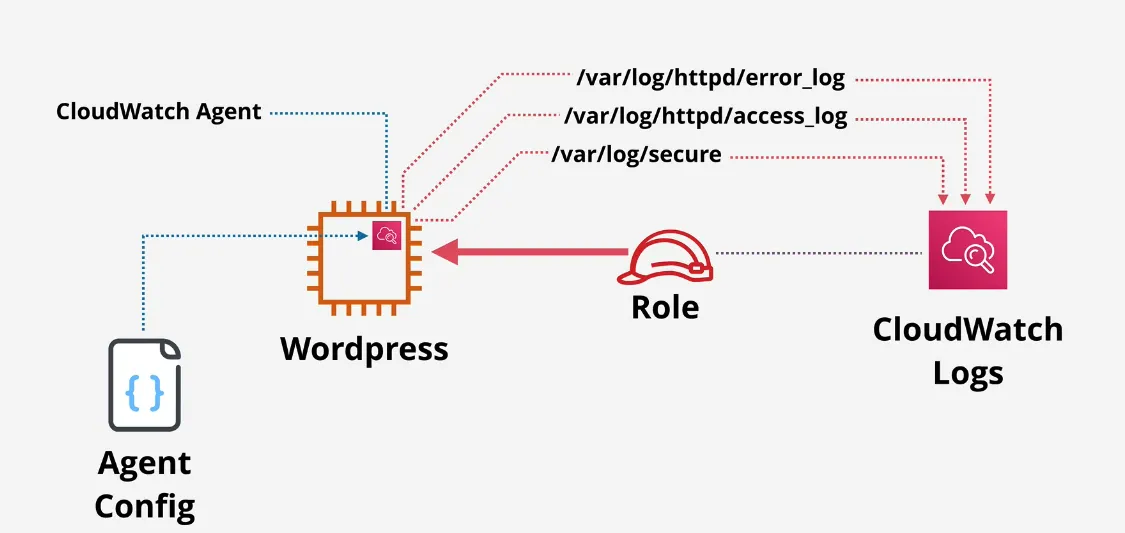
- CloudWatch and CloudWatch Logs can't natively capture data INSIDE an instance, by default
- CloudWatch Agent is required
- plus configuration and permissions
Placement Groups
- 3 types:
- cluster - pack instances close together
- spread - keep distances separated (make sure to run on different hardware)
- partition - spread groups apart
- cluster
- best practice is to launch them at the same time
- and use the same type of instance
- but not mandatory
- single AZ only
- the first instance locks down the AZ
- often the same rack
- sometimes some host
- can span VPC peers - but impacts performance in a very negative way
- all members have connections to each other
- 10 Gbps/single stream vs 5Gbps normally
- if hardware fails, everything fails
- and also requires specific instance types
- when?
- performance
- fast speeds
- low latency
- best practice is to launch them at the same time
- spread
- provides infrastructure isolation
- spread across AZ's
- max 7 instances per AZ per region
- hard limit
- spread across racks (never run on the same host), and have
- separate network
- separate power
- spread across AZ's
- not supported by dedicated instances or hosts
- when?
- availability
- resilience
- small number of critical instances that need to be kept separated from
each other
- mirrors of a file server
- different domain controllers within an organization
- provides infrastructure isolation
- partition
- similar architecture to spread placement groups
- you design your own resilient architecture
- spread across AZ's
- max 7 partitions per AZ per region (hard limit)
- inside 1 partition multiple instances can be running
- allow AWS to auto place the instance
- or place it in a specific partition
- each partition is isolated (separate racks)
- when?
- when more than 7 instances per AZ are needed
- huge scale parallel processing
- topology aware applications
- HDFS, HBase, Cassandra
- contains a failure to a part of an application
- similar architecture to spread placement groups
Optimizations
- enhanced networking
- required by cluster placement groups
- uses SR-IOV - NIC is virtualization aware
- multiple logical card per physical card
- host doesn't need to arbitrage the physical network card between the two instance, which can cause slowdowns when the host is busy with other tasks
- hardware itself manages the virtualization rather than the host
- higher I/O & lower host CPU usage
- more bandwidth
- higher packets-per-second (PPS)
- consistent lower latency
- enabled by default, or at least available on most EC2 instances
- EBS Optimized instances
- block storage over network
- either on/off
- historically EC2 networking was shared between data and EBS
- caused slowdowns
- means dedicated capacity for EBS, and certain optimizations were introduced specifically for EBS
- most instances support and have it enabled by default
- some older instances can be enabled, but costs extra
- it's required by certain instances storage types, that require high level of performance (throughput or iops)
- block storage over network
AWS Systems Manager
SSM Parameter Store
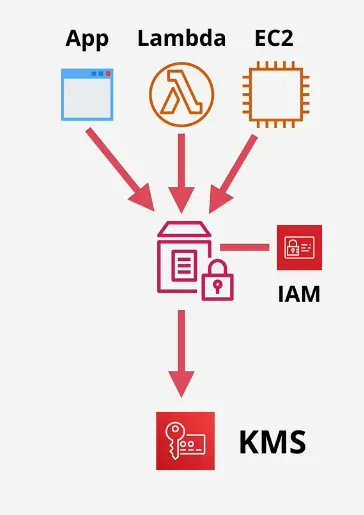
- passing secrets to instances via user-data is bad practice
- public service, so all services have access to this
- has an ARN
- storage for configuration & secrets
- String, StringList & SecureString
- such as license codes, database strings
- is hierarchical, and has versioning
- /wordpress/DBUser
- /cat-app/DBUser
- dev-team-passwords...
- either plaintext or ciphertext (via KMS)
- needs access to the provided KMS key in order to decrypt it
- also possible to have public parameters (like the ones AWS uses for the latest AMI per region)
- up to 10 000 parameters in the regular tier, more in the advanced
- up to 4KB, 8KB in advanced
- most parameters are fine in standard tier
- standard tier is free
Containers & ECS
- dockerfiles are used to build images
- fs layers are shared, if both containers are using the same hash for the layers, resulting in less disk space used
- only runs the application & environment
- provides much of the isolation VM's do
- things need to be exposed explicitly
- either run on EC2 instance, or via ECS
- two modes
- EC2 mode => ECS runs on EC2 instances
- Fargate mode => serverless
- possible to store images on Elastic Container Registry (ECR)
- container definition tells ECS
- where the container needs to pulled from
- what ports to use
- task definition
- represent a selfcontained application
- could contain multiple containers definition
- stores the Task Role
- IAM Role to gain temporary credential to interact with AWS resources
- best practice way to give ECS containers access to AWS
- defines resources the container uses
- service definition
- makes ECS highly available
- how ECS should scale
- multiple independent copies of the application running
- let a load balancer do the rest
- task or services are deployed in ECS Cluster (either EC2 or Fargate based)
EC2 Mode - (EC2 Linux/Windows + Networking)
- ECS management component handles high level tasks:
- SchedulingAndOrchestration
- ClusterManager
- PlacementEngine
- ECS Cluster runs within a VPC inside the AWS account
- benefits from multiple AZ's them
- uses an Auto Scaling Group to manage horizontal scaling of multiple EC2 hosts
- useful when you have EC2 instances reserved already in pricing
- EC2 Mode handles the Task being deployed on all the hosts
- you are responsible for managing these EC2 hosts, despite ECS provisioning
Fargate Mode - Network Only (Fargate)
- ECS management component handles high level tasks:
- SchedulingAndOrchestration
- ClusterManager
- PlacementEngine
- don't need to manage EC2 instance
- serverless (no servers to manage)
- don't need to pay for the instances, cause there is none
- AWS maintains a Shared Infrastructure
- similar to shared EC2 hosts, but for containers
- isolated from other customer's containers
- allocated resources are shared in Fargate
- the cluster still operates in a VPC => meaning multiple AZ's
- ECS Tasks run on the shared infrastructure
- but are injected into the VPC,
- andgets given an Elastic Network Interface (ENI)
- work like any other VPC resource
- only pay for the containers and resources they are using
When EC2 vs ECS (EC2) vs Fargata
- if you use container => ECS
- large workload and price conscious => EC2 Mode
- large workload and overhead conscious => Fargate
- small/burst workloads => Fargate
- batch/periodic workloads => Fargate
ECR - Elastic Container Registry
- architecture
- managed container image registry
- like docker hub, but for AWS
- each account has 1 public and 1 private registry
- each registry has many repositories
- each repository contains many images
- and images have several tags
- public => R/O by anyone, R/W requires permissions
- private => R/O and R/W requires permissions
- benefits
- integrated with IAM => Permissions
- security scanning: basic and enhanced (AWS Inspector)
- nr real-time metrics => CW (auth, push, pull)
- API Actions => CloudTrail
- Events => EventBridge
- Replication: Cross-Region AND Cross-Account
EKS - Elastic Kubernetes Service
Kubernetes 101
- cluster structure
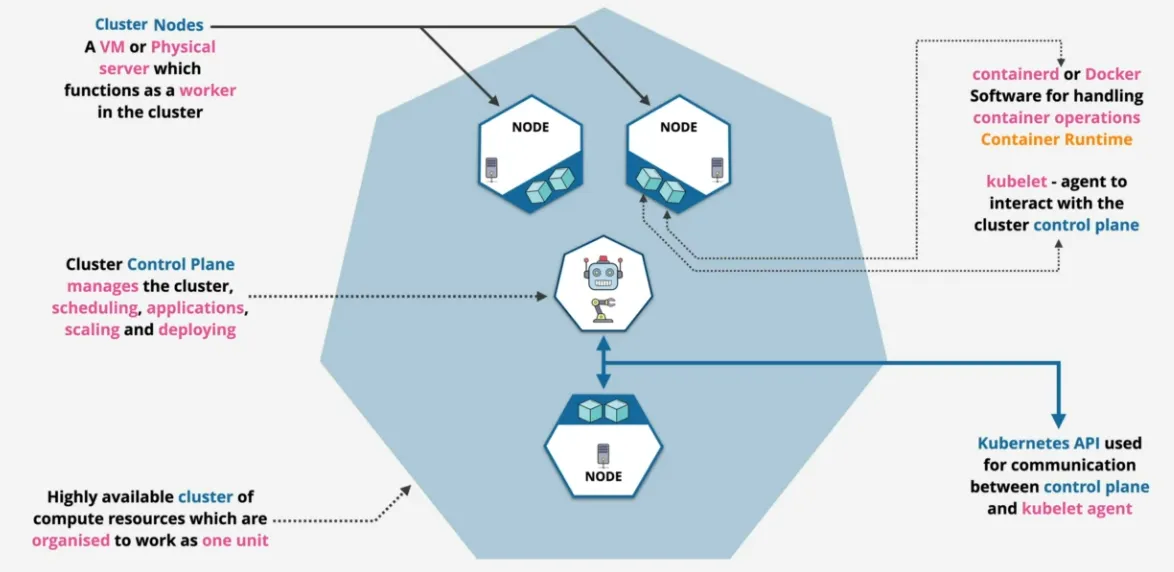
- highly available cluster organized to work as one unit
- Cluster Control Plane manages the cluster, scheduling, applications, scaling
and deploying
- Cluster Node are VM or Physical server which functions as a worker in the
cluster (provides compute)
- Container Runtime is containerd or Docker software runs on each Cluster Node to handle container operations
- kubelet is an agent to interact with cluster control plane
- these kubelets talk via the Kubernetes API
- Cluster Node are VM or Physical server which functions as a worker in the
cluster (provides compute)
- cluster detail
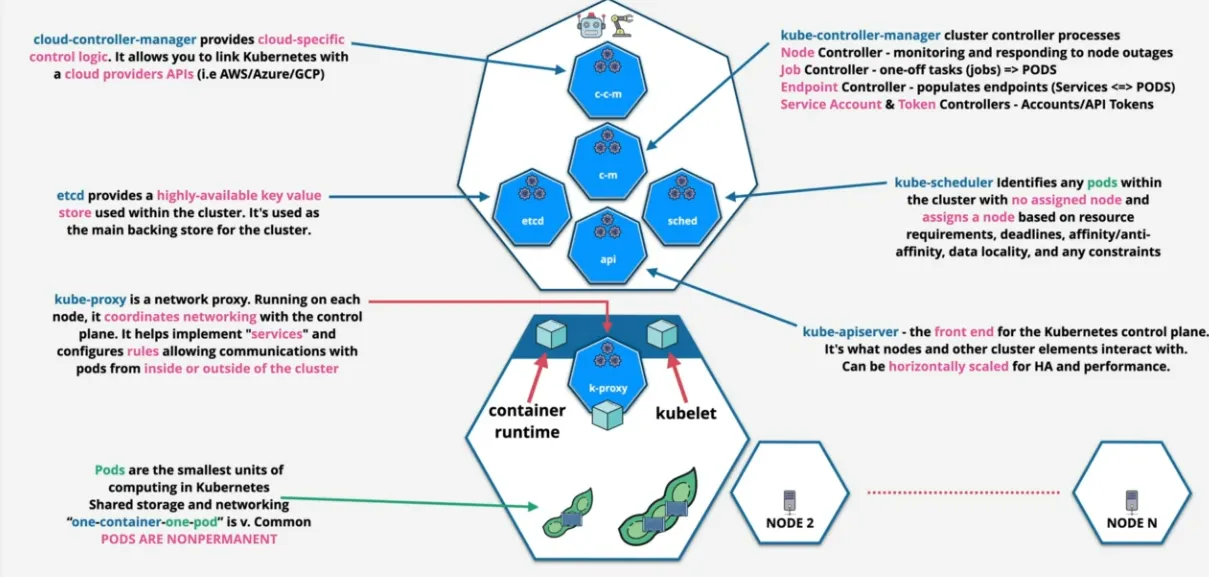
- Cluster Node
- pods are smallest units of computing in Kubernetes
- don't think of pods as containers
- can have multiple containers, but usually 1 pod 1 container
- work and manage pods, the pods manage the containers within
- pods are non-permanent, created, do a job, and discarded
- kub-proxy coordinates networking with control plane, allowing communications with pods from inside or outside
- pods are smallest units of computing in Kubernetes
- Clouser Control Plane
- kube-apiserver
- horizontally scaled for HA
- front-end for control plane
- etcd
- HA key-value store within the cluster
- used as the main backing store
- kube-scheduler identifies pods within a the cluster without an assigned node, and assigns a node based on resource requirements, deadlines, affinity, data locality, and any constraints
- cloud-controller manager
- cloud specific control logic, used by AWS to interact with Kubernetes
- optional
- kube-controller manager
- node controller monitors and responds to node outages
- job controller one-off tasks (jobs) => PODS
- endpoint controller populates endpoints (Services <=> PODS)
- service account & Token Controller for Account/API Tokens
- kube-apiserver
- Cluster Node
- summary
- cluster is a deployment of kubernetes; management, orchestration
- node are resource; pods are placed on node to run
- pod are 1+ containers; smallest unit in kubernetes, often 1 container, 1 pod
- service provide abstraction from pods; service running on 1 or more pods
- job is ad-hoc; creates one or more pods until completion
- ingress exposes a way into the service
- Ingress => Routing => Service => 1+ Pods
- Ingress Controller provides ingress to other service (AWS LoadBalancer controller uses Application and Network Load Balancers (ALB/NLB))
- pods are stateless, so session data from pods need to be stored on
- persistent storage (PV) - Volume which lives beyond the pod's life
EKS 101
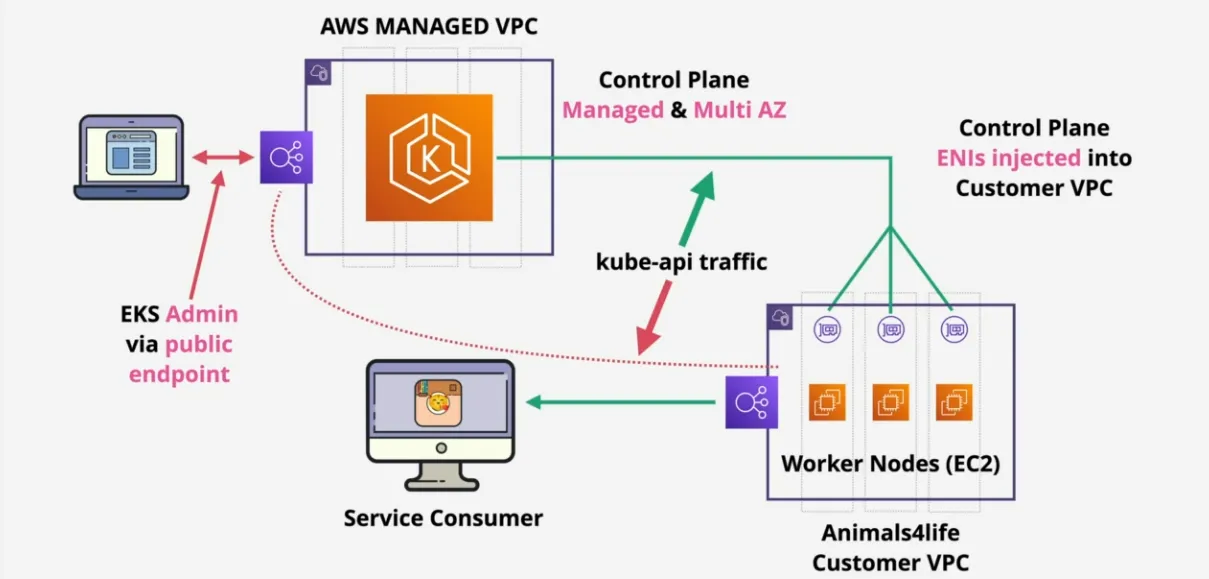
- aws managed kubernetes - open source & cloud agnostic
- runs on AWS, Outpost (tiny on-premise aws), EKS Anywhere (on-premises), EKS Distro (open-source)
- Control Plane scales and runs on multiple AZ's
- Integrates with ECR, ELB, IAM, VPC
- EKS Cluster = EKS Control Plane & EKS Nodes
- etcd distributed across multiple AZs
- node: self-managed, managed node groups or fargate pods
- depending on if you windows, GPU, Inferentia, Bottlerocket, Outposts, Local Zones, etc all change the type you might want to use
- Storage Providers via EBS, EFS, FSx, Lustre, FSx for NetApp ONTAP
EC2 Bootstrapping
- build automation vs creating a custom AMI
- via User Data (accessible via the meta-data IP address)
- http://169.254.169.254/latest/user-data
- everything inside User Data is executed by the instance OS
- ONLY on launch (updating and restarting the instance doesn't do anything)
- EC2 doesn't interpret the data, so the OS needs to understand it
- architecture
- AMI launches an EC2 instances
- includes a EBS volume (block device mapping)
- EC2 service provide user data to the EC2 instance
- the software inside the instance is designed to look at this metadata ip to execute when user data is available
- the user data (unless you specifically mess with the status checks) can error out, while the instance still reports a running state and healthy status checks, while the user data wasn't properly configured
- not secure (anyone with access to the instance, has access to the user data)
- limited to 16 KB in size (if you need more, then you need to download and run a script)
- boot-time-to-service-time
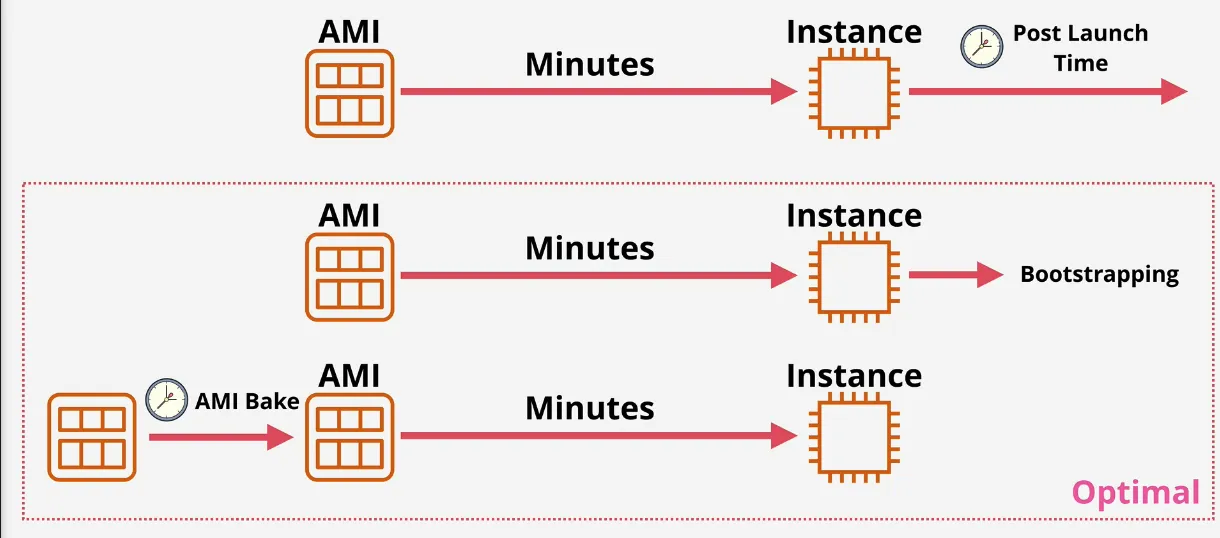
- cloud-init logs
- used to debug to bootstrapping process
less /var/log/cloud-init-output.logless /var/log/cloud-init.log
With User Data
CloudFormation
Basics
https://docs.aws.amazon.com/AWSCloudFormation/latest/UserGuide/aws-template-resource-type-ref.html
- Logical Resources is what's defined in the template, and a physical resource that was created by creating a CloudFormation Stack
- If AWSTemplateFormatVersion and Description exist, they the Description needs to follow the AWSTemplateFormatVersion. The AWSTemplateFormatVersion isn't mandatory, but if you use them both at the same time, that's how it is
- Resources: are added when they show up the first time, and you run the template again without it, they will be removed
- Metadata: Controls the UI in the AWS Console, and other things
- Parameters: Are inputs you need to give when running the CloudFormation, you can have allowed values
- Condition: You first declare the condition, then when the Condition is used somewhere it only applies when the condition is true
- Outputs: Any output given to the executor as feedback for running it, such as the device id that was created
- Once you run the template a stack will be created with the resources, if you delete the stack, all the resources will be deleted
Physical and Logical Resources
- CloudFormation Templates (yaml or json)
- declarative
- contains logical resources (creating the what, not how you want to create)
- cloudformation deals with the how
- are used to create Stacks (1 => 100 stacks, 20 stacks in each region, ...)
- create physical resources from the logical
- if a template changes, so does the stack, and also updates the physical resources
- if a stack is deleted, physical resource is also deleted
- once a logical resource moves to createcomplete (physical resources becomes active), then it can be queried by other templates
Template and Pseudo Parameters
- template parameters accept input (console/CLI/API)
- when stack is created or updated
- can be referenced from within logical resources
- influence physical resources and/or configuration
- can be configured with Defaults, AllowedValues, Min and Max & AllowedPatterns, NoEcho (for example passwords) & Type
- pseudo parameters
- "injected" by AWS as a parameter
- kinda like an environment variable, populated by AWS
- for example
AWS::Regionalways has the current selected AWS region
Intrinsic Functions
Ref&Fn::GetAttallow you to reference a value from one resource into another oneFn::Split&Fn::Joinsplitting or joining strings => usefull to join the DNS name with a url, to create web urlFn:GetAZs&Fn::Selectget a list of all AZs for a given region (or by default uses the current selected region), and select one of the AZs. The visible AZs only show the ones that also have a valid VPC in that AZ- conditions =>
Fn::If, And, Equals, Not & Orused to provision resources based on conditions, for example deploying big instances for prod, smaller for dev Fn::Base64&Fn::Sub, many AWS things accept base64 encoded values (for example providing EC2 with user-data), while Sub replaces text based on runtime information => providing a value from the template parametersFn::Cidr=> generate CIDR blocks mainly used for subnetsFn::ImportValue,Fn::FindInMap,Fn::Transform(see mappings)
Mappings
- templates contains Mappings object
- contains many mappings
- which map keys to values, allowing lookup
- can have one key, or top & second level keys
- commonly used to retrieve AMI for given region & architecture
- improves portability
- use !FindInMap intrinsic function
- example
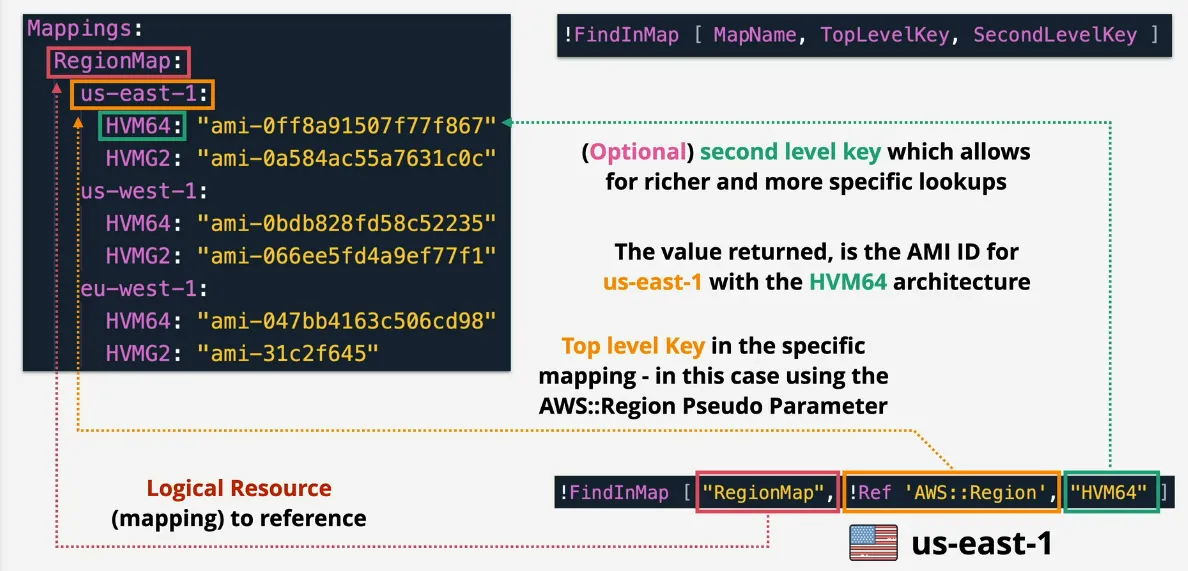
Outputs
- templates can have optional Outputs section
- values are
- visible as outputs when using CLI
- visible as outputs in the console UI
- accessible from a parent stack when using nesting
- can be exported, allowing cross-stack references
- example
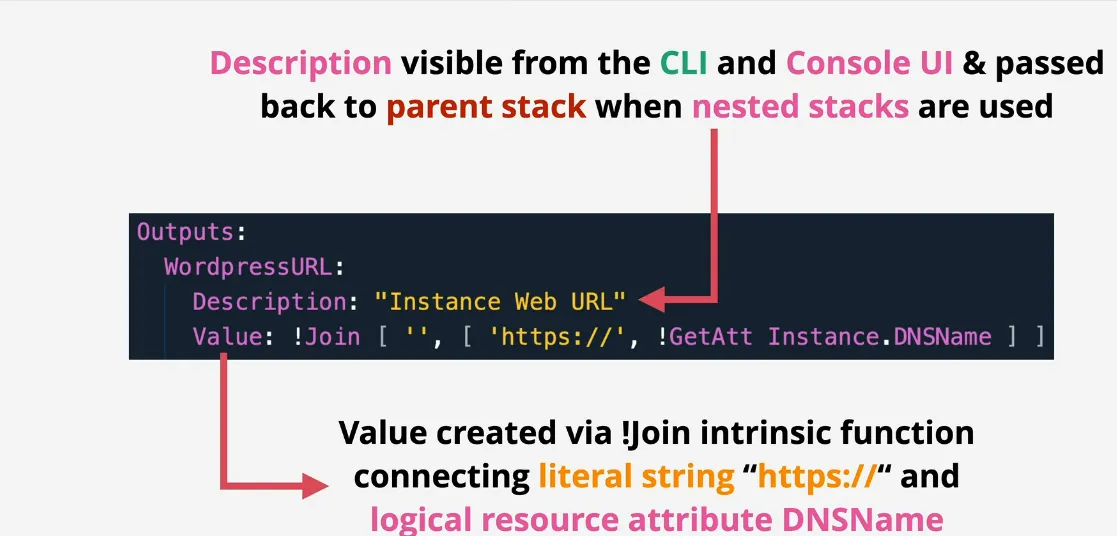
Conditions
- created in the optional conditions section of a template
- conditions are evaluated to TRUE or FALSE
- processed BEFORE resources are created
- use other intrinsic functions: AND, EQUALS, IF, NOT, OR
- and or associated with logical resources to control creation or not
- visually
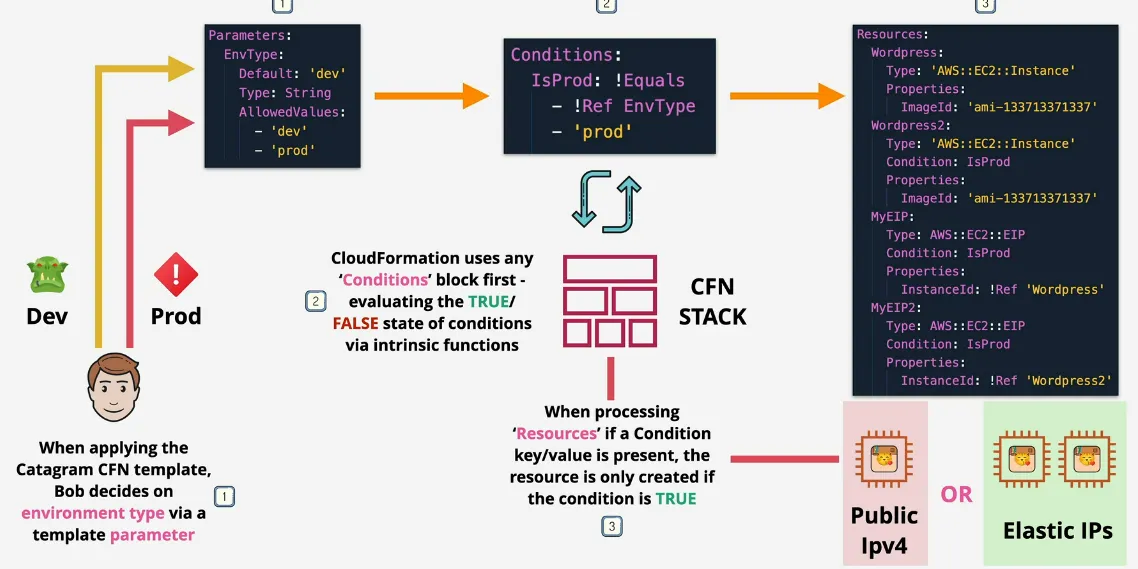
DependsOn
- cf tries to be efficient
- does things in parallel (create, update & delete)
- tries to determine a dependency order (VPC => SUBNET => EC2)
- by references or functions (
!Ref)
- DependsOn let's you explicitly define these
- if resources B and C depend on A
- both wait for A to complete before starting
- in 90% cf is quite good at figuring out the dependencies itself
- most common that never works, is setting an Elastic IP (EIP), which requires a IGW attached to a VPC in order to work, but there not implicit dependency in the template => use DependsOn
WaitCondition, Creation Policy and cfn-signal
- configure cf to hold a resource
- wait for X number of success signals
- wait for timeout H:M:S for thoese signals (max 12h)
- the EC2 instance sends a signal via
cfn-signalas part of the bootstrapping process (UserData) - if success signals received => CREATECOMPLETE
- if failure signal received => CREATIONFAILED
- if timeout reached => CREATIONFAILED
- the logical resource is usually an EC2 or Auto-Scaling group which uses a CreationPolicy, or separate resource with a WaitCondition
- it's also possible to send/receive some minor data information with WaitConditions
Nested Stacks & Cross-Stack References
- single stack
- shares a lifecycle (everything is deleted and created using one stack)
- max resource limit is 500
- isolated by default (can't re-use resources in another stack )
- nested stacks
- root stack => created fist, either manually, or automation
- acts like a normal cf template: has outputs, parameters, ...
- but also includes a cf Resource which links another templateURL with the current template, and also possible to provide parameter values
- outputs are referenced via
VPCSTACK.Outputs.XXXX - not possible to reference resources from the nested stack, only outputs
- parent stack, is any stack, which has nested stacks, so the root stack, is also a parent stack
- nested stacks are any children of a parent stack
- benefits
- whole template can be re-used in other stacks
- re-using the code, not the actual resources, meaning if you re-use a VPC template in another stack, a second VPC will be created => re-uses templates, but not the same stacks
- overcoming resource limit of a single stack
- modular templates => code re-use
- use when stacks form part of one solution => life-cycle linked
- root stack => created fist, either manually, or automation
- cross-stack references
- outputs can be exported, making them visible from other stacks
- exports must have unique name in the region per account
- use
Fn::ImportValueinstead ofRef - when?
- different life-cycles
- re-use stack (re-using resources)
- service-oriented
- remember template != stack
StackSets
- allows cf stack across many accounts & regions
- are containers in an "admin account"
- contain stack instances, which reference the actual stacks running in a region in an account
- stack instances & stack are in a "target account"
- each stack = 1 region, 1 account
- created via self-managed IAM Roles or service-managed within an ORG
- the template of a StackSet looks like a regular cfn template
- some terms:
- concurrent accounts => amount of accounts at the same time that are provisioning stacks
- failure tolerance => how many failures of stack creation before the whole StackSet fails
- retain stacks => removing stack instances from stackset won't delete resources
- commonly used:
- enabling AWS config
- MFA, EIPS, EBS Encryption
- IAM Roles for cross-account access
DeletionPolicy
- by default, physical resource is deleted if logical resource is deleted from the template
- this can cause data loss: EBS Volumes, RDS databases, ...
- with deletion policy you can define to delete (default), retain or snapshot (if supported: EBS Volume, ElastiCache, Neptune, RDS, Redshift)
- snapshots continue past stack lifetime (you have to clean it up, otherwise it cost $)
- only applies to delete, NOT replace (sometimes resources are deleted, and re-created when replacing, in this case, the DeletionPolicy doesn't cover your data loss)
Stack Roles
- cfn uses the permission of the logged in identity
- which means you need permissions to change templates, stacks and the actual resources
- cfn can assume a role to gain permissions
- role separation
- identity who creates the stack, doesn't need resource permission (only PassRole) => means that someone can create a template a code, provision the resources without being able to look at the actual resources
- it also means that a user can't assume the role that it's passing to CFN
- visual
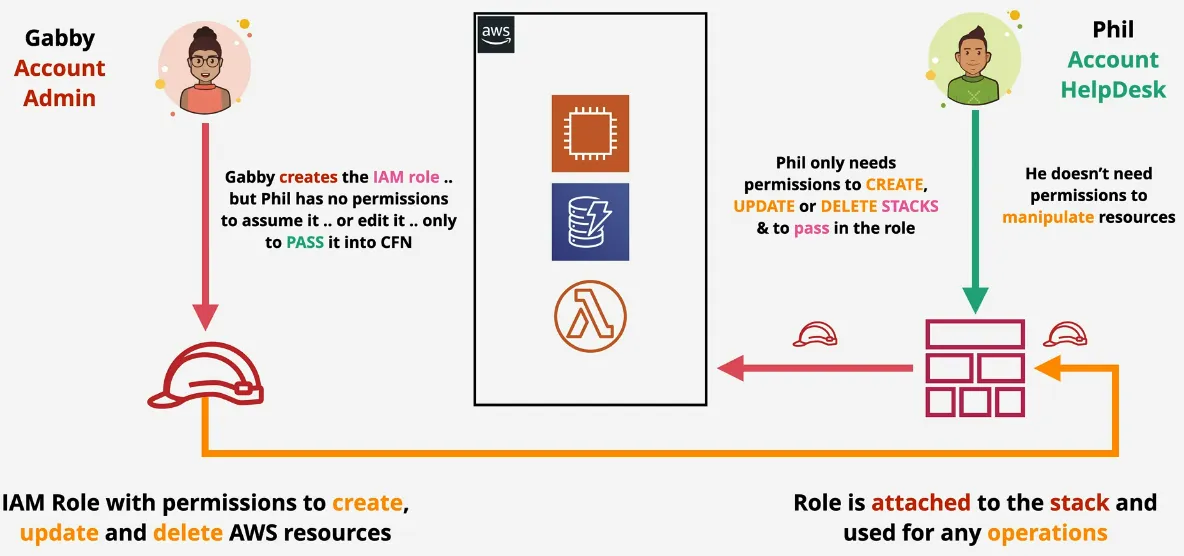
CloudFormationInit & cfn-init
- simple configuration management system
- desired state (if for example apache is already installed, it won't re-install it) or procedural, as opposed to procedural only (line by line) from EC2 User Data
- similar to Ansible, maybe?
- provided with directives via Metdata and
AWS::CloudFormation::Initon a CFN Resource - possible to update the configuration, while configuring to user-data (procedural) can't be updated on restart
- logs are in
cloud-init.logfor user-data andcfn-init-*.logfor anything init related - architecture
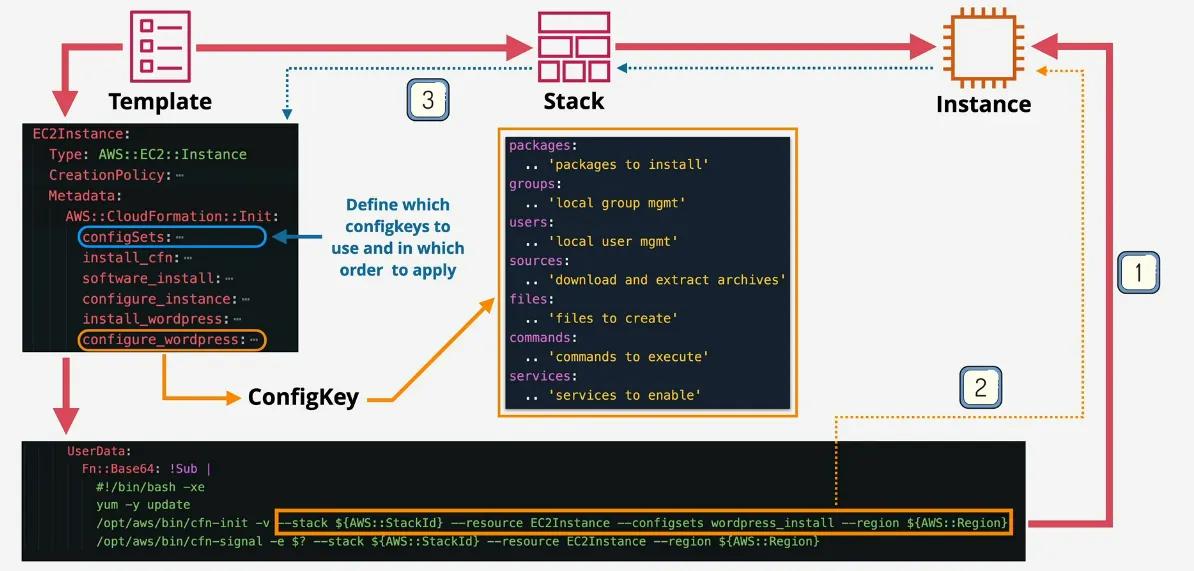
- CloudFormation template creates an EC2 instance
- includes fields to configure the different parts of the instances via metadata
- the cfn-init command is passed in via the user-data of that instance
- CloudFormation creates a stack, which creates an instance
- user-data gets run, then this metadata is configured, which is defined via configSets (defines which keys to use from the set, and what order to apply them in)
- with CreationPolicy and Signals we can
- set a timeout policy
- to notify CloudFormation if the cfn-init command was run (un)successfully
- if resource was OK, then CloudFormation reports a succesffully created
- if there was an error, or timeout it reports a creation error
- meaning that we have visibility now, if a creation was failed or not, vs providing via user-data
cfn-hup
cfn-initis run once as part of bootstrapping (user data)- if CloudFormation::Init is updated, it isn't rerun
cfn-huphelper is a daemon which can be installed- detects changes in resource metadata by periodically checkin the metadata
- runs configurable actions, when a change is detected (for example re-running cfn-init)
- UpdateStack => updated config on EC2 instances
Change sets
- usual flows
- template => stack => physical resource (CREATE)
- stack delete => delete physical resource (DELETE)
- v2 template => existing stack => change resources (UPDATE)
- certain changes can have no interruption, some interruption and a full replacement (creates a new copy) => risk of data loss
- change sets let's us preview changes
- possible to have multiple different version (lots of change sets)
- chosen changes can be applied by executing the change set
- it's a nice way to let someone else double check infrastructure as code, without completely and automatically messing up the whole infra
- visually
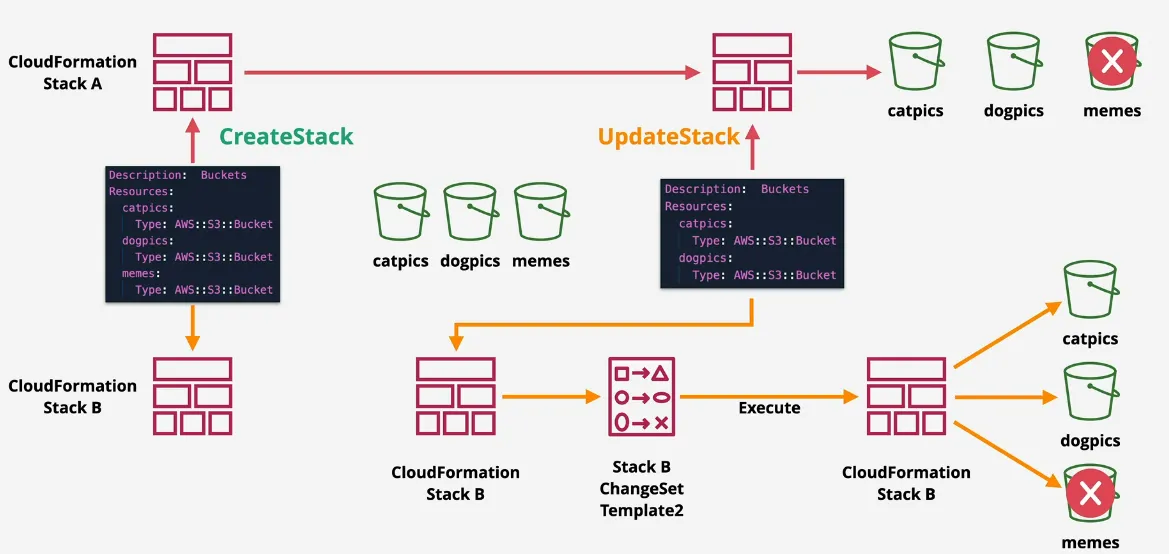
Custom Resources
- cfn doesn't support everything in AWS
- custom resources let CFN integrate with anything it doesn't yet, or doesn't
natively support
- for example populating S3 buckets
- deleting S3 buckets which still have data in them
- possible to provide non-AWS resources
- passes data to something, get data back from something
- example
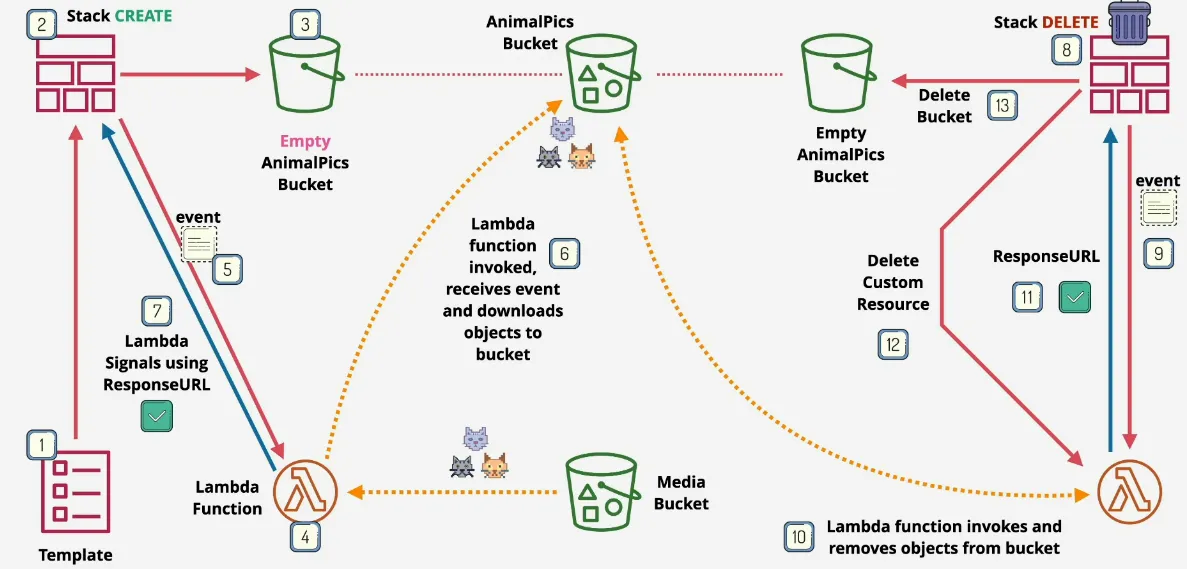
Route 53
- AWS's DNS as a Service
- is a DNS DB for a domain eg venikx.com
- globally resilient (multiple DNS Servers)
- created automatically with domain registration in R53
- or created separately
- hosts DNS Records (A, AAAA, MX, NS, TXT, ...)
- hosted on 4 name servers
- Hosted Zones are what the DNS system references - Authoritative for a domain eg. venikx.com
DNS Record Types
- read Domain Name Server (DNS)
- A(v4) and AAAA(v6) records: given a DNS zone, map hostnames to ip addresses
- CNAME (Canonical Name): host to host, most likely pointing to another A record, they can't be pointing to an IP! Exam!
- MX Records: finding the mail server for a specific domain, has a priority, lower number is higher priority, and as soon as you have a dot in the name, it means it's pointing to another domain (or zone)
- TXT Records: additional information, often used in proving domain ownership, or related to spam settings
- Time To Live (TTL): reduce to a low value way beforehand when you want to make changes to these in the future
Difference Between CNAME and ALIAS
- CNAME's maps names to another name
- CNAME can't be used to point to a naked/apex domain (venikx.com)
- so pointing to an ELB would be invalid
- ALIAS records map a NAME to an AWS resource
- ALIAS CAN point a naked/apex domain, and also used for normal records
- No charge for ALIAS requests pointing at AWS resource
- so default to using ALIAS
- ALIAS (A Record ALIAS, and CNAME Record ALIAS) have to match the same type
it's pointing to
- for example, you are given an A Record for an ELB (name which points to an IP Address), so you have to create A Record ALIAS
- services such as: API Gateway, CloudFront, Elastic Beanstalk, ELB, Global Accelerator & S3
- again this shit makes the request to AWS services free!
- only possible if R53 is hosting your domains
Registering Domains
- checks with the registry if domain is available
- AWS creates a zone file (database with DNS entries), and allocates nameservers (4 for each zone), adds these zones to the top level domain by pointing the NS to the 4 nameservers of that zone
R53 Public Hosted Zones
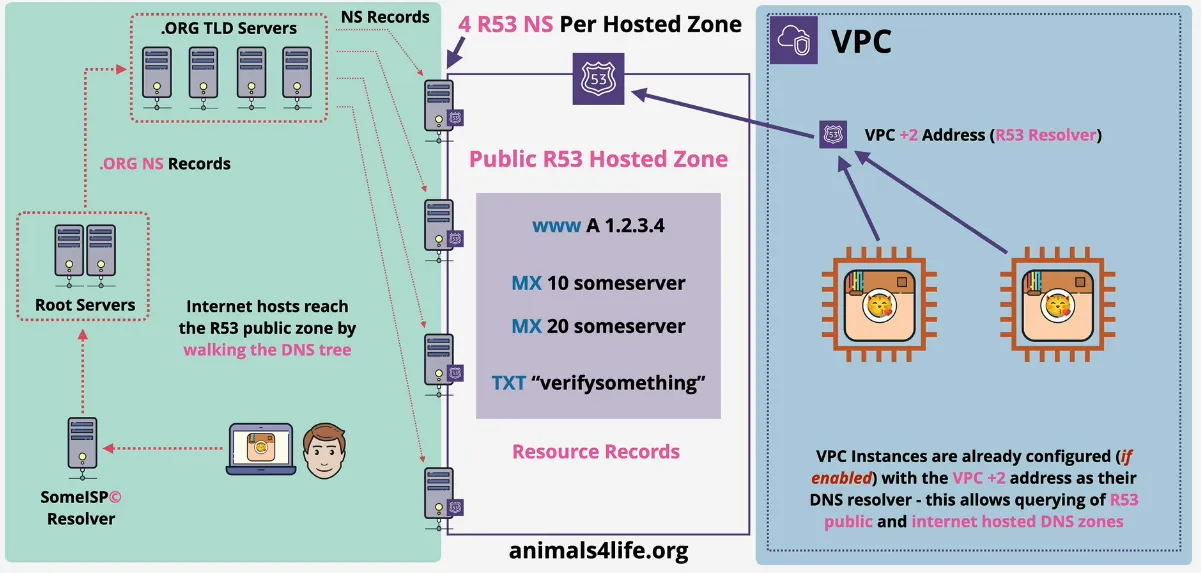
- DNS database (zone file) hosted on R53 (Public Name Servers)
- accessible from public internet & VPCs
- allocates 4 R53 Name Servers (NS)
- use NS records to point at these NS (connects to global DNS)
- Resource Records (RR) created within the Hosted Zone
- externally registered domain can point at R53 Public Zone via those 4 NS's
- monthly cost + cost for queries
R53 Private Hosted Zone
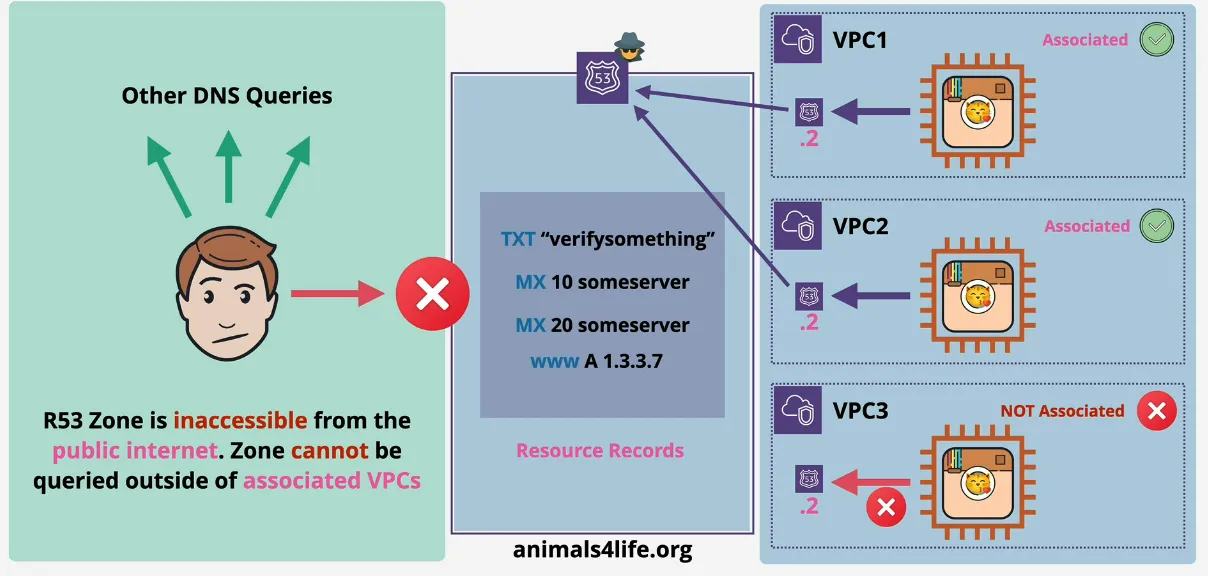
- a public zone, which isn't public
- associated with VPCs
- only accessible in those VPCs
- using different accounts is supported via the CLI/API
- split-view (overlapping public & private) for PUBLIC and INTERNAL use with the same zone name
R53 Split View Hosted Zone
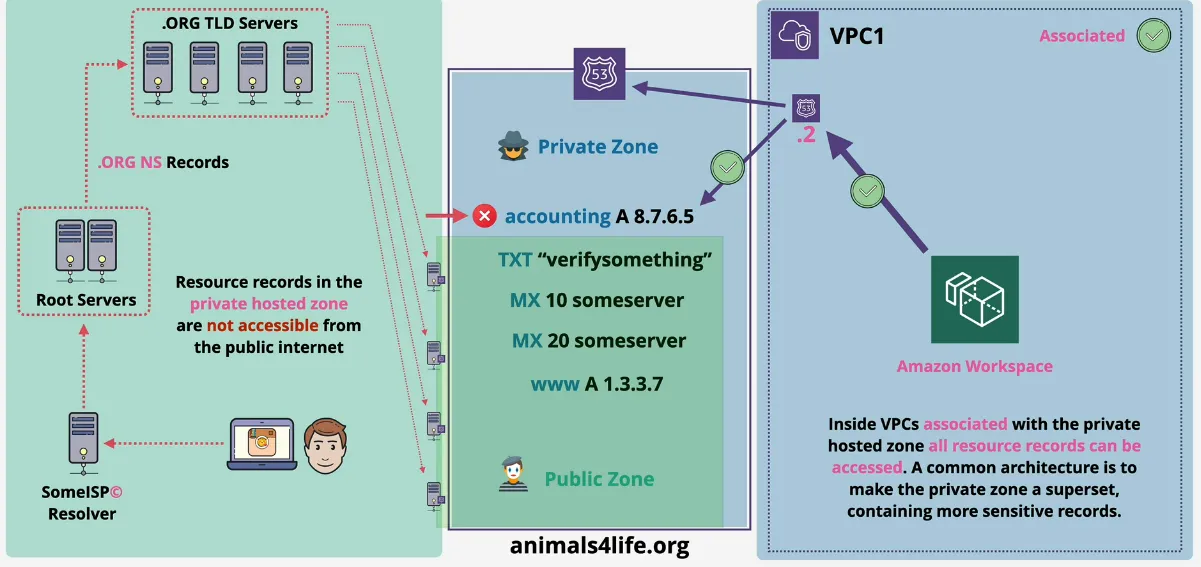
Routing
Simple Routing
- 1 record per name, each record can have multiple values
- if a client request a record it
- receives all the listed IP values from that record
- chooses one IP to actually use AT RANDOM
- doesn't support health checks
- meaning that the randomly chosen IP might actually be broken
Health Checks
- separate from, but used by records
- performed by health checkers globally
- every 30s (or every 10s at an extra cost)
- via
- TCP only
- HTTP/HTTPS (TCP + HTTP Status Code)
- HTTP/HTTPS With String Matching (+ also needs to verify a certain string in the response body)
- either healthy/unhealthy
- kind of checks
- endpoint
- CloudWatch Alarm
- Checks of Checks (calculated checks) => application wide health
- if 18% of the health checkers report healthy, it's considered healthy
Failover Routing
- two records (primary and secondary), each pointing to a different resource
- the primary record's health is checked
- on failure, points to the failover service/s3 bucket to display error page
- when?
- active-passive failover
- use an active service, like EC2, and a passive failover like S3
Multi Value Routing
- combines simple and failover routing
- multiple records with the same name all pointing to different IPs
- each record is health checked, and only the healthy IPs are sent back
- the client uses one of these healthy IPs at random
- improves availability
- not a replacement for load balancing
Weighted Routing
- simple load balancing
- testing new software versions
- for example 5% of requests go to a new updated server
- weight of record / total weight
- if a chosen record is unhealthy, it's skipped until a healthy record is chosen
Latency-Based Routing
- optimize for performance & user experience
- specify the region where the infra is located
- one record, with the same name, in each region
- AWS maintains a db with the latencies between regions, and selects the ip
based that table (using IP Lookup Service)
- db is not live
- meaning the actual latency numbers might not be accurate, if there's problems in that region
- can combined with health checks
- improves performances of global applications
Geolocation Routing
- similar to latency
- but just instead of based on latency, is based on location
- via state, country, continent, or default (if nothing is relevant)
- doesn't return "closest" records, only relevant locations
- for example someone in Russia with close proximity to USA, will not match to lookups in the USA, nor in continent
- ideal for restricting content
- or language specific content
Geoproximity Routing
- similar to latency-based, but based on geographic proximity
- by providing a region (if it's an aws resource)
- or by providing longitude, and latitude (if it's external)
- and a bias (add some weight affecting the range)
- meaning, despite Turkey being closer to Europe, still make it route to an Australian server
*
Interoperability
- acts as a domain registrar AND domain hosting
- can do both, or either Domain Registrar or Domain Hosting
- domain registration fee, once every year or 3y (domain registrar)
- allocates 4 NS (domain hosting)
- creates a zone file (domain hosting) on the above NS
- communicates with registry of the TLD (domain registrar)
- and sets the NS records for the domain to point to the 4 NS above
- both roles
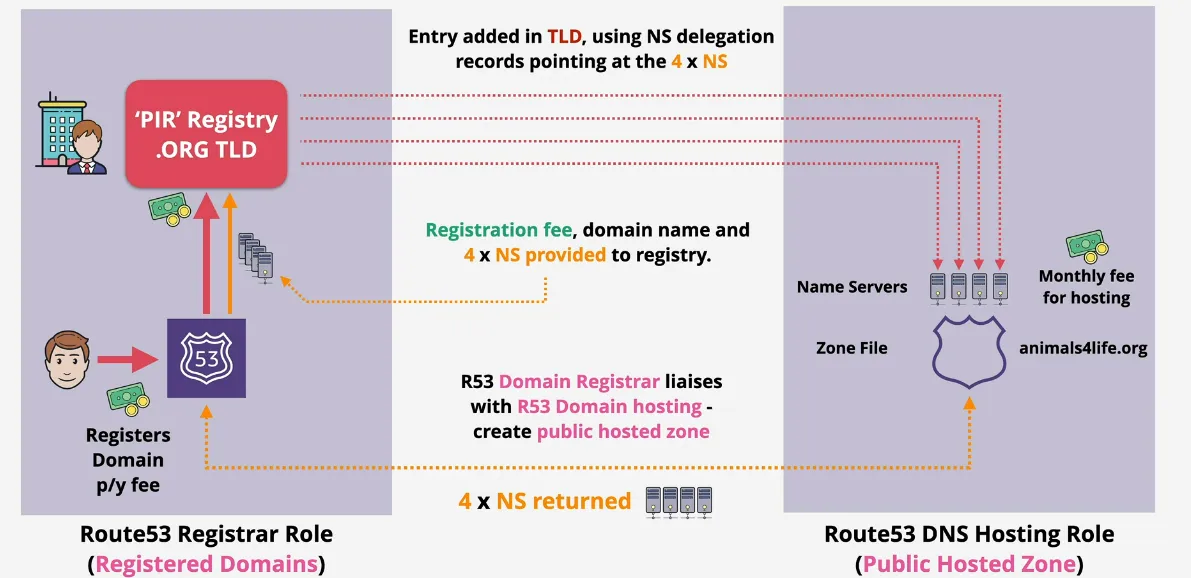
- hosting only
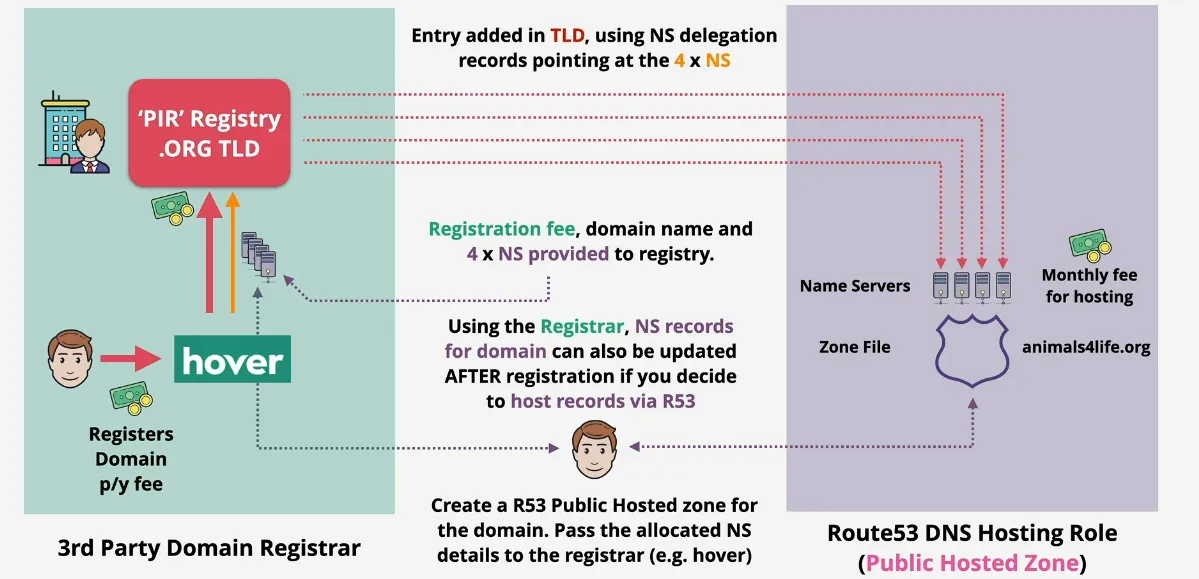
- registrar only
- don't use this please, it's weird
Implementing DNSSEC
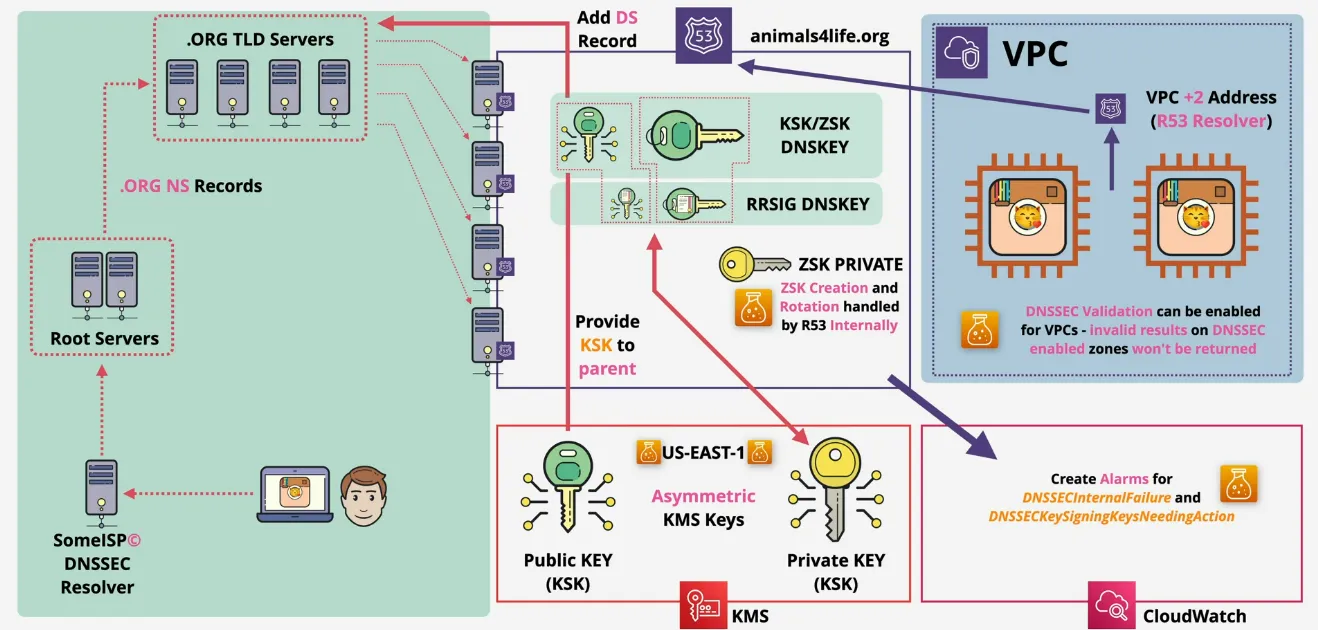
- asymmetric keypair created in KMS
- these KMS keys are used to create the Key Signing Keys (KSK), used by R53
- keys need to be available in us-east-1 (only in this region!)
- R53 creates and rotates the Zone Signing Keys (ZSK) internally
- R53 adds the public parts of KSK and ZSK into a DNSKEY of the hosted zone
- the KSK is used to create the RRSIG DNSKEY, which is used by the resolver to check if the key remained invalid and unchanged
- next R53 has to establish trust with the parent zone
- hashed version of the public key needs to be sent to the parent zone
- if zone is managed by R53, it automatically adds a "Delegated Signer" record to the parent zone
- make sure to create alarms for, in order to quickly resolve DNSSEC issues
DNSSECInternalFailureDNSSECKeySigningKeysNeedingAction
- can be enabled in VPCs
RDS - Relational Database Service
Database Refresher
Relational
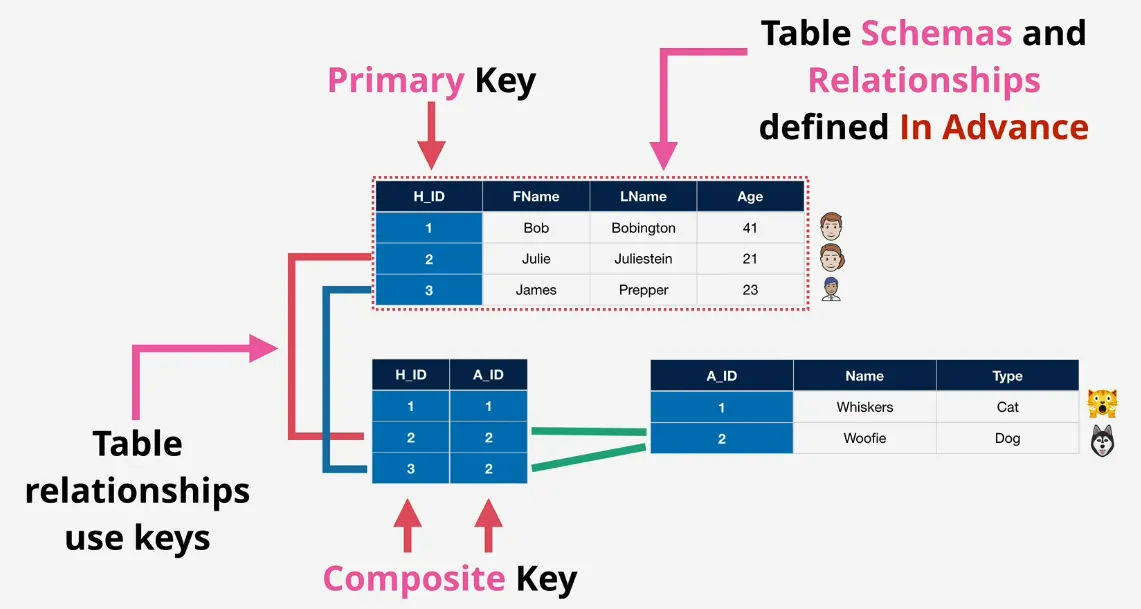
Non-Relational
- key-value (Redis)
- no structure
- no schema
- scaleable
- when?
- simple data structures
- fast access
- in memory cache
- wide column store (DynamoDB)
- partition key (+ other key(s)) + table
- table has no attribute schema (any/all/none)
- document
- store and query data as documents
- JSON, or XML
- flexible indexing for inside documents
- when?
- interactive with whole documents, or deep attribute interactions
- for example orders, or contact forms, CMS's
- column (Redshift)
- whole column is stored on disk, grouped together
- for example querying all sizes sold ever
- take data from row based database (usually SQL), and shift to a column one
- when?
- reporting
- or when all values for a specific attribute (size is required), a count perhaps?
- graph
- relationships are fluid/dynamic
- relationships are stored inside the database
- don't need to query for them like in SQL databases
- beyond the scope of this course
- when?
- complex relationships
- social media
ACID and BASE
- are DB transaction models
- CAP Theorem (every db product only can implement 2, so choose 2)
- Consistency
every read will receive the most recent write (or error)
- Availability
every request receives a non error response, but without the promise for the most recent write
- Partition Tolerant (resilience)
made from multiple network partitions, system continues to operate when there are dropped messages or error between these network nodes
- Atomic Consistent Isolated Durable (ACID)
- focuses on consistency
- generally RDS
- limits scaling
- Atomic
either ALL, or NO components of transaction SUCCEEDS or FAILS
- Consistent
transactions move the db from one valid state, to another, in-between is not allowed
- Isolated
parallel transactions are executed on the db as if they were the only one, they do not interfere with each other
- Durable
once committed, transaction are stored on non-volatile memory, which is resilient to power outages or crashes
- Basically Available Soft state Eventually Consistent (BASE)
- high performance
- highly scaleable
- generally non-sql (mostly DynamoDB)
- Basically Available
READ and WRITE operations are as much available as possible, no guarantees for consistency, kinda - maybe
- Soft State
doesn't enforce consistency, delegates this to the application/user, data being read, might not be the same as the data that was just written
- Eventually Consistent
if we wait long enough, read from the system will be consistent
Databases on EC2
- generally considered bad practice
- bad reasons to use it (really question the need here)
- access to the DB instance OS
- advanced db option tuning => AWS even provides some tuning
- usually a vendor demands it
- decision makers who "just want it"
- good reasons
- db or db version which AWS doesn't provide
- OS/DB combination doesn't provide
- architecture which is not provided by AWS (replication/resilience)
- reason not to use
- admin overhead
- backup / DR Management
- EC2 is single AZ
- Features - some AWS DB products are amazing
- EC2 is on/off - no serverless, no easy scaling
- replication - skills, setup, monitoring
- performance - aws invest time into optimizations and features
Architecture
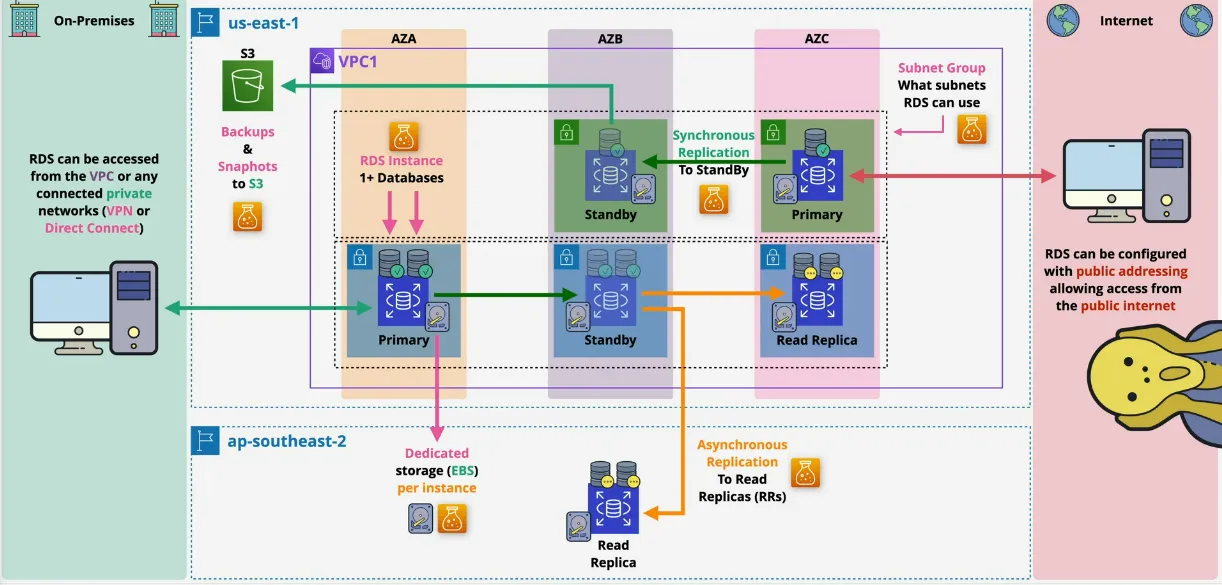
- is not Database as a Service (DBaaS)
- but is a Database Server as a Service (DBSaaS)
- is SQL only
- can have multiple databases on one DB Server (instance)
- db engines: MySQL, MariaDB, PostgreSQL, Oracle, MS SQL Server
- each have their own licenses though
- each instance has their own dedicated EBS storage per instance (different from how Amazon Aurora stores things)
- Amazon Aurora is a different product (custom database engine from Amazon)
- managed service, no access to OS or SSH (RDS Custom doesn have SSH access)
- deployed in a subnet group, with a primary db and a standby db
- preferably private
- access to the private subnet via a VPC, or Direct Connect
- public subnet is frowned upon
- replication happens synchronously to the standby db instance
- also possible to have read replicas, which are asynchronous in order to scale read loads across the globe, or add region resilience
- backups happen to S3, meaning it spans across AZ's
- if multi AZ mode is enabled backups happen from the standby instance
Costs
- loosely based on EC2
- billed for resource allocation
- based on instance size & type
- multi AZ or not
- storage type (EBS based) & amount (monthly per gb)
- data transferred (in AND out)
- backups & snapshots (if you ahve 2TB of storage you get 2TB of snapshots for free, after monthly per GB cost)
- licensing (if applicable)
Multi AZ
- Multi AZ - Instance Mode (older architecture)
- synchronous replication to standby in another AZ
- data is only viewed as committed if data is written to the primary, AND replicated to StandBy
- only has ONE StandBy replica ONLY ONE
- replication at storage level
- exact replication method depends on the db itself
- access the database via Database CNAME (which points to the primary db)
- backups from the standby
- all accesses read/write happen via the primary
- in case of failure, DNS get changes to update to the standby (60s-120s)
- not free tier
- Reason for failover: AZ Outage, Primary Failure, Manual Failover, Instance type change and patching, ...
- synchronous replication to standby in another AZ
- Multi AZ Cluster Mode
- might be confusing with Aurora DB
- one writer, replicates to 2 read instances (2 only, in Aurora can be more)
- all in different AZ's
- needs application support in order to say that this data can be read from another instance
- synchronous replication to readers
- data is committed when 1+ reader finishes writing
- each instance has it's own storage (different than Aurora DB)
- accessing the cluster via
- cluster endpoint points at writer, which can be used for reads, writes and admin
- reader endpoint directs any reads to an available reader (also include the writer) => scales on reader
- instance endpoints point at a specific endpoint, usually not recommended to use directly except for testing/fault finding (no failover)
- runs on much faster hardware
- graviton + local NVME SSD Storage
- fast writes to local storage flushed to EBS
Backups
- AWS Managed S3 Buckets (not visible in the S3 Console, but are visible in RDS Console)
- regionally resilient
- taken from the standby instance, because it has an IO pause
- replicate backups to another region
- both snapshots and transaction logs
- charge apply for cross-region data copy
- and storage costs apply for destination region
- not default
- manual snapshots
- run against the instance, so snapshots the whole storage of the instance with all the databases in it
- first snapshot is a full copy, the rest incremental ones
- snapshots don't expire
- snapshots live on after the instance gets deleted
- have to clean them up yourself (manually)
- automated backups
- once per day
- similar architecture, so think of them as automated snapshots
- every 5 minutes the transactions logs are also written to S3
- meaning that you can restore a db within a 5min granularity
- cleared up immediately
- retention between 0 and 35 days
- restores
- creates a new RDS Instance => new endpoint address
- snapshots => single point in time, RPO might be suboptimal
- automated => any 5min point in time
- backup is restored, and transaction logs are "replayed", to bring the DB into a desired point in time (GOOD RPO)
- restores aren't fast (think about RTO (and RR's))
Read Replicas
- read only db replicas
- either in another AZ
- or another region
- think of them as separate things
- they aren't part of the main db
- own endpoint address
- meaning the application needs to be able to handle it
- asynchronous replication => small lag
- read perf improvements
- 5x direct read-replicas per db instance
- each providing an additional instance of read performance
- read-replicas can be have read-replicas, but lag starts to become a real problem
- global performance improvements
- RPO (Recovery Point Objective) / RTO (Recovery Time Objective) Improvements
- snapshots and backups improve RPO
- but RTO is a problem
- Read Replicas offer
- near 0 RPO (assuming no data corruption)
- promoted quickly (low RTO)
- failure only (watch for data corruption)
- read only until promoted
- global availability improvement, global resilience
- snapshots and backups improve RPO
Security
- SSL/TLS (in transit) is available for RDS
- can be set mandatory per user
- Encryption at rest depends on the database engine
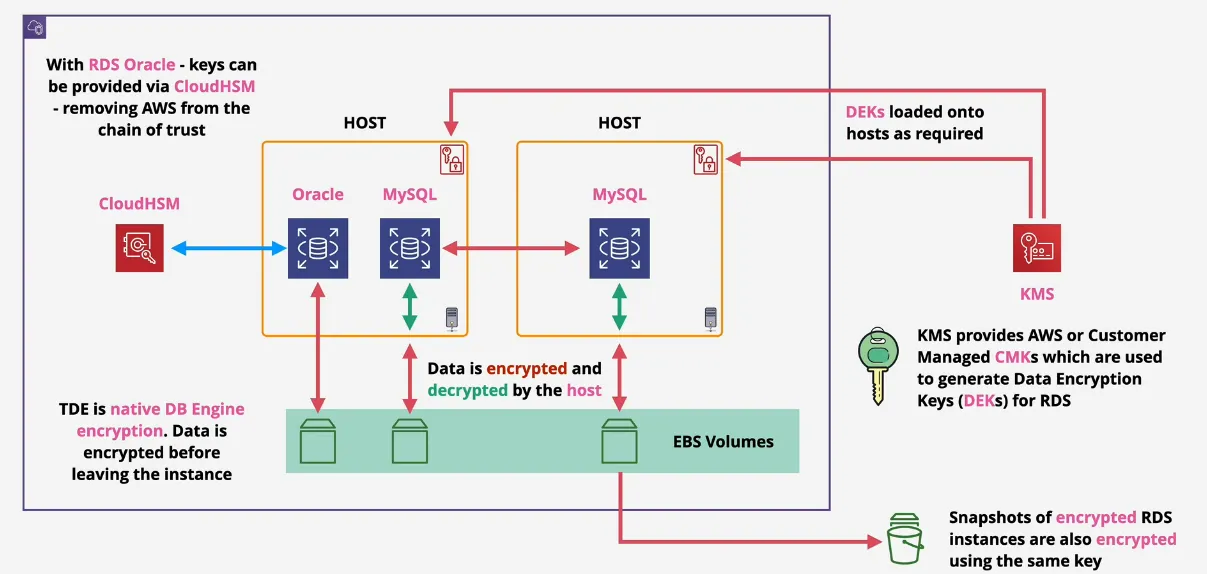
- by default EBS Volume encryption via KMS
- handled by RDS Host, and underlying EBS Volumes
- as far as the engine goes, it's writing encrypted data to the db
- AWS or Customer Managed CMK generate data encryption keys (or DEK), which are used for encryption operations
- Storage, Logs, Snapshots & replicas are encrypted by the same master key
- encryption can't be removed
- RDS MSSQL and RDS Oracle support TDE (Transparant Data Encryption)
- handled within the db engine
- data is secure from the moment it's written out to the disk
- RDS Oracle supports integration with CloudHSM (managed by you)
- much more secure
- much stronger key controls (even for AWS)
- no trust chain involving AWS
- by default EBS Volume encryption via KMS
- IAM Authentication
- normally logins are controlled via local db users
- username+password
- outside aws's control
- but you can use IAM users to connect with db
- local db account, configured to use AWS Auth Token
- policy attached to user or role maps that IAM Identity to the local RDS user, which generate
- allows those identities to run
generate-db-auth-token, which creates a token to access the db for 15min - can login the db without requiring a password
- this is only authentication, not authorization
- authorization is still handled internally
- normally logins are controlled via local db users
Custom
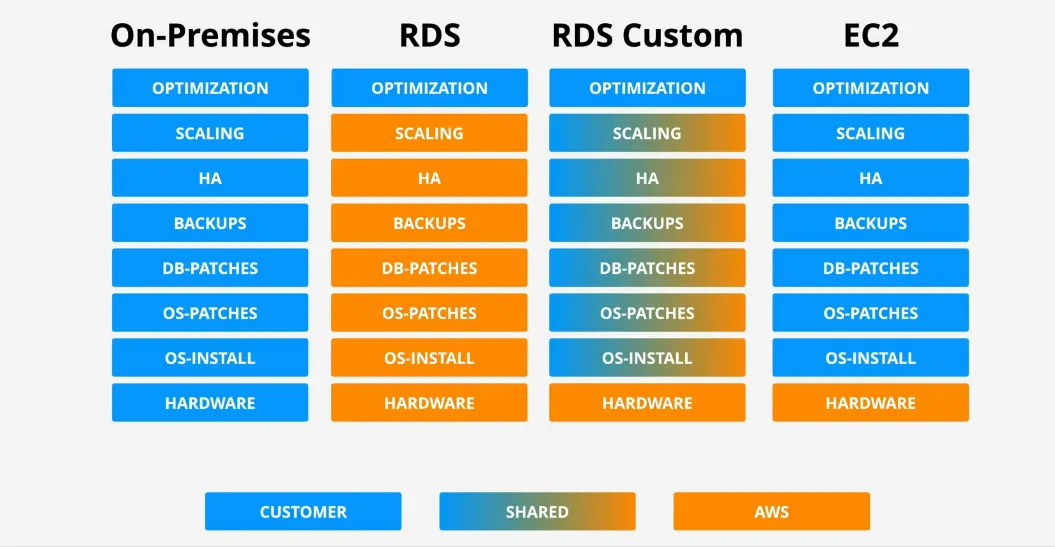
- fills gap between RDS and EC2 running a db Engine
- RDS is fully managed => OS/Engine access is limited
- DB on EC2 is self managed => lots of overhead
- Custom => middleground
- works for MS SQL and Oracle
- connecting via SSH, RDP, Session Manager
- the only visible thing from RDS is when the instances are injecting into your VPC
- however with custom you do see EC2 instances, S3 Backups, etc
Aurora
Aurora Privisioned
- uses a "cluster"
- very different from normal RDS
- single primary instance + 0 or more replicas
- replicas can be used as reads for normal operation
- provides benefits from RDS Multi AZ and Read Replicas
- no local storage - uses cluster volume which available to all compute
instances in a cluster
- faster provision
- improved availability & performance
- architecture
- primary in one AZ
- multi AZ replicas
- replication is synchronous
- replication happens at the storage level, so no resources are consumed on the instances to perform these replications
- by default, only the primary instance can write, the rest read
- automatically detects disk failures on it's cluster, and automatically repairs the data on that disk from the other storage nodes
- up to 15 replicas, instant failover
- all SSD Based - high IOPS, low latency
- billing is very different
- storage is billed based on what's used
- based on high water mark (billed for the most used) => lifetime of the cluster
- if you use 8GB, then 15GB and then 4GB you are billed 15GB for that month
- storage which is freed up can be re-used
- high water mark billing is probably being rotated out
- no free-tier option, because it doesn't support Micro instances
- beyond RDS singleAZ(micro) Aurora offers better value
- compute => hourly charge, per second, 10 minute minimum
- storage GB/month consumed, and IO cost per request
- 100% db size in backup come for free
- replicas can be added and removed without storage provisioning
- accessing Aurora is based on endpoints, the cluster endpoint (primary, read/write) and the reader endpoint (primary, and load balances across replicas)
- possible to also access based on custom endpoint, and each instance also have their own endpoint
- backups & restore
- work similar to RDS
- restores create a new cluster
- advanced features
- backtrack can be used which allow in-place rewinds to a previous point in time
- fast clones, make a new db much faster than copying all the data
(copy-on-write),
- it references the original source instead of copying
- new data are written normally
- cloned db doesn't use the same amount of data
Aurora Serverless
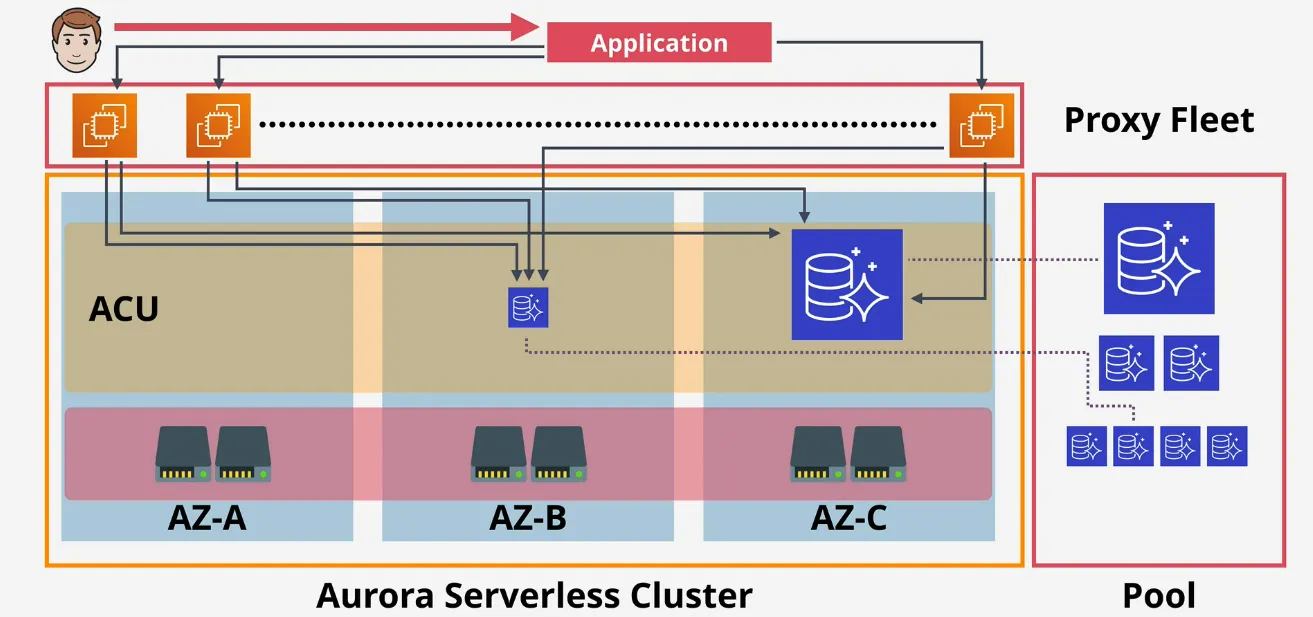
- Serverless for Aurora, is what Fargate is for ECS
- more closer to Database as a Service
- no need to provision the db
- Scaleable - ACU - Aurora Capacity Units
- has a min & max ACU
- clusters adjusts based on load
- can go to 0, and be paused
- consumption billing per-second basis
- same resilience (6 copies across AZs)
- similarities
- same cluster volume architecture
- once ACU is allocated, they have access to the same storage
- differences
- no provisioned servers, but ACUs
- warm pool of managed Aurora instances, managed by AWS
- if more resources are asked for, and the config allows it, a bigger ACU is automatically swapped with the current ACU
- connections happen to the proxy fleet
- proxy fleet brokers the connection to the ACU
- users just connect to a single endpoint
- no disruptions
- when?
- infrequently used application, such as blogs
- new applications (unsure about the size of the application)
- variable workloads (burst usage, like once per week 15min)
- unpredictable workloads (can be used initially to check when you need the workload)
- development and test databases
- when paused, only billed for the storage charges, no the compute itself
- great for multi-tenant applications
- billing user per month, per license, the more users you have the more income you have to pay for aurora serverless
- scales up in cost, when you also scale in revenue
- the DEMO video was broken at the moment, need to come back later
Global Database
- cross-region Disaster Recovery and Business Continuity
- low latency via global read scaling
- 1s or less replication between regions
- one-way, from primary region to secondary region
- no impact on db performance, as replication happens on storage level
- secondary regions can have 16 replicas
- can be promoted to r/w
- max 5 secondary regions
Multi-Master Writes
- default mode is single-master
- 1 r/2 and 0+ read only replicas
- cluster endpoint to write, read endpoint for load balancing reads
- failover takes time, replica needs to be promoted
- multi-master mode
- all instances are r/w
- the application connects to 1 of the instances
- no concept of a load balanced endpoint for the cluster
- if one node receives a write, the instance proposes a change to be committed to the storage node, these can accept or deny the change
- once it's accepted, it's synchronizes the change with the other node, so they have this data in the instance's caches AND replicates the change all to the storage disks
RDS Proxy
- why?
- opening and closing connections consumes resources
- takes time, which creates latency
- with serverless, ever lambda opens and closes
- handling failure of db instances is hard
- doing this in your application adds risk
- db proxies help managing them, but is not trivial to setup (scaling and resilience) => RDS Proxy
- applications connect to a db proxy, which is responsible for keeping connections open to the database
- opening and closing connections consumes resources
- architecture
- managed AWS service
- manages a long term connection pool
- runs across multiple AZs in the VPC
- abstract clients away from db failure or failover events
- the proxy waits even if the target db is unavailable
- the proxy automatically moves the connection to the standby db
- when? (exam)
- too many connection errors (when using small/burst instances)
- AWS LAmbda (time saved/connection reuse) & IAM Auth
- long running connection (SAAS apps) - low latency
- resilience to db failure is a priority
- reduces the time for failover
- makes it transparent for the application
- key facts (exam)
- full managed db proxy for rds/aurora
- auto scaling, HA by default
- connection pooling (reduces db load)
- no constant opening/closing
- multiplex between the db and clients to reduce the amount of db connections, vs the amount of clients connection to it
- only accessible from a VPC
- accessed via a proxy endpoint (no app changes)
- enforce SSL/TLS connection
- reduces failover time, by over 60%
- abstract failure away from your applications
Database Migration Service (DMS)
- more and more featured on the exam
- managed db migration service
- runs using a replication instance
- source and destination endpoints pointing at
- source and target db's
- one endpoint MUST be on AWS
- architecture
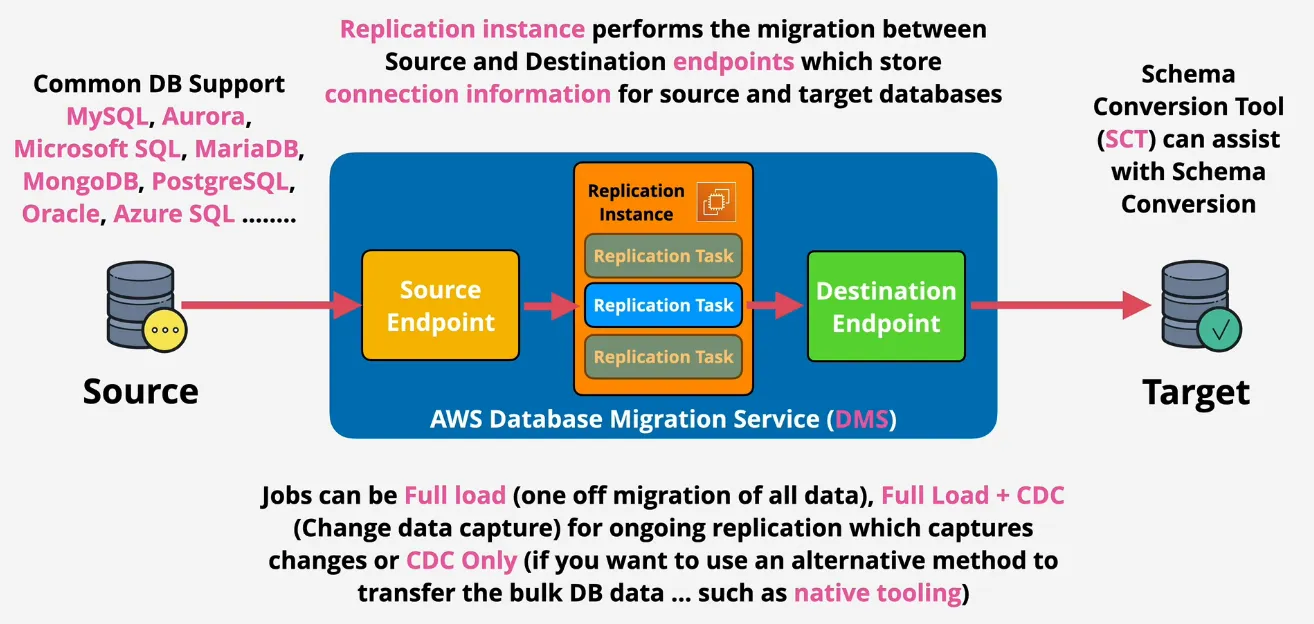
- full load (one-off migration of all data) => outage
- full + CDC does a full load, but also captures incoming changes, and applied to target
- CDC Only (if you want to use an alternative method to transfer db data)
- great to use for moving on-site to AWS datbases
- no downtime migration => DMS
- SCT (Schema Conversion Tool)
- standalone application
- used when converting one database engine to another
- or db => S3
- not used when migrating between db's of the same type
- for example on-premise MySQL => RDS MySQL => engines are the same, so don't use it
- do use on-premise MSSQL => RDS MySQL
- do use on-premise Oracle => Aurora
- works with
- OLTP db types (MySQL, MSSQL, Oracle)
- OLAP (Teradata, Oracle, Vertica, Greenplum)
- DMS & Snowball
- large migrations might be multi-TB in size
- moving data over networks takes a lot of time and capacity
- DMS can utilise snowball
- use SCT to extract locally and move to a snowball device
- ship the device back to AWS, they load it on S3 bucket
- DMS migrates from S3 in target store
- CDC can capture change, and via S# intermediary they are also written to target db
Non-Relational DB's
Dynamo DB
Architecture
- basics
- NoSQL Public DBaaS => access via public services
- key/value & document
- no self-managed servers or infrastructure
- manual / automatic provisioned performance IN/OUT or On-Demand
- highly-resilient (across multiple AZs), and optionally global
- really fast (backed by SSD)
- backups, recovery, and encryption at rest
- event-driven integration => do things when data changes
- backups
- on-demand => similar to manual RDS snapshots
- full copy of table retained until removed
- restore into same or cross-region
- restore with ot without index
- or adjust encryption
- PITR - Point-in-time Recovery
- not enabled by default
- continuous record of changes allows replay to any point in a window
- recovery window is 35
- restore with 1s granularity
- on-demand => similar to manual RDS snapshots
- table
- grouping of ITEMS with the same PRIMARY KEY
- unlimited amount of ITEMS
- capacity = speed
- on-demand => configured for you => price per access
- manual performance
- writes 1 WCU = 1KB/s
- reads 1 RCU = 4KB/s
- items
- primary key can be:
- simple (partition key - pk)
- composite (partition + sort key (sk))
- but MUST BE unique
- attributes can be anything => the values I guess of the table
- max size is 400KB
- primary key can be:
- billing based on RCU, WCU, Storage, and Features
Operations, Consistency and Performance
- on-demand => unknown, unpredictable, low admin
- ... price per million R or W units
- provisioned => RCU and WCU set per table
- ... every operation consumes at least 1 RCU/WCU (there's a way to get cheaper reads tho)
- every table has a RCU/WCU burst pool (300s)
- operations
- query operation
- accepts a single pk value
- or optional an additional sk or range
- capacity consumed is the size of all returned items
- filtering further => data gets discarded, but still billed
- scan operation
- moves through table item by item
- scans the entire table => so consumes capacity for every item it reads
- query operation
- consistency
- eventually consistent
- 50% of the price of 1 RCU (so twice as much reads)
- application still needs to be work when data is slightly out of sync
- user could be unlucky and read out-of-date data
- replication happens in a couple milliseconds
- strongly (immediate) consistent
- always users the leader node in an AZ
- price is regular for each RCU (no reduction here)
- eventually consistent
- WCU Calcuations
- 10 items/s and 2.5K average size per item (remember for the exam, sometimes they trick you into giving the data per minute)
- in this case => 3 WCU * 10 items/s = 30 WCU/s
- RCU Calcuations
- 10 items per second, average size is the same
- in this case => 2.5 KB /4 kB = 1 RCU * 10 items/s => 10 RCU
- but this is strongly consistent, meaning that eventual consistency will only consume 5 RCU
Local (LSI) and Global Secondary Indexes (GSI)
- indexes are alternative views on table data
- different sk (LSI), or different pk and sk (GSI)
- some or all attributes can be used for projection
- Local Secondary Indexes (LSI)
- must be created with a table
- 5 LSI's per base table
- alternative SK on the table
- share the RCU and WCU with the table
- attributes: ALL, KEYSONLY & INCLUDE
- visually
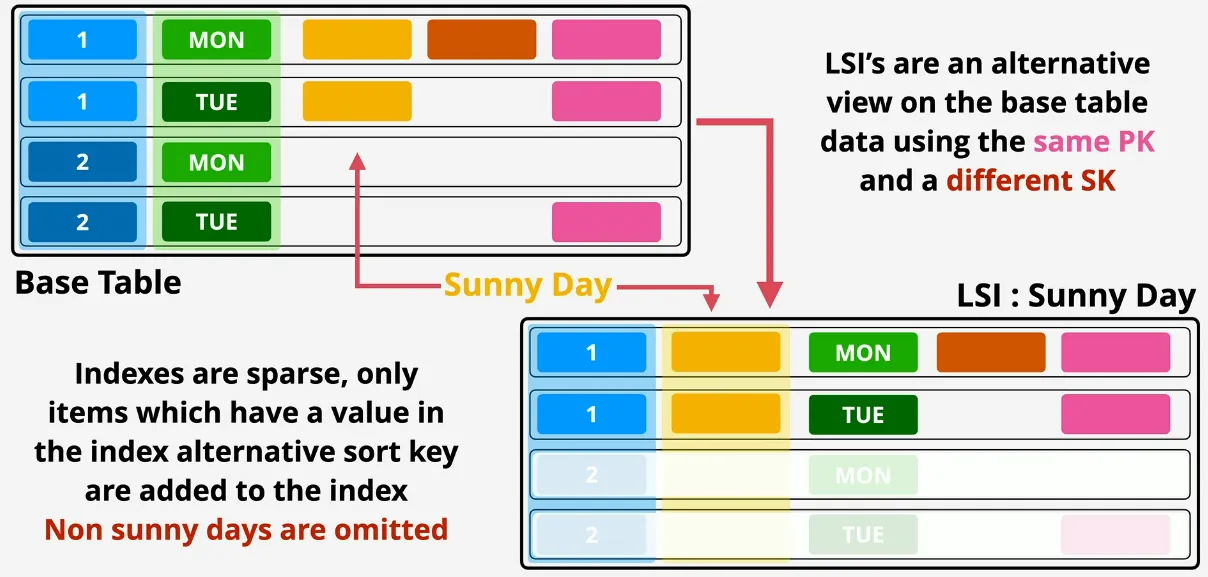
- Global Secondary Indexes (GSI)
- can be created at any time
- default limit of 20 per base table
- alternative pk and sk
- own RSU and WCU allocations
- attributes: ALL, KEYSONLY & INCLUDE
- always read eventually consistent way, replication between base and GSI is asynchronous
- visually
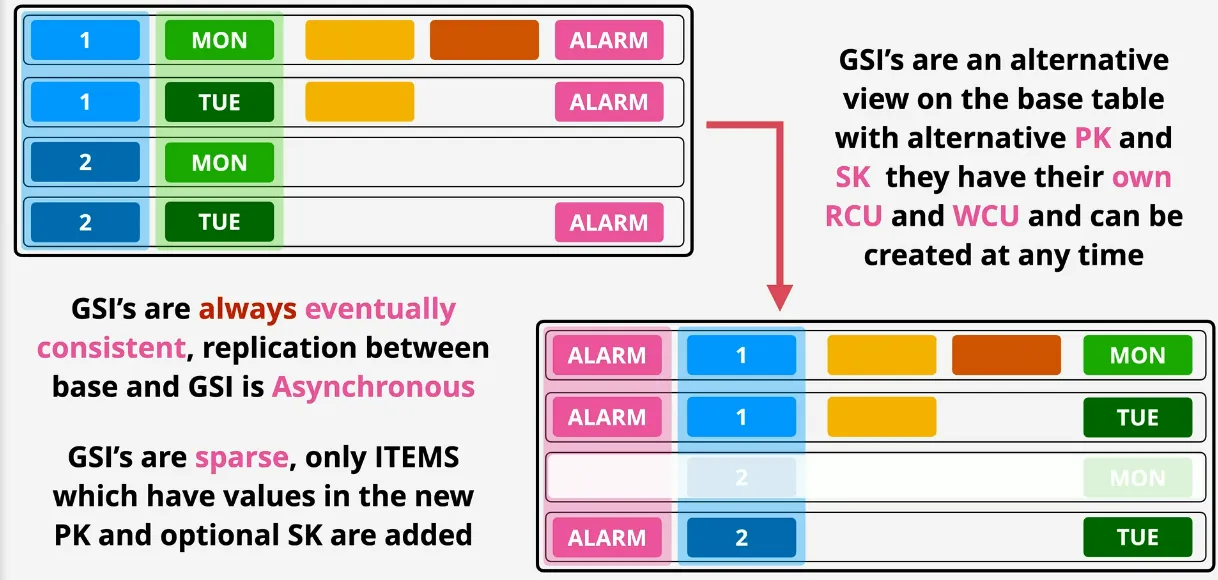
- careful with projections (KEYSONLY, INCLUDE, ALL)
- queries on non-projected attributes are expensive
- AWS recommends GSIs by defaukt, LSI only when strong consistency is needed
- indexes allow for alternative access patterns
Streams & Lambda Triggers
- time ordered list of item changes in a table
- 24h rolling window
- enabled on per table basis
- records INSERT, UPDATE and DELETE
- different view types influence what is in the stream
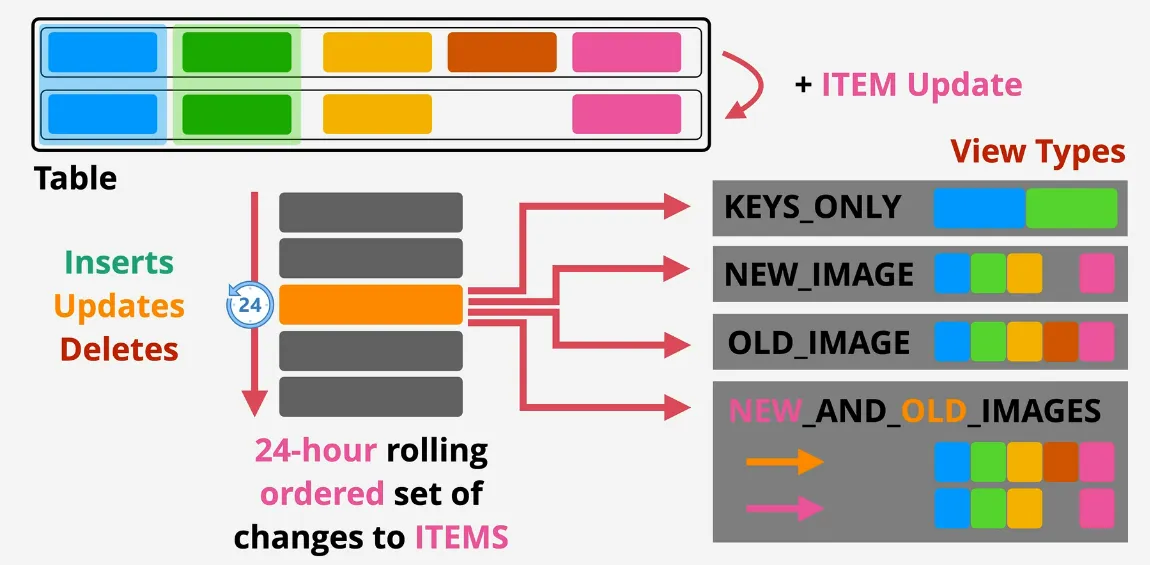
- database triggers
- event-driven architecture
- ITEM changes generate event
- event contains the data based on a view type
- action is token using that data
- AWS = streams + lambda
- powerful in reporting and analytics scenarios => maybe cool to generate reports based on changes in the db
- aggregation, messaging, or notifications => cool be to indicate which numbers were currently added to the UI
Global Tables
- provide multi-master cross-region replication
- tables are created in multipl regions and added to the same global table
- tables become table replicas of a global table
- last writer wins (conflict resolution)
- read and writes can occur in any region
- generally sub-second replication between regions
- only possible to have strong consistent reads WHEN it happens in the same region as the write, rest is eventually consistent
- globally highly available application
- global DR/BC
- global performance
DynamoDB Accelerator (DAX)
- architecture
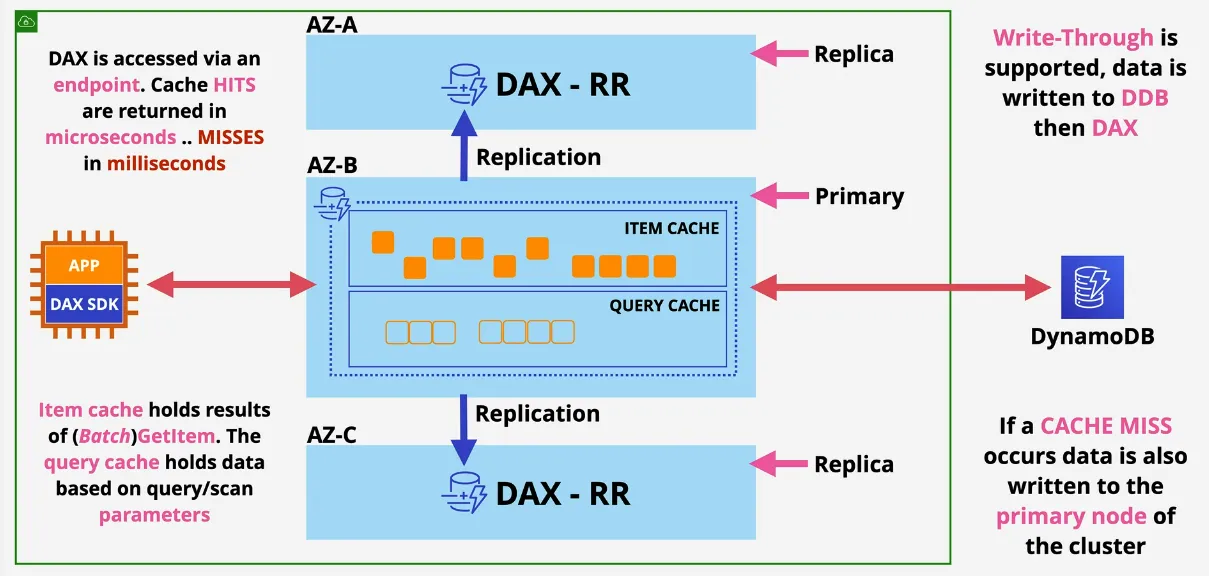
- holds 2 different cache
- item cache: holds results of Batch(GetItem) via pk or pk+sk
- query cache: holds data based on query/scan parameters, so it also storage the query itself
- every DAX cluster has an endpoint used to load balance across the cluster
- cache hit => microseconds
- cache miss => milliseconds
- considerations
- primary node (writes), and replicas (read)
- HA => primary failure => replica node becomes primary
- in-memory cache => scales => much faster reads, reduced costs
- scale UP and scale OUT (Bigger or More)
- supports write-through (writes data to DynamoDB + commit it to the cache)
- DAX is deployed inside a VPC, NOT A PUBLIC SERVICE LIKE DYNAMODB
TTL
- timestamp for automatic deletion of ITEMS
- when enabled
- pick an attribute that's selected for TTL
- attribute should contain a timestamp in the future from EPOCH
- first process can scan the table periodically, comparing the current time to the TTL one, and potentially expire the item => item no longer valid
- second process, can scan for any expired items and delete the actual items, delete might be added to the stream, if streamer are enabled
- can be configured to have a stream of TTL deletions, in order to keep track of which were deleted
- usefull when data becomes irrelevant after a certain amount of time
Amazon Athena
- serverless interactive querying service
- ad-hoc queries on data in S3 => pay only for data consumed (and storage of S3)
- no base monthly cost, no per minute or hourly cost
- schema-on-read => table like translation
- original data is never changed => remains in S3
- schema translates data => relational-like when read
- output can be sent to other services
- supports XML, JSON, CSV/TSV, AVRO, PARQUET, ORC, Apache, CloudTrail, VPC Flowlogs
- tables are defined in advance in a data catalog, and data is projected through when read => allows SQL-like queries on data without transforming source data
- no database infrastructure
- no loading data in advance
- scans the whole data when using the queries most likely, so definetely there's some data usage to be mindful of if the dataset is like 85GB => not free
- when?
- queries where loading/transformation isn't desired
- occasional/ad-hox queries on data in S3
- serverless querying scenarios -> cost conscious
- querying AWS logs => VPC Flow Logs, CloudTrails, ELB Logs, cost reports, etc
- AWS Glue Data Catalog & Web Server Logs
- using Athena Federated Query => other data sources can be used (non-S3)
- example
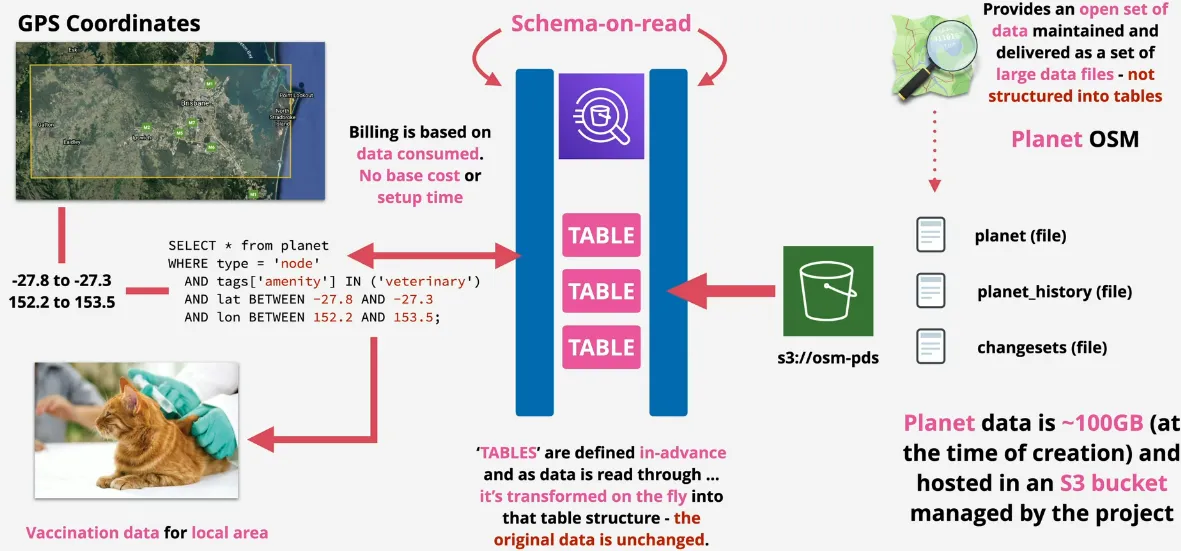
ElastiCache
- in-memory database => high performance
- managed Redis or Memcached as a Service
- used to cache data for READ HEAVY workloads with low latency requirements
- reduces database workloads => relative expensive when there's heavy reads => cost-effective in these cases and high performance
- used to store session data => stateless services
- requires application code changes => needs to check for the cache => if a miss, get the data from server (different from DAX)
- MemcacheD vs Redis
| MemcacheD | Redis | |
| data structures | simple | advanced |
| replication | none | multi-az |
| backups & restore | none | yes |
| multiple nodes (sharding) | scale reads (replication) | |
| multi-threaded | transactions (consistency) |
Redshift
- petabyte-scale data warehouse
- data warehouse is a place where many operational databases of your organization pump data into for long-term analysis and trending
- designed for reporting and analytics => not operational style usage
- Redshift is an OLAP database (Online Analytical Processing) is column based, not OLTP (Online Transaction Processing) is row/transaction based such as RDS
- pay as you use, similar structure to RDS
- direct querying S3 using Redshift Spectrum
- direct query other DBs using federated query
- integrates with AWS tooling such as Quicksight
- SQL-like interface JSBC/ODBC connections
- architecture
- server based (not serverless) => VPC based
- means VPC Security, IAM Permissions, KMS at rest Encryption, CW Monitoring
- not ad-hoc like Athena
- cluster architecture in a private network => runs in 1 AZ in VPC (due to cost and performance)
- Leader Node: query input, planning and aggregation
- data is replicated to 1 additional node to create redundancy for hardware failure
- Compute Node: performs queries of data
- Enhanced VPC Routing
- by default uses public traffic when communicating with S3
- with enhanced => uses VPC Networking => you need to manage way more though
- server based (not serverless) => VPC based
- visually
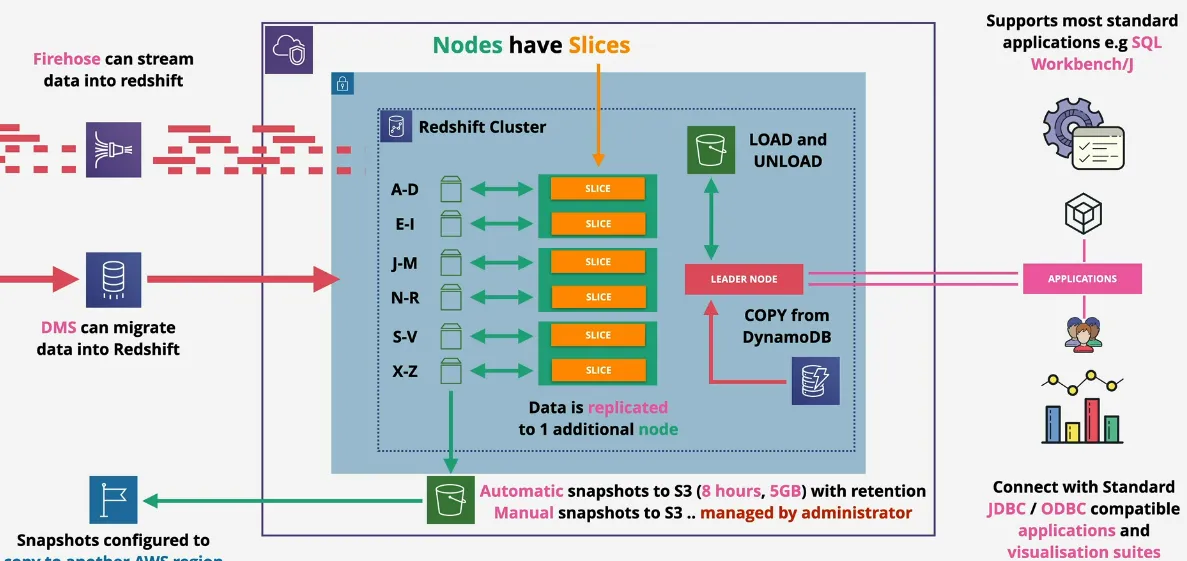
- backups
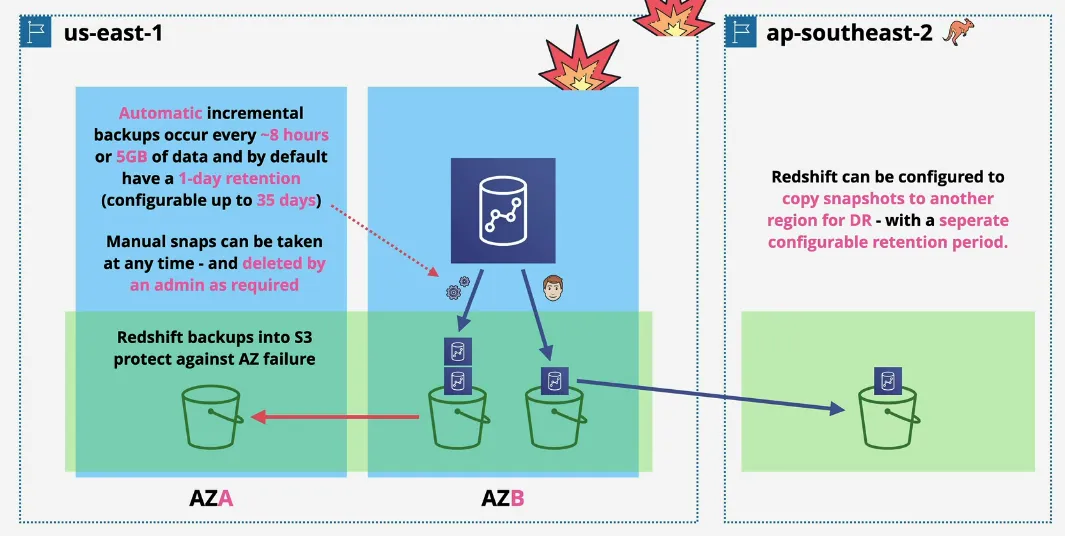
- automatic snapshots to S3 every 8 hours, or 5GB of data with a certain retention period
- manual snapshots to S3 managed by the admin => possible to copy to another region
EFS - Elastic File Storage
Architecture
- implementation of NFSv4
- can be mounted in Linux
- POSIX file permissions
- shared between many EC2 Instances
- just like, EBS, is separate from the EC2 instance, but instead of a block storage is a file storage
- private service
- accessed via mount targets
- which live inside VPCs
- or on-premise networks with VPN or DX
- multiple mount targets in multiple AZs, create resilience
- 2 performance modes
- general purpose (99.9% of use-cases)
- Max I/O (useful for highly parallel workloads, as it has increased latency, such a big data, large media)
- 2 throughput modes
- burst, works like gp2 volumes in EBS, but throughput scales with size of the volume
- provisioned, specify throughput requirements separately from the storage
- 2 storage classes (similar to S3)
- standard
- infrequent access
- have lifecycle policies to be used with classes
AWS Backup
- fully-managed data-protection (backup/restore) service
- consolidate storage management into one place, across account & across regions
- supports a wide range of AWS products
- Compute: EC2, VMWare
- Block Storage: EBS
- File Storage: EFS, FSx
- Databasese: Aurora, RDS, Neptune, DynamoDB, DocumentDB
- Object Storage: S3
- backup plans => frequency, window, lifecycle, vault, region copy
- backup resource => what resources are backed up
- vaults => backup destination (container) => assign KMS keys for encryption
- vault lock => write once, read many, 72h cool off period, then even AWS can't delete, can't be bypassed
- on-demand
- PITR (Point in time Recovery)
ELB - Elastic Load Balancers
Evolution
- 3 types, split between v1 (avoid) and v2 (prefer)
- classic load balancer (CLB) => v1
- no real L7, doesn't understand HTTP, lacks features, more expensive, 1 SSL per CLB
- don't use this
- application load balancer (ALB) => v2
- understands L7 (HTTPS,WebSocket)
- network load balancer (NLB) => v2
- understands TCP, TLS, UDP (not HTTPS)
- email servers, game servers, ssh
- v2's are faster, cheaper, support target groups and rules
Architecture
- configured to run in 2AZ's, or more
- 1+ nodes are places into a subnet in each AZ and scale with load
- each ELB is configured with an A record DNS name, this resolves to the
different ELB nodes
- request are distributed evenly across nodes
- if ELB is configured to be public, ALL NODES will get public and private ip addresses
- if ELB is public, it can communicate with PRIVATE and PUBLIC instances in the same AZ
- each node is configured with listeners, which accept traffic on a port and protocol, and communicate with targets on port and protocol
- needs at least 8 free ips, and a /27 or larger subnet to allow for scale
- AWS actually recommends at minimum /28, but recommends /27, because in /28 you will only have 3 ips available for your actual instances
- /28 gives you 16 ips, 5 of which are used by AWS already, default gateway, and what not => then ELB's require 8+ free ip, which means you are left with only 3 ips for your instances, which means you can have 3 devices => not cool
- load balancers allow each tier to scale independently, for example the web tier, might bombard a microservice to use a certain service, and this app tier can then scale infinitely, while the web tier only communicates with the load balancer and is thus web tier doesn't even know it autoscaled
- cross-zone LB
- by default, at least 1 node per AZ
- initially, LB's could only distribute connections between node within the same AZ, which means if one AZ has more instances, they would be underused, vs the 1 instance in the second AZ
- cross-zone LB distribute the load under all instances, of all AZ's
- originally not enabled by default
ALB (Application LB) vs NLB (Network LB)
- application (ALB)
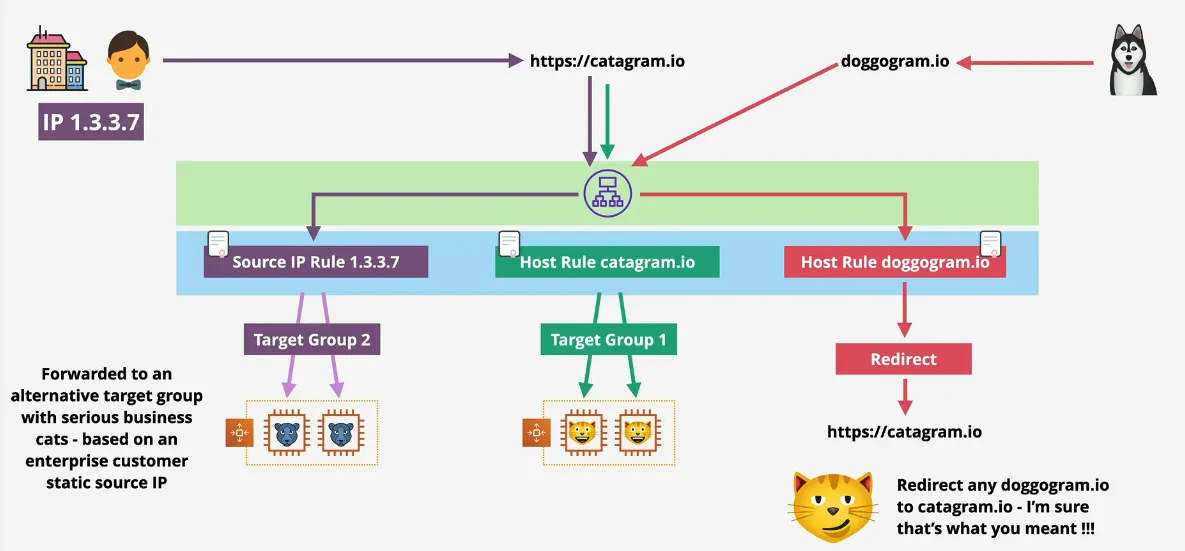
- true layer 7 LB (listens on HTTP and/or HTTPS), and make decisions based on
the information available at HTTP level
- content-type
- cookies
- custom headers
- user location
- evaluate health checks at layer 7
- can't understand other layer 7 protocols, like SMTP, SSH, Gaming
- no TCP/UDP/TLS listeners
- HTTPS (SSL/TLS) connection is terminate at the ALB, and restarted towards the app, so there's no unbroken SSL (might be important for security teams)
- must have SSL certs, if HTTPS is used
- are slower than NLB (more levels of the network stack to process)
- rules
- direct connections which arrive at a listener
- are processed in priority order
- default rule = catchall
- check conditions: host-headers, http-headers, http-request-method, path-pattern, query-string, source ip, ...
- perform actions: forward, redirect, fixed-response, authenticate-oidc & authenticate-cognito
- true layer 7 LB (listens on HTTP and/or HTTPS), and make decisions based on
the information available at HTTP level
- networking (NLB)
- layer 4: tcp, tls, udp, tcpudp
- no understand of http(s)
- no header, no cookies, no session stickiness
- really really fast (millions of rps, 25% of ALB latency)
- SMTP, SSH, Game Servers, financial apps (not http/s)
- healthcheck can only check ICMP / TCP handshake => not app aware
- NLB's can have static IP's, useful for whitelisting
- can forward TCP to instances, unbroken encryption, any layer build on of TCP can be sent unbroken
- used with private link to provide services to other VPCs (exam)
Launch Configurations and Launch Templates
- allow config of EC2 instance be defined in advanced
- AMI, Instance Types, Storage and Key Pair
- networking and Security groups
- userdata an IAM Role
- both are not editable, LT has version
- LT provides newer features
- newer instances
- placement groups
- capacity reservations
- elastic graphics
- recommended by AWS, since they are are superset of LC
- LC provide config of the EC2 instances in an auto-scaling group
- LT can do the same, but can also be used to launch EC2 instances from the console, or CLI
Auto Scaling Groups
- auto scaling and self-healing for EC2
- uses Launch Templates or Configurations
- minimum, desired and max size (1:2:4)
- keeps the running instances at the desired capacity, by provisioning or terminating instance => desired capacity needs to be bigger than min
- the desired value manually control the instances, or
- scaling policies automate based on metrics
- are essentially rules
- manual scaling => adjust desired capacity
- scheduled scaling => time based adjustment, eg sales
- dynamic scaling
- simple, rules based on metric (if cpu = x, add 1, else -1)
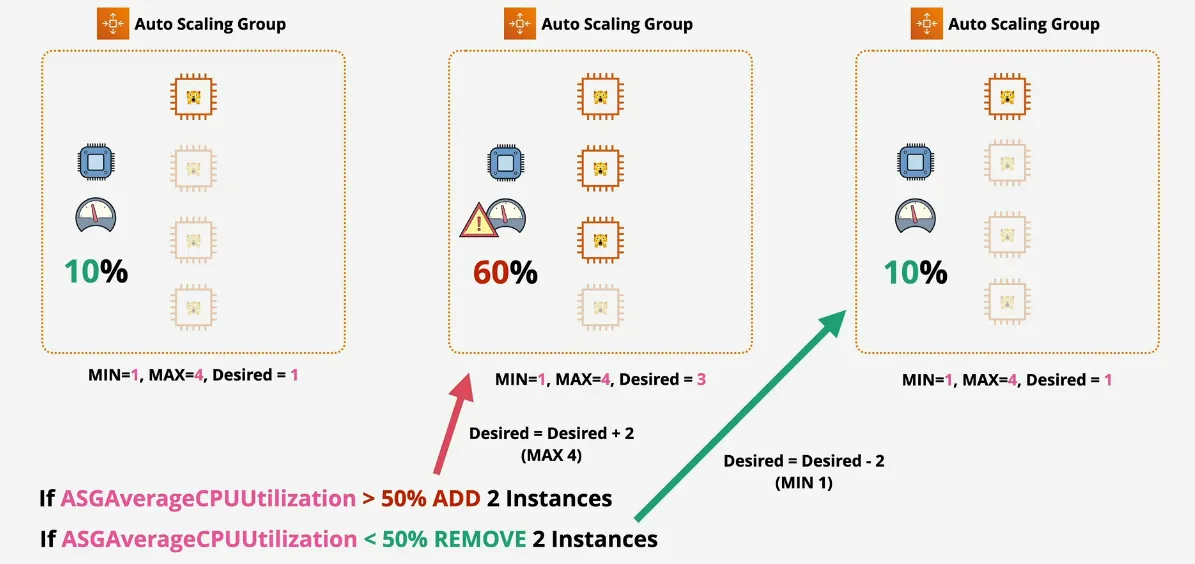
- stepped, bigger +- based on difference (preferred)
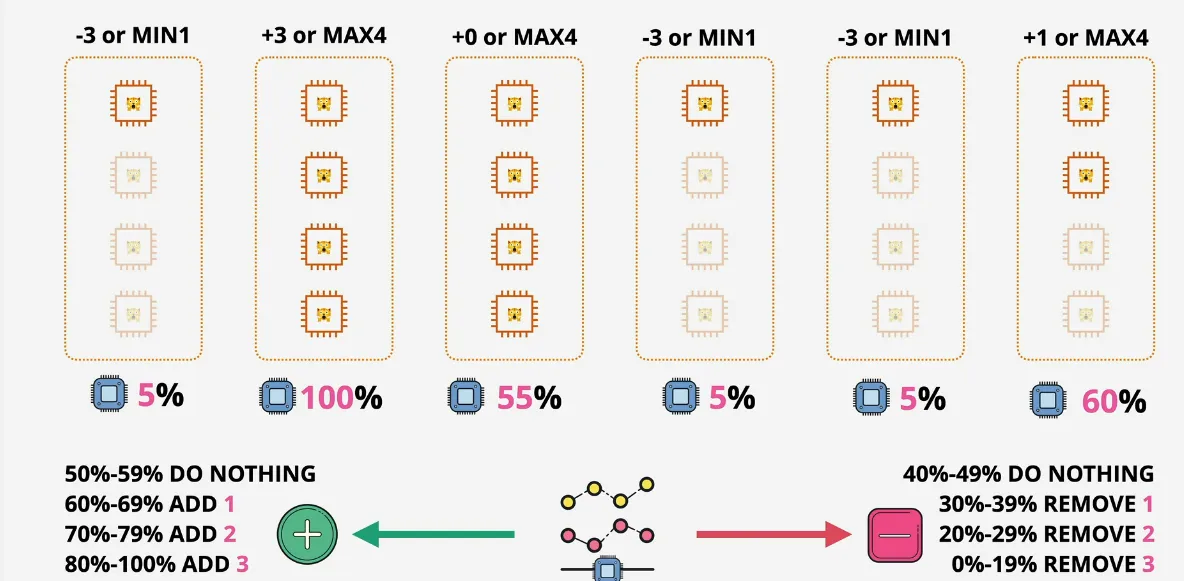
- target tracking, desired aggregate CPU = 40%, ASG handle it
- based on SQS Queue => ApproximateNumberOfMessagesVisible
- simple, rules based on metric (if cpu = x, add 1, else -1)
- cooldown periods
- value in seconds
- wait x seconds after an action, before the ASG takes another action
- because constantly adding or removing instances are billed already during provisioning
- self-healing
- monitor the health of the instance, via health checks
- if failed, terminates the instance, and create it again
- ASG + Load Balancers
- ASG can use LB health checks => makes it application aware
- AGS instances are automatically added to or removed from the target group
- scaling processes
- launch/terminate set to suspend => no ASG action is used
- AddToLoadBalancer => adds LB on launch
- AlarmNotication => accept notifications from CW
- AZRebalance => balances instances evenly across all of the AZs
- HealthCheck => instance health checks on/off
- ReplaceUnhealthy => terminate unhealthy and replace
- ScheduledActions => scheduled on/off
- Stanby => use this for instances InService vs Standby
- useful when performing maintenance
- autoscaling are free
- only cost is the resources
- use cooldown to avoid rapid scaling
- use more smaller resources
- use ALB's to abstract away the ASG
- ASG define WHEN and WHERE, Launch Templates define WHAT
Lifecycle Hooks
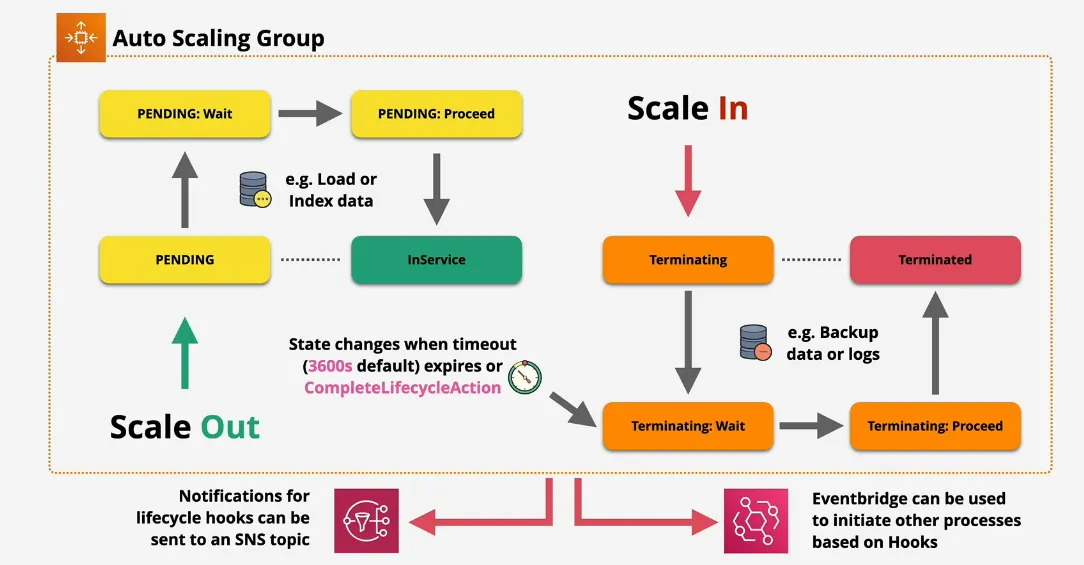
- custom action on instances, during ASG actions
- instance launch or instance terminate transitions
- instance are paused within the flow, they WAIT
- until a timeout (then continue or abandon)
- or you resume the ASG process with
CompleteLifecycleAction
- can be integrated with EventBridge or SNS Notifications
HealthChecks
- EC2 (default), ELB (can be enabled), and Custom
- EC2
- stopping, stopped, terminated, shutting or impaired (no 2/2 check) is considered unhealthy
- ELB
- instance running
- and passing ELB health check
- can be application aware (ALB ( Layer 7))
- Custom
- instances marked as (un)healthy by an external period
- health check grace period (default 300s)
- delay before starting checks
- allow system launch, bootstapping, and application start
SSL Offload & Session Stickiness
SSL Offload
- 3 ways to secure connections: bridging, pass-through, offload
- bridging (default)
- 1 client, make 1 or more connection to ELB
- ELB is configured with the listener to use HTTPS => connection is terminated on the ELB & needs a certificate for the domain name
- ELB initiates a new SSL connection to the backend, instances need SSL certs (the same certificate) and compute required for cryptographic operations
- negatives
- certificate also is exposed on ELB
- admin overhead, cause EC2 also need access to the cert
- perf issues with high volume requests on EC2 instances
- pass-through (NLB)
- each instance still need SSL cert installed
- no certificate exposure to AWS
- all is self-managed and secure
- listener is configured via TCP, no encryption/decryption, only passing to the EC2 instance
- can use CloudHSM for even more security
- offload
- just like bridging
- ELB is configured to use HTTPS
- connections are terminates
- but backend connection are not re-encrypted (send via HTTP)
- meaning EC2 don't need compute to decrypt
- nor need an SSL cert
- just like bridging
Connection Stickiness
- problem
- connections are distributed across all in-service backend instances
- application needs to handle logged in user state => stateless backend => using Redis for example
- however, what if you don't have this, or don't want it?
- solution
- sticky connection create a cookie which locks the device to a single backend instance for a certain duration (1s => 7days)
- upon expiration => creates a new cookie
- if the service fails => creates a new cookie
- creates an uneven load though
- where possible, applications should host session state externally => load balancing can happen automatically, without this connection stickiness hack
Gateway Load Balancers (GWLB)
- let's say we have an that is publicly available
- no ingress / egress security scans
- we can add security by scanning the data after it leaves and before it enters the instance
- this type of architecture doesn't scale, because for every instance, you need another security layer in front of it
- what is GWLB?
- helps run and scale 3rd part appliances
- things like firewalls, intrusion detection, and prevention systems
- inbound/outbound traffic (transparent inspection and protection)
- two major components
- GWLB endpoints => traffic enters/leaves via these endpoints
- GWLB balancer => balances across multiple backend appliances
- traffic and metadata is tunneled using GENEVE protocol, packets are send through this tunnel to this 3rd party vendor
- helps run and scale 3rd part appliances
- why?
- network security at scale!!
- how it works?
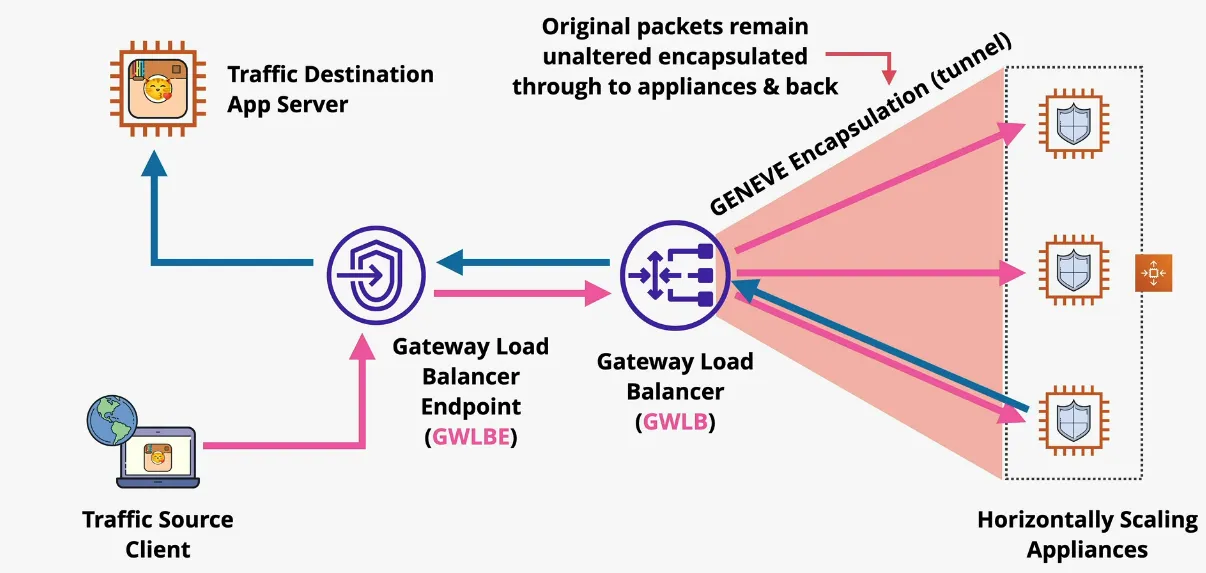
AWS Lambda
Event-Driven Architecture
- monolithic architecture
- fails together
- scales together
- billed together
- tiered architecture
- tightly coupled
- in YouTube, "Uploading" expects and requires at least one instance of "Processing" to respond
- each tier has to be running something in order to answer
- but can be internally load balanced
- and thus can scale independently
- is highly available (HA)
- tightly coupled
- evolving with queues
- usually fifo
- for example YouTube
- uploading saves a video to an S3 bucket
- then the upload service puts a message in the queue with the status, and where to find the video in the s3 bucket
- auto-scaling group, based on queue length, starts processing the the message (worker fleet architecture)
- finds the video in s3 bucket, and processing service transcodes the video
- microservice architecture
- upload (producer), process (consumer), and store/manage (both) microservices
- event-driven architecture
- event producer
- event consumer
- component can be both
- event router
- event producers generate events when something happens
- such as clicks, errors, criteria met, uploads, actions
- are delivered to consumer
- using an event router in order to not flood the services
- actions are taken & system returns to waiting
- mature event-drive architecture only consumes resources while handling events (serverless)
- no constant running or waiting for things
Architecture
- Function-as-a-Service (FaaS) => short running & focused
- Lambda function => piece of code lambda runs
- functions use a runtime (eg Python 3.8)
- loaded and run in a runtime environment
- environment has a direct memory (indirect CPU) allocation
- billed for the duration that the function runs
- key part of serverless architecture
- lambda runtime environments are stateless, assume everytime a lamda function is invoked it's a new environment
- has some disk space allocation
- by default 512 MB available as /tmp
- up to 10240 MB
- assume this is blank at boot
- max 900s (15min) function timeout
- common uses
- serverless applications (S3, API Gateway, Lambda)
- file processing (S3, S3 Events, Lambda)
- database triggers (DynamoDB, Streams, Lambda)
- serverless CRON (EventBridge/CWEvents + Lambda)
- realtime stream data processing (Kinesis + Lambda)
- logging
- uses CloudWatch, CloudWatch Logs & X-Ray
- X-Ray is used for distributed tracing
- CloudWatch requires permissions via the Execution Role
Networking
- public
- by default, given public networking
- access to public AWS services and internet
- best performance, because of there's no customer specific VPC required
- no access to VPC based services, unless public IPs are provided and security controls allow external access
- VPC
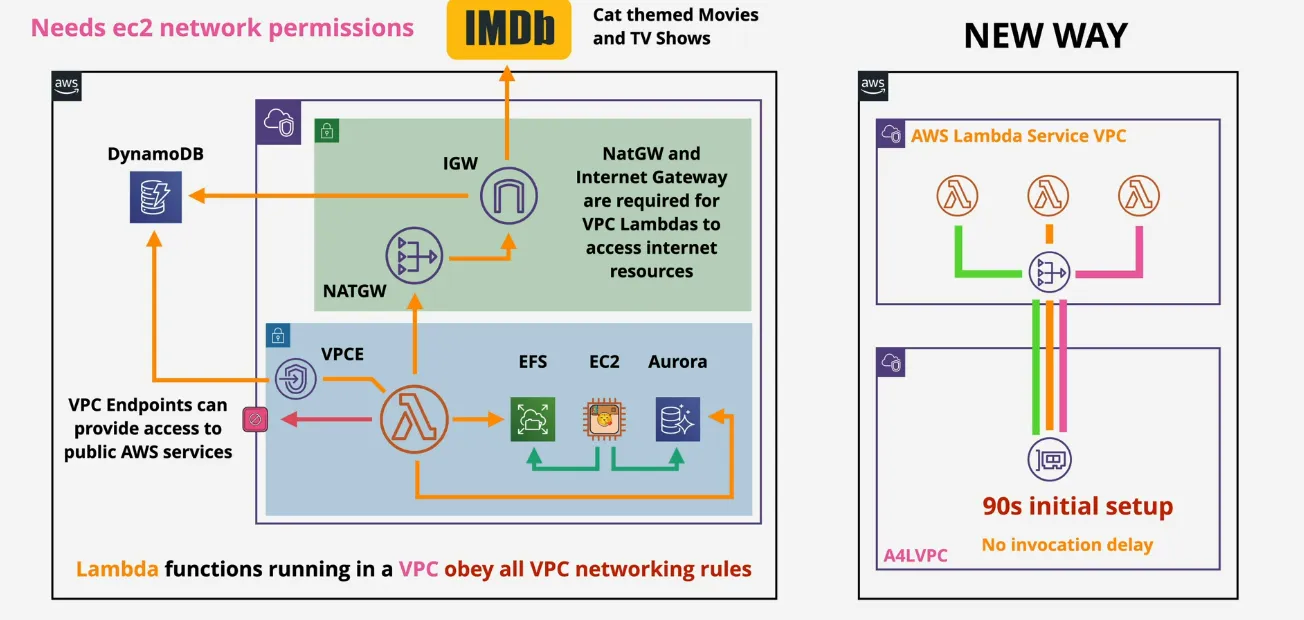
- obey all VPC networking rules
- by default, have access to any of the services inside the VPC
- by default, no access to public facing services
- can use a VPC Endpoint to access public services, just like any VPC
- or use a NATGW + Internet Gateway, into a public subnet to access public services and internet
- needs ec2 networking permissions
- Lambda functions, work similar from a networking perspective as Fargate
- historically Lambda would inject ENI's into the private VPC, in order to communicate with the private network, WHEN INVOKED (huge penalty in performance) and parallel computing didn't scale, as each function needed it's own ENI injected in the VPC
- now, there's only 1 ENI used per unique combination of subnets and security groups, so if your lambda functions run in the same subnet, and have the same security group, there will be only 1 ENI injected into the VPC
- these interfaces are created when you configure the function (around 90s), but they are NOT configured per invocation (no delay)
Security
- the environment is configured with an execution role, the role is assumed by lambda, and the code receives all permissions of the role, similar to EC2 instance role
- also possible to attach resource policies, which controls what service and account can invoke the functions => gives access to potential external accounts to invoke a lambda
Logging
Invocation
- synchronous invocation
- results (success or failure) is returned during the request
- errors need to be handled on the client
- CLI/API directly invoking a lambda function
- waits for a response
- client communicates via API Gateway => proxied to lambda function
- response back through the api gateway
- asynchronous invocation
- typically used when AWS services invoke lambda functions
- S3 Event sends event, and S3 doesn't wait for the event to respond
- if processing of the event fails, lambda will retry 0 up to 2 times =>
lambda handles the retry
- these failed events can be sent to DLQ (Dead Letter Queue) after repeated failed processing
- function needs to be idempotent
- reprocessing a result, should have the same end state
- setting a value VS incrementing for example
- new feature is Destinations, where a successful or failed events can be sent (SQS, SNS, Lambda and EventBridge)
- event source mappings
- typically used on streams or queues which don't support event generation to invoke lamda (Kinesis, DynamoDB streams, SQS)
- usually requires some sort of polling
- the Event Source Mapping uses the permissions from the lambda execution role to interact with the event source, so you will need to set the perms needed of the event source mapping's reader onto the lambda function's execution role
- SQS Queues or SNS Topics can be used for any discarded failed event batches (DLQ Failed Events)
Versions
- a version describes
- code
- configuration of the lambda
- is immutable
- never changes
- has it's own ARN (Amazon Resource Name)
- once published, never changes
- $Latest points at latest version
- Aliases (dev, stage, prod) point at a version => can be changed
Performance
- start-up times
- cold start
- environment is created (hardware)
- then runtime is installed (software packages)
- about to start function code
- can take around 100ms
- warm start
- execution context is re-used
- takes around 1-2ms
- invocations can re-use execution context, but should be programmed in a way that it doesn't so it can't rely on it
- future invocations
- aws creates the contexts and will keep these warm and ready to use to improve start speeds
- use `/tmp` space by keeping images around for future invocations => careful though, but functions need to be able to cope if they are not there
- anything outside the lambda function handler can be re-used in future invocations, such as db connections
- cold start
Serverless
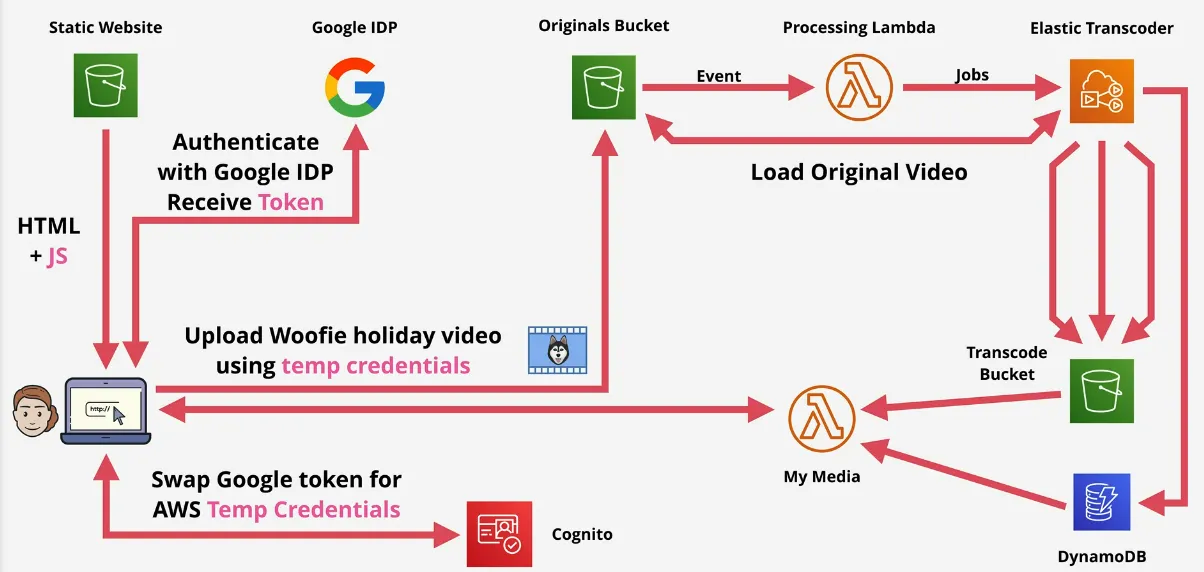
- it isn't one single thing
- manage few, if any servers => low overhead
- takes the good bits from micro-service and event-driven architecture
- applications are a collection of small & specialized functions
- FaaS wherever compute is needed
- runs in stateless and ephemeral environments
- event-driven => consumption only when being used (duration billing)
- use managed services where possible: s3, DynamoDB, third-party identity providers, elastic transcoding on AWS, ...
SNS - Simple Notification Service
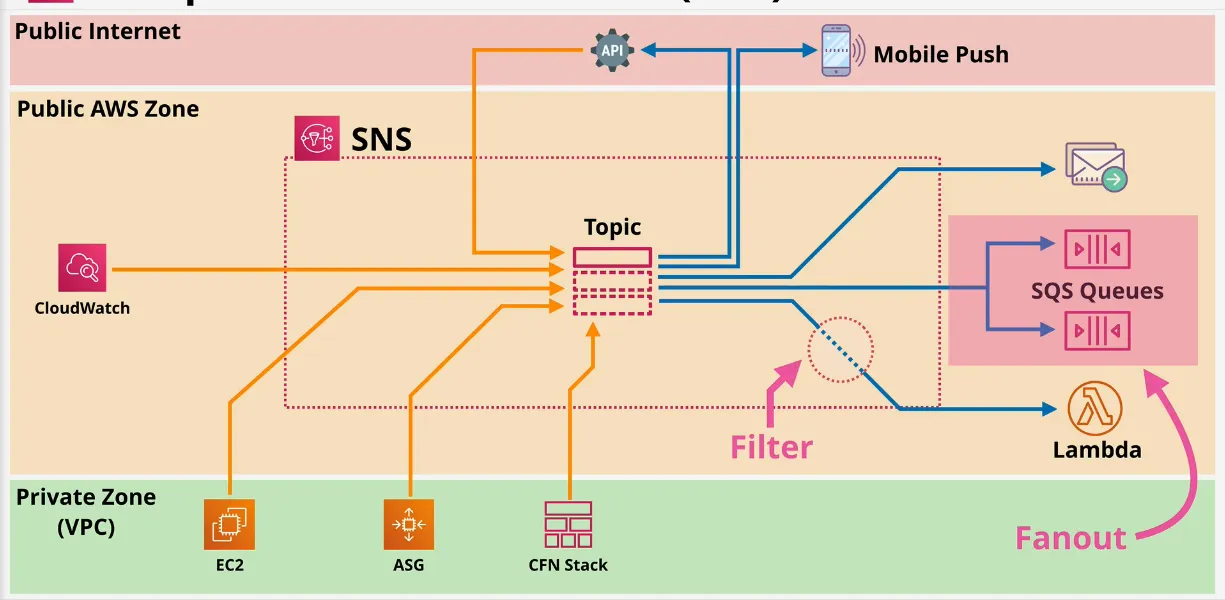
- key component of many aws architectures
- high-available, durable, secure pub-sub service
- public AWS Service => network connectivity with Public Endpoint
- still needs the correct permissions in order to access it tho
- coordinates sending/delivery messages (<= 256KB payloads) => no large files
- SNS Topics (base entity) => sets permissions and configuration
- Publisher sends messages to a TOPIC
- Topic have subscribers, which receive message
- eg: HTTP(S), Email, JSON, SQS, Mobile Push, SMS Messages & Lambda
- used across AWS services
- CloudWatch uses it when alarms change set
- CloudFormation uses it when stacks change state
- what functionality?
- delivery status (including HTTP, Lambda, SQS)
- delivery retries => reliable delivery
- HA and scaleable in a region
- region resilient
- server side encryption
- cross-account via Topic Policy (similar to Resource Policy)
AWS Step Functions
- problems with Lambda
- is FaaS
- 15min max execuction time
- can be chained together, but get messy at scale
- runtime environment are stateless
- solution: long-running Serverless Workflows
- state machine
- start => states => end
- states are things which occur
- standard workflow is default
- long running
- max duration is 1y
- express workflow
- highly transactional
- high volume event processing workflows such as iot, streaming data processing and transformation, mobile application backends, ...
- up to 5min
- started via API Gateway, IOT Rukes, EventBridge, Lambda, manually, ...
- usually used for backend processin
- Amazon States Language (ASL) - JSON Template
- IAM Role is used for permissions
- states
- succeed & fail (states end here)
- wait (waits for a certain period, or a specific date)
- choice (allows the machine to take a different path)
- parallel (performing multiple sets of actions at the same time)
- map (accepts a list of things, and for each item, performs an items)
- task (represents a unit of work performed by a state machine => integrated with lambda, batch, dynamodb, ecs, SNS, SQS, Glue, SageMaker, EMR, Step Function)
- => state machines don't do the work, they coordinate the work based on a flow
- step functions example
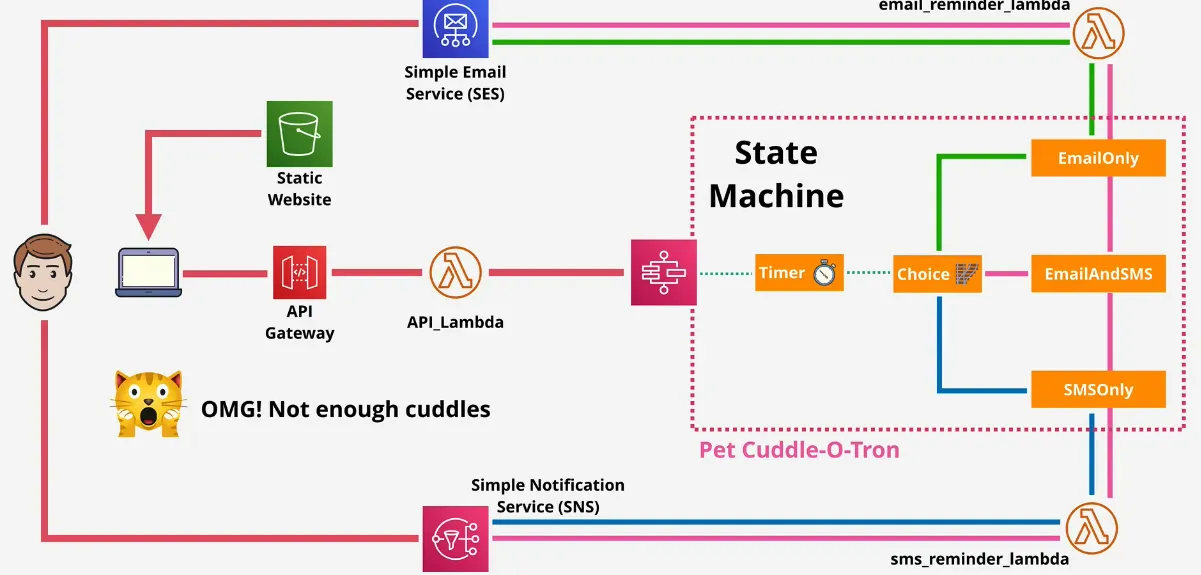
API Gateway
101
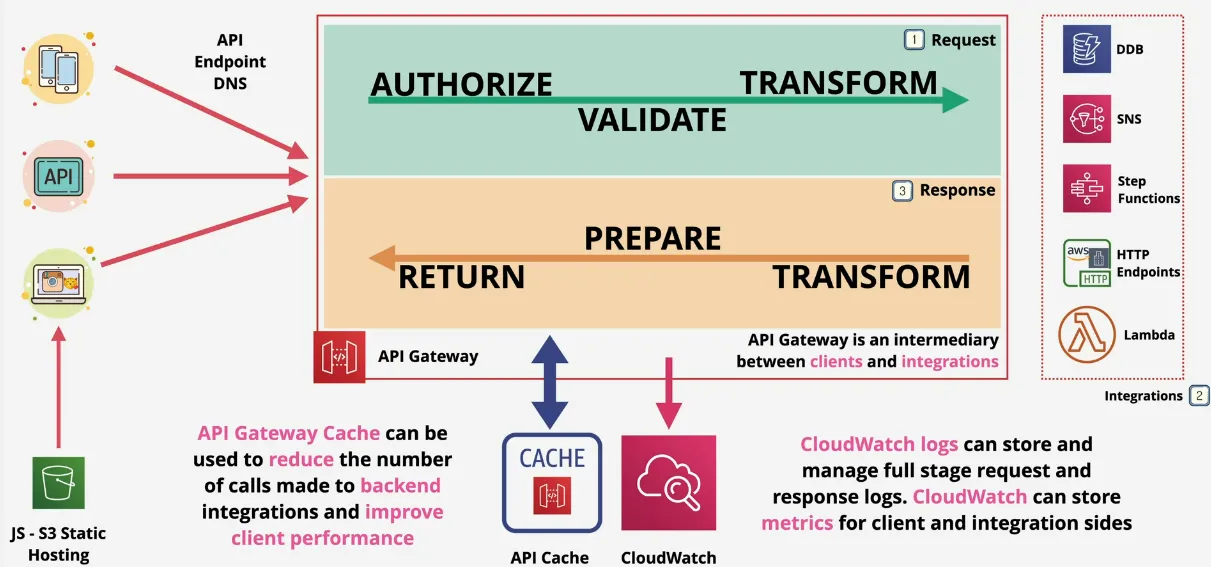
- create and manage APIs
- endpoint/entry-point for applications
- sits between applications & integrations (services)
- HA, scaleable, handles authorization, throttling, caching, CORS, transformations, OpenAPI spec, direction integration, and much more
- can connect to services/endpoints in AWS or on-premises
- HTTP APIs, REST APIs, and WebSocket APIs
- the cache can greatly reduce the number of calls made to backend integrations and improve client performance
In Detail
- authentication
- complete open access (no authentication)
- cognito user pools
- authenticate with cognito, and receive a token
- passes the token together with the request
- gateway verifies validity with the Cognito integration
- lambda token (previously Custom Token)
- call API with bearer token (ID)
- lambda authorizer called
- call to custom compute to check the id
- IAM Policy and principle identifier gets returned
- handles request via lambda integration or return 403 to the client
- endpoint types
- edge-optimized => routed to nearest CloudFront POP (Point of Presence)
- regional => clients in the same region (doesn't use CloudFront network)
- private => only accessible via VPC, via interface endpoint
- stages
- api's are deployed to stages, each stage has one deployments
- which each have their own urls
- stages can be enabled for canary deployments, if done, deployments are made
to the canary not the stage
- can be configured, so a certain percentage of traffic is sent to canary
- can be adjusted over time
- can be promoted to become the new base "stage"
- errors (these facts and figure, remember them for exam)
- 4XX = Client Error => invalid request on client side
- 5XX = Server Error => valid request, backend issue
- 400 = Bad Request => generic client side error
- 403 = Access Denied => Authorizer denies, WAF Filtered
- 429 = Exceeded Throttle => API Gateway can throttle requests
- 502 = Bad Gateway Exception => bad output returned by Lambda
- 503 (common on the exam) = Service Unavailable => backing endpoint offline => major service issue
- 504 = Integration Failure/Timeout => 29s limit
- caching
- configured per stage
- without a cache every request, is issued to the corresponding backend service, which might produce the same work over and over again
- with caching, calls are only made upon a cache miss
- reduced load & cost
- improved performance
- cache TTL default, 300s
- cache size 500MB => 237GB
- cache can be encrypted
SQS - Simple Queue Service
- public, fully managed, high-available queues
- standard, or FIFO
- up to 256KB in size => need to link to large data in S3
- received messages are hidden (VisibilityTimeout)
- then reappear (to retry), or are explicitly deleted
- if client fails to process the queue, then the message comes back
- dead-letter queue can be used for problem messages
- ASG can scale Lambdas invoke based on queue length
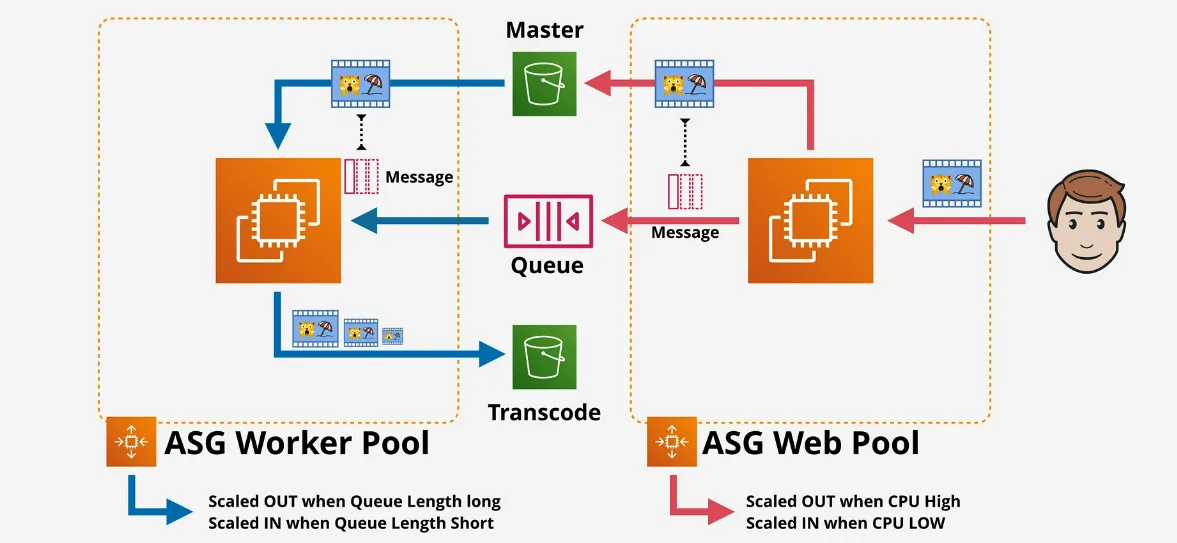
- possible to use SQS Fanout from SNS Topics (really import for exam)
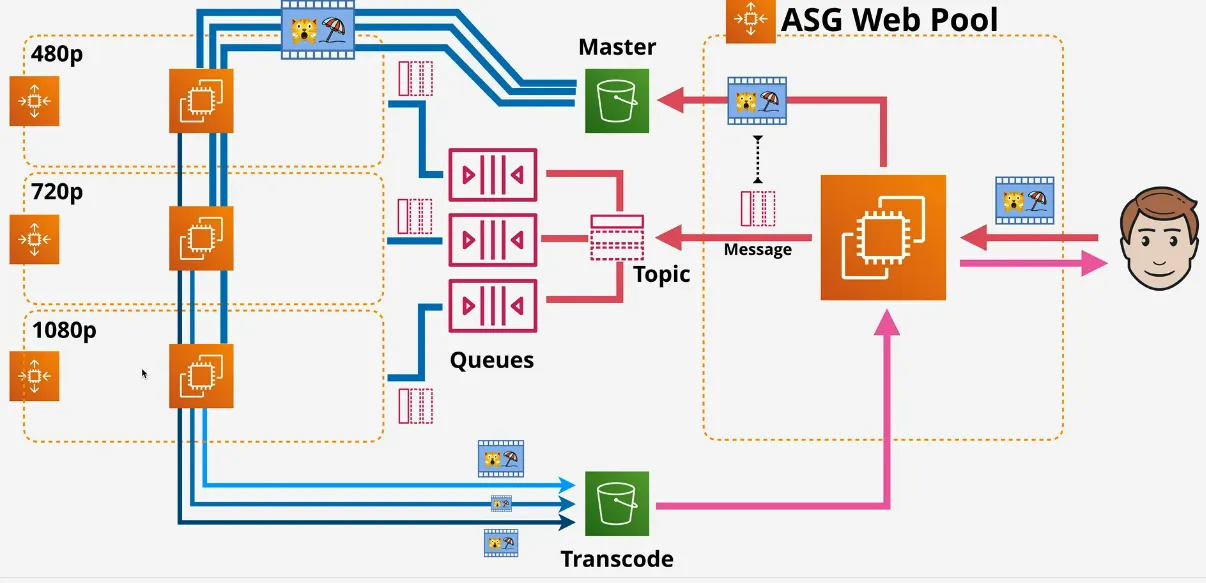
- queue types
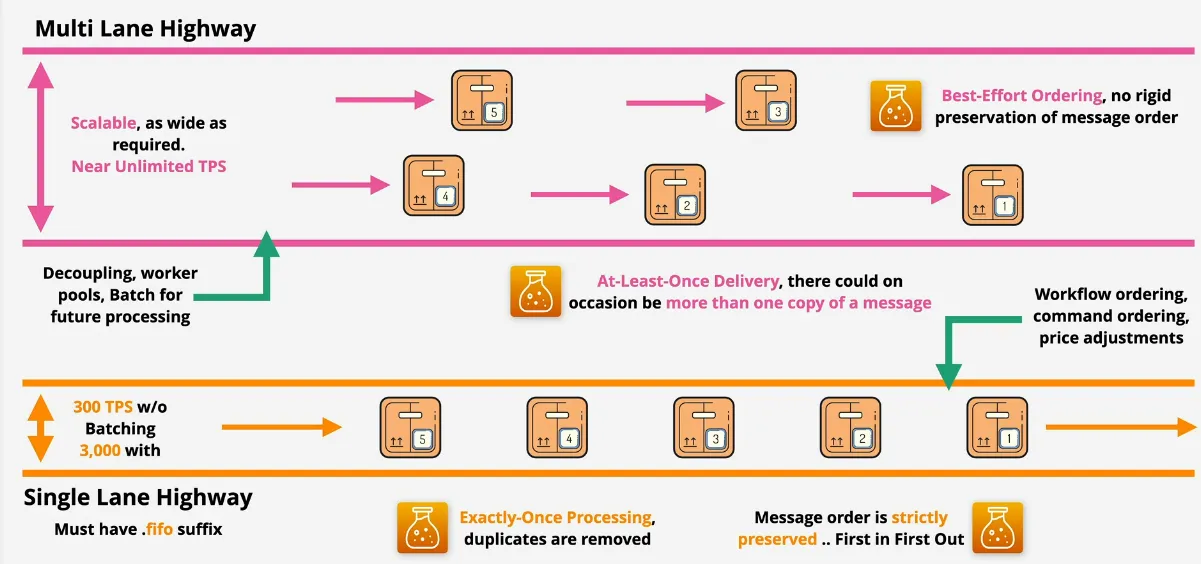
- standard queue
- tries to be a best effort FIFO queue, but messages can come out of order
- at-least-once
- scaleable
- near unlimited TPS
- when?
- decoupling
- worker pools
- batch for future processing
- FIFO queue
- guaranteed order
- exactly-once
- limited performance => 3000 messages/second with batching, or up to 300 messages/s without it
- when?
- workflow ordering
- command ordering
- price adjustments
- standard queue
- technical
- billed per request
- 1 request = 1-10 messages, up to 64KB total
- => the more you poll, the more expensive it gets
- short polling (immediate) VS long (waitTimeSeconds) polling
- preferably use long polling
- it waits until there's multiple messages, in one request
- with short polling, you are more likely to send a request for every message, which gets very expensive
- messages are encrypted at rest with KMS & in-transit (HTTPS)
- control access via identity policy, or queue policy
- queue policy is again, just like a resource policy, so it means it's the only way to give access to external account
- delay queues
- has DelaySeconds set
- conceptually are invisible in the queue for DelaySeconds
- any ReceiveMessage operation => No Messages
- max 15min, min 0
- message timers can be set per-message visibility (not possible in FIFO mode)
- when?
- performing actions before processing the queue
- delay the processing of an action of a customer
- NO USED FOR AUTOMATICALLY RETRYING PROBLEMATIC MESSAGES (VisibilityTimeout)
- dead-letter queues
- places a constantly failing message processing in a separate queue
- prevents the regular queue from flooding with the faulty messages
- redrive policy
- specifies the source queue, the dead-letter queue and the condition when the messages are moved from one to another
- specifies the maxReceiveCount
- for retention period, the enqueue timestamp is used, meaning if the message was retrying for 1 day in the normal queue, and the retention period of the dead-letter queue is 2 days, then the message will onyl stay there for one more day
- retention time should be longer than the normal queue retention time
- single dead-letter queue can be used for multiple source queues
Kinesis
Data Streams
- confused with SQS
- scaleable streaming service
- producers send data into a kinesis stream
- stream can scale from low to near infinite data rates
- public service and HA by design
- streams store a 24h moving window of data
- can be increased to a maximum of 365 days (additional cost obviously)
- based on shards, can infinitely scale
- 1 MB ingestion, 2 MB consumption
- Kinesis Data Record (1MB) is stored on a Kinesis Stream
- SQS vs Kinesis
- SQS
- 1 production group, 1 consumption group
- decoupling and asynchronous communication => assume SQS first, then change for strong reasons
- no persistence of messages
- no window
- Kinesis
- huge scale ingestion of data
- multiple consumers
- rolling window
- used for data ingestion, analytics, monitoring, app clicks, ..
- SQS
Data Firehose
- full managed service to load data for data lakes, data stored, and analytics services
- allows data to be persisted in S3 outside of the rolling time window
- scales automatically, fully serverless, resilience
- NEAR real time delivery (not like Kinesis Data Stream) => 60s delay
- buffers data up until a size of 1MB
- or, after 60s
- supports transformation of data on the fly via Lambda
- billed on volume through firehose
- valid destinations
- HTTP endpoints
- Splunk
- Redshift (after copying it in an S3)
- ElasticSearch
- S3
- possible to have producers send data directly to Data Firehose
- when?
- providing persistence into a stream
- storing data in a different format
- can't be real-time (60s), vs 200ms from Kinesis Data Stream
Data Analytics
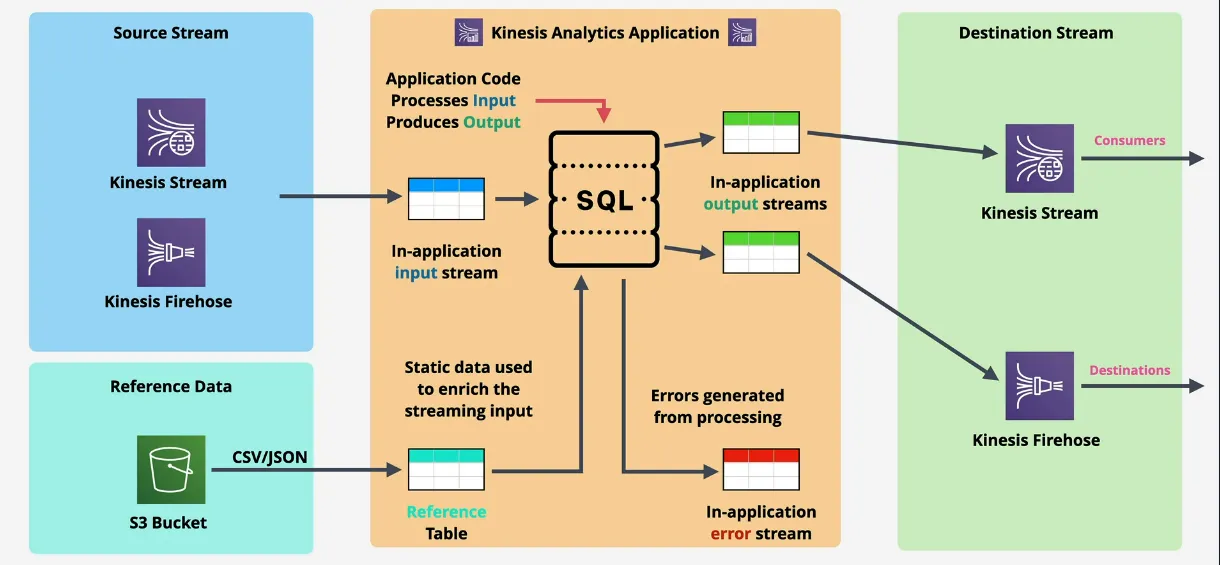
- real-time processing of data
- using SQL
- ingests from Kinesis Data Streams, or Firehose
- destination
- Firehose => S3, Redshift, ElasticSearch & Splunk)
- Lambda
- Data Streams
- not cheap, but only pay by data processed by the application
- when?
- streaming data which needs real-time SQL processing
- time-series analytics => elections / e-sports
- real-time dashboards => leaderboards for games
Video Streams
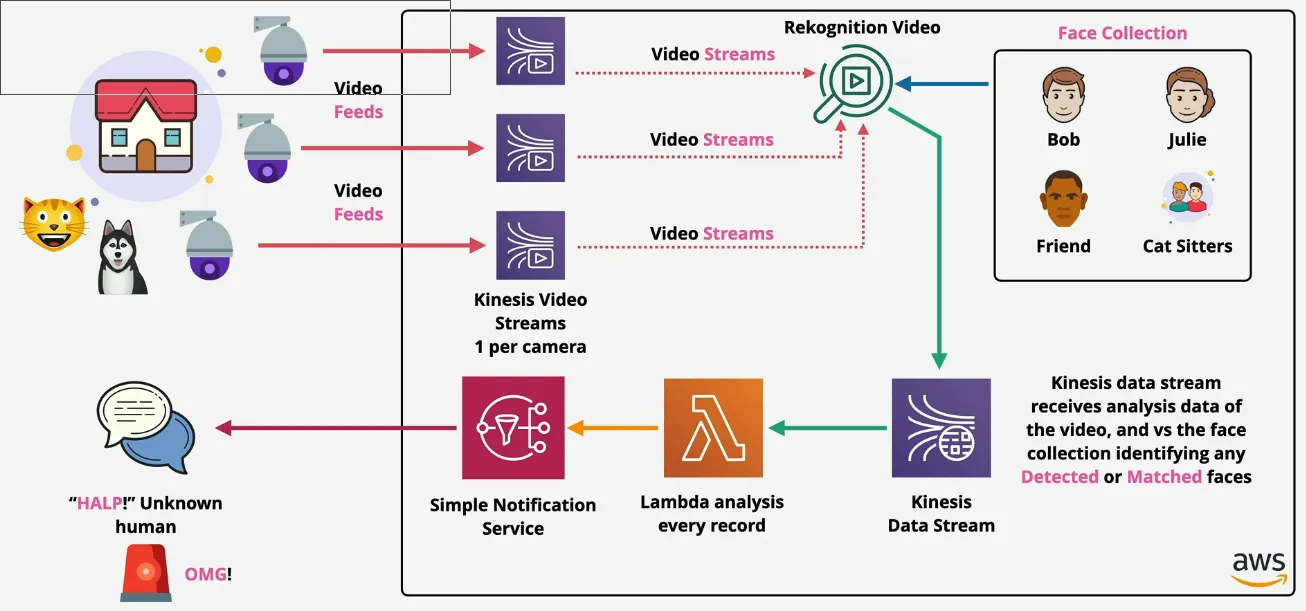
- ingest live video data from producers
- such as security cameras, smartphones cars, drones, time-serialised audio, thermal, depth and RADAR data
- consumers access data frame-by-frame, or as needed
- can persist, encrypted in-transit and at-rest
- can't access directly via storage, only via APIs (don't let exams fool you)
- integrates with AWS services, like Rekognition (facial recognition), and Connect (voicemail)
- Gstreamer, RTS ping, ...
Cognito
- cognito has a terrible naming
- authentication, authorization, and user management for web/mobile apps
- used for web scale application, instead of giving each user a login
- USER POOL
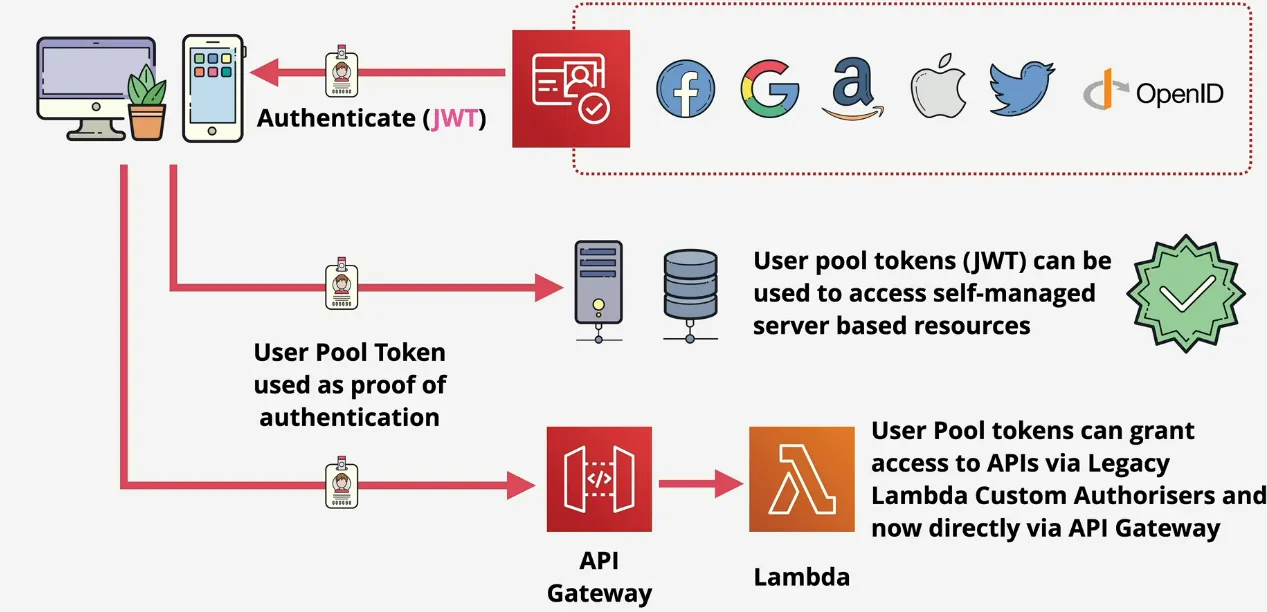
- sign-in and get a JSON Web Token (JWT)
- can be used in services, and API Gateway can even accept these
- but can't be used for most AWS services, most AWS services can only be used with AWS Credentials
- don't grant access to AWS
- used for user directory management and profiles, sign-up, sign-in, MFA, and other security features (SAML)
- used for accessing self-managed services
- IDENTITY POOL
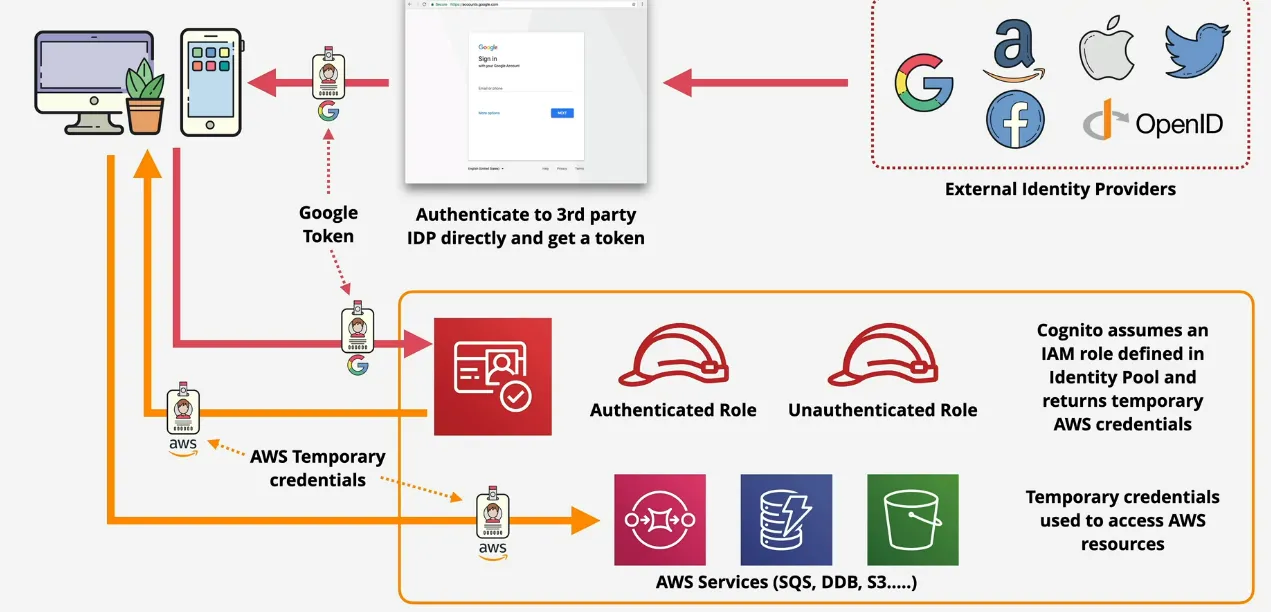
- allows to offer access to Temporary AWS Credentials
- can be for unauthenticated identities => guest users
- swap external identity to swap for temporary AWS credentials (Google, Facebook, Twitter, SAML2.0 & User Pool)
- this is known as web identity federation
- work by assuming an IAM Role, to get temporary credentials for AWS resources
- code doesn't store any credentials
- User & Identity Pools COMBINED
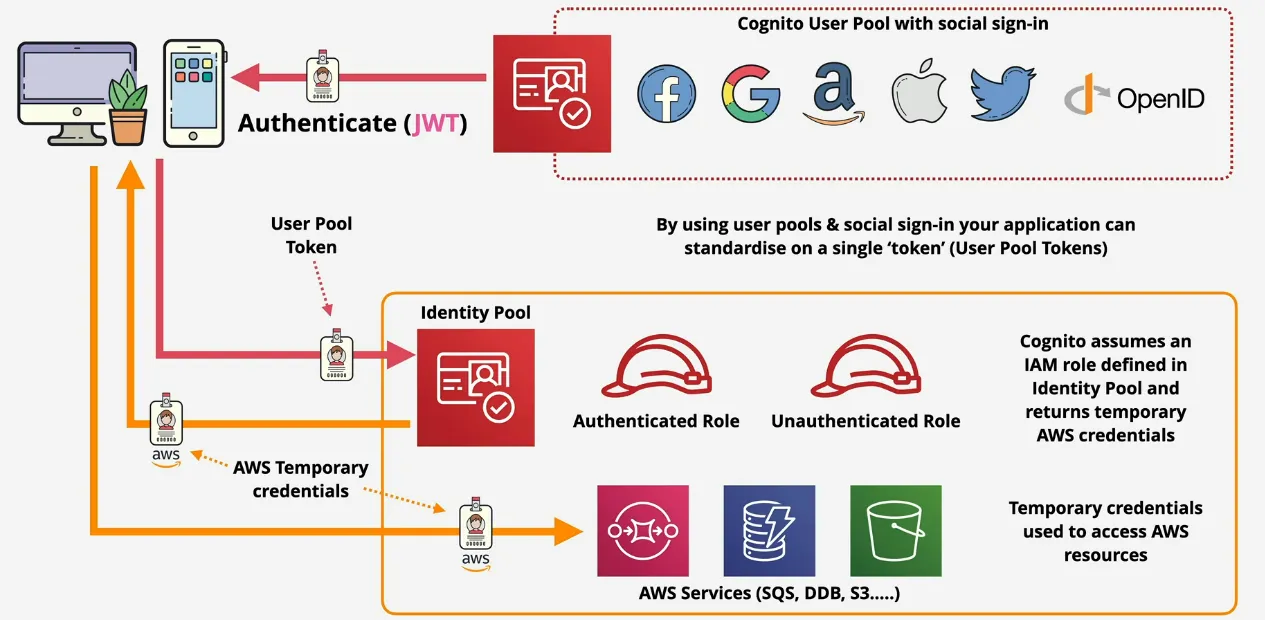
- User Pool is configured to support certain identity providers
- manages an internal store of users
- means you only need to manage one user store, instead of a user store for identity provider when using IDENTITY POOLS alone
- the authenticated identity becomes the Cognito User Pool User (JWT)
- passes the user Pool Token to an Identity Pool, which then gets temporary credentials to access aws resources
- this combination has less admin overhead
Glue
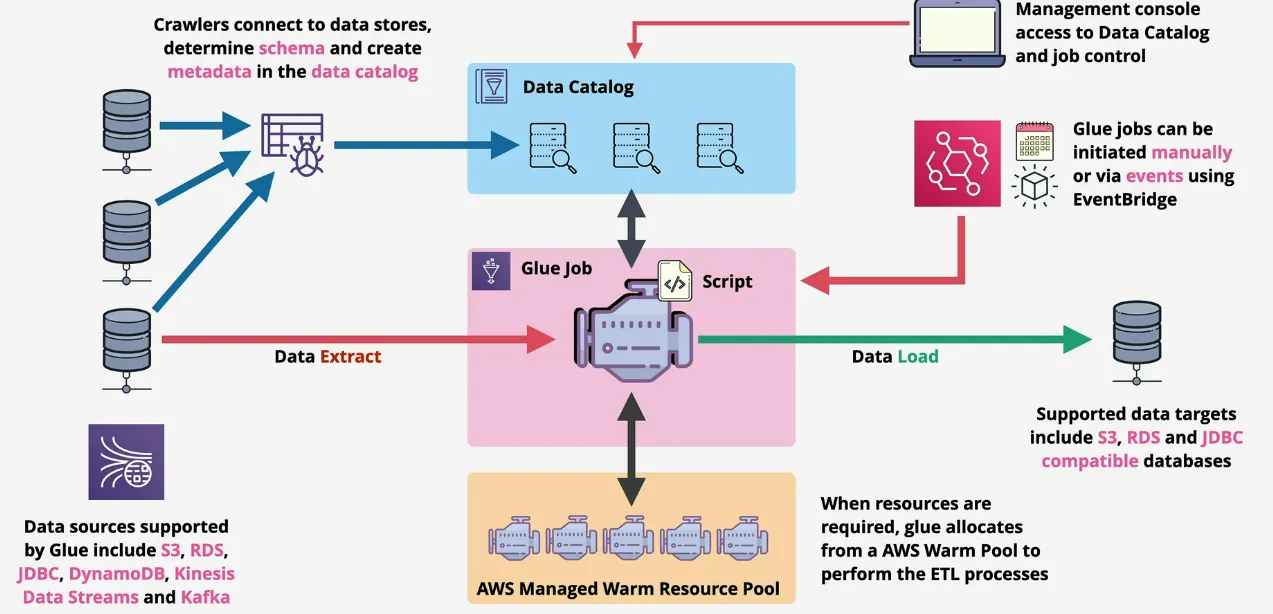
- serverless ETL (Extract, Transform & Load)
- vs datapipeline (which can do ETL), but uses servers (EMR Cluster)
- if both datapipeline and glue are mentioned in the exam, usually only one should be the best answer, and glue is the newer product
- moves and transform data between source and destination
- crawls data sources and generates the AWS Glue Data catalog
- data source: stores: S3, RDC, JDBC Compatible & Apache Kafka
- data source: streams: Kinesis Data Stream & Apache Kafka
- data targets: S3, RDS, JDBC Databases
- data catalog
- persistent metadata about data sources in region
- one catalog per region per account
- avoid data silos => improves visibility
- used by Amazon Athena, Redhsift Spectrum, EMR & AWS Lake Formation
- data is discovered via crawlers
- allows for example the finance team to load data from engineering to make some graphs
Amazon MQ
- context
- SNS and SQS are AWS services using AWS APIs
- SNS provides TOPICS and SQS provides QUEUES
- public services, highly available, aws integrated
- many orgs, might already have topics and queues
- ... and might want to migrate into AWS
- ... SNS and SQS won't work out of the box
- Amazon MQ
- an open standard merge between SQS and SNS (kinda)
- open-source message broker
- based on Managed Apache ActiveMQ
- if you need support JMS API, or protocols like AMQP, MQTT, OpenWire and STOMP => you need Amazon MQ
- provides queues and topics
- supports one-to-one and one-to-many architectures
- managed service, but as managed as SQS or SNS, cause you gets
- single instance (test, dev), or HA Pair (Active/Standby)
- VPC Based - NOT A PUBLIC SERVICE
- no AWS integration, delivers activeMQ product which you manage
- when?
- new implementations (default) => SNS or SQS
- aws integration requires => SNS or SQS
- migrate from existing system with little to no application change => Amazon MQ
- using existing API's like JMS, or protocols like AMQP, MQTT, OpenWire and STOMP => Amazon MQ
- REMEMBER!! You need private networking setup for Amazon MQ
- means you need access via VPN if you want it on-premise
Amazon AppFlow
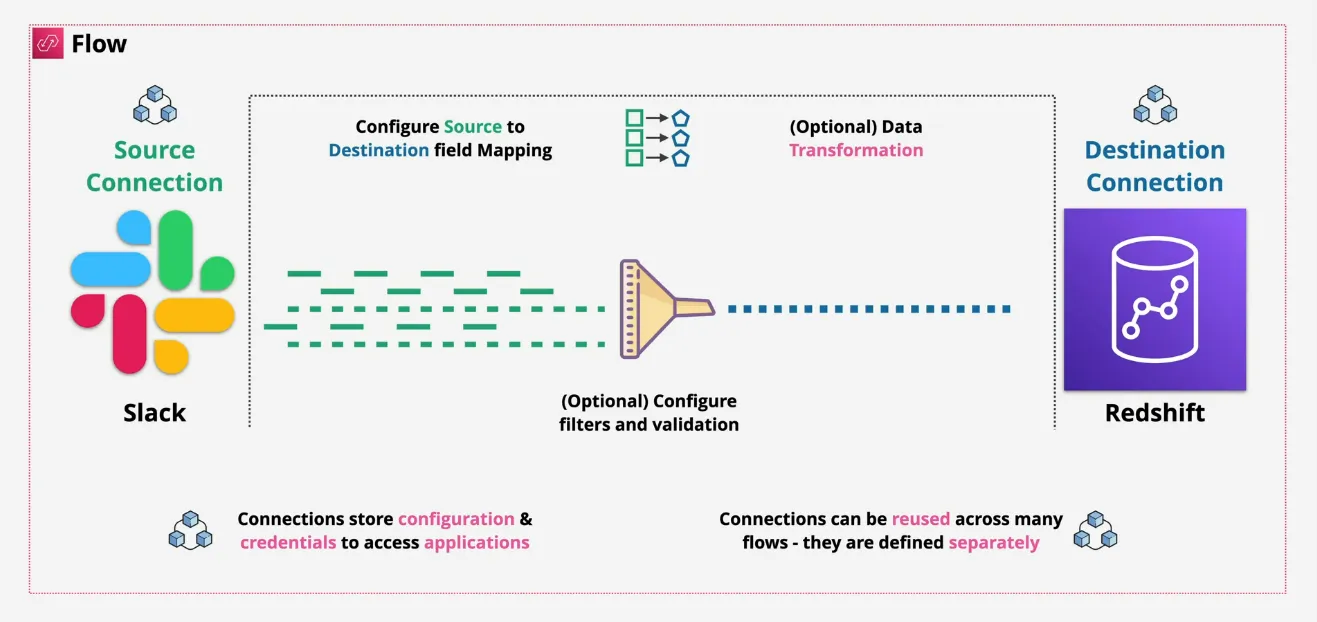
- fully-managed integration service
- exchange data between applications (connectors) using flows
- sync data across applications
- aggregate data from different source
- public endpoint, but works with PrivateLink (privacy)
- AppFlow Custom Connector SDK (build your own)
- Contact records from Salesforce => Redhsift
- Support Tickets from Zendesk => S3
- connections store configuration and credentials to access applications
- connections can be re-used across many flows => defined separately
- translates data from one application to another
CloudFront
Introduction
- content-delivery network uses
- caching
- efficient global network
- terms
- origin => source of the content, such as S3 Origin or Custom Origin
- distribution => configuration unit of CloudFront
- behaviors => sit in the middle between origins and distributions, each
distribution has at least 1 behavior, can have much more
- if a requests match a path pattern, then that specific behavior will be used, for example
- default (*) => pointing to a regular bucket
- private (img/*) => pointing to a private bucket
- origins, origin groups, TTL, Protocol Policies, restricted access are actually set via behaviors, despite the UI showing it in the distribution
- edge locations => global infra where content is locally cached (based around capital cities, over 200 edge location => not regions)
- regional edge cache => larger version of an edge location, provides another layer of caching
- integrates with ACM (Amazon Certificate Manager) for HTTPS
- CloudFront is used for downloads only
- uploads go directly to the origin, no write caching
TTL and Invalidations
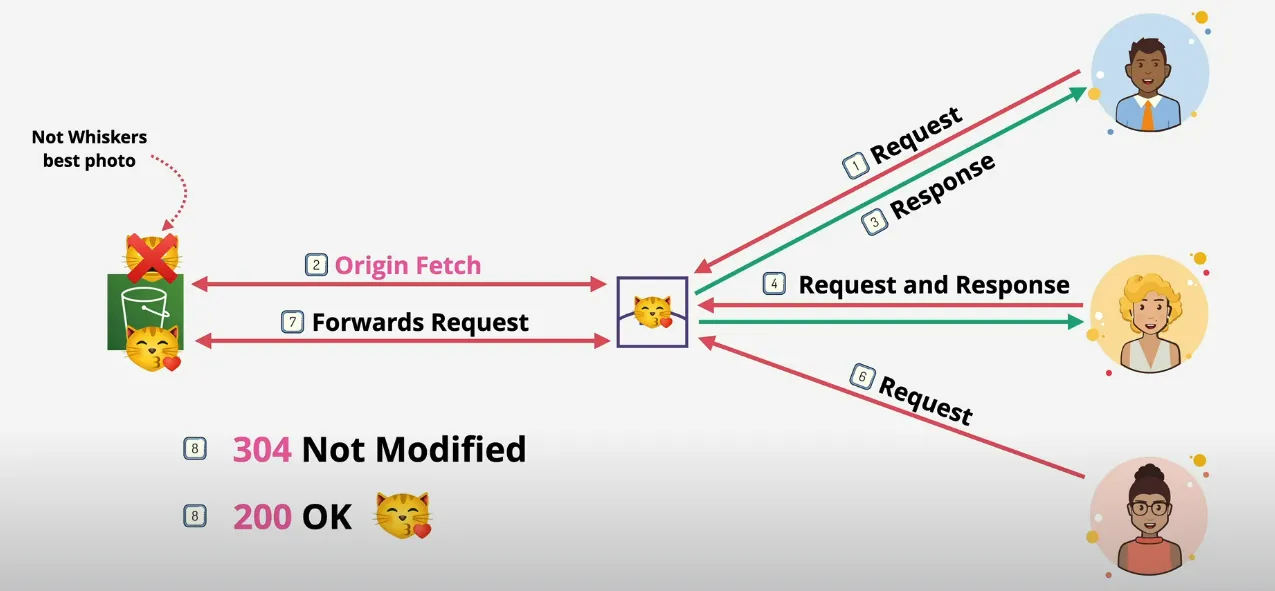
- 8
When the object is not changed (304), then the object is returned FROM THE EDGE LOCATION, otherwise (200) first updates the edge location object
- 4
Actually receives an older version of the cat picture, even though it was already updated in the origin, since it wasn't marked as expired (via TTL) => you need a way to invalidate it
Cache-Control max-age (seconds)
Cache-Control s-maxage (seconds)
Expires (Date & Time)
How does it use SSL?
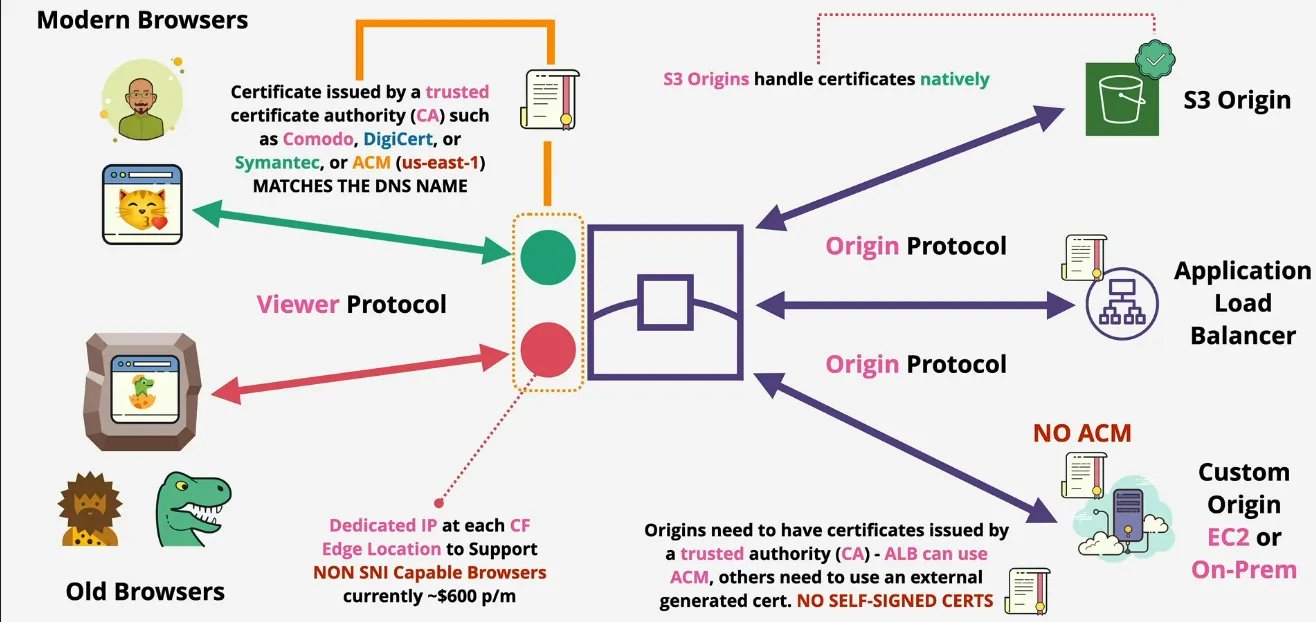
- CloudFront Default Domain Name (CNAME)
- https://randompart.cloudfront.net
- SSL support by default via *.cloudfront.net cert
- Alternate Domain Names (CNAMES)
- for example cdn.catagram.com
- verify ownership (optionally HTTPS) using a matching certificate
- generate or import via ACM - AWS Certificate Manager in us-east-1
- HTTP, HTTPS, HTTP => HTTPS, or HTTPS Only
- CloudFront uses 2 connections
- Viewer => CloudFront
- CloudFront => Origin
- both of these connections need valid public certificates (and intermediate certs in the chain) => self-signed certificates WILL NOT WORK, they need to be public
- Historically
- every SSL enabled site needed its own IP
- encryption starts at TCP connection (which is a lower layer than HTTPS)
- reading host headers (HTTP => Application Layer) happens after the connection has already been established
- TLS (the encryption part of HTTPS) happens before this point, so it means that the web server needs to identify itself before the connection happens, but there was no way to read the host header still (not possible to host multiple domains on one IP)
- SNI (Server Name Indication) => TLS extention, allowing host to be included, meaning the web server can be identified before a TCP connection is made => results in many SSL Certs/Host using a shared IP => older browsers don't support SNI => CloudFront charges extra for dedicated IPs, or use the free SNI mode
Origin Types & Architecture
- origin groups can be referenced in the behaviors instead of a single origin
- provides resiliency
- origin types:
- S3 (simplest origin)
- AWS Media Packaged Channel Endpoints
- AWS Media Store Container Endpoints
- custom origin => Everything Else => web servers
- if you configure static web hosting as on origin, CF sees it as a custom origin (aka web server), not an S3 bucket
- possible to set headers in order to block all requests which are not coming from CloudFront
- OAI (Origin Access Identity)
- only possible with S3 Origins
- is an identity
- associated with CloudFront Distributions
- CloudFront "becomes" the OAI
- OAI can be used in S3 Bucket Policies
- in general S3 is completely locked down except for the OAI when using CF
- What about Custom Origins?
- via custom headers
- require custom headers to be set at the origin server
- inject those headers from CF
- effectively blocking off all access to the server, unless you guess the custom header
- allow the CF ip range in the firewall of the origin
- via custom headers
Private Behaviors
- 1 behavior, either whole distribution is public or private
- more commonly there's multiple behaviors, each either public or private
- old way
- CloudFront Key created by account root user
- account is added as a trusted signer to a distribution
- preferred method
- create trusted key groups
- assign them as signers
- key groups determine which keys can be used to sign URLs and cookies
- no need to use root user (better admin) => using API
- signed URLs
- provide access to one object
- historically RTMP distributions couldn't use cookies
- use URLs if client doesn't support cookies
- signed cookies
- provides access to groups of objects
- for example group of files, certain file types, ...
- requirement to maintain application URLs
Lamda@Edge
- run lightweight Lambda at edge locations
- adjust data between Viewer & Origin
- doesn't support full lambda
- currently only supports Node.js and Python
- runs in AWS Public space (not VPC)
- layers are not supported
- different limit vs normal lambda limits
- architecture
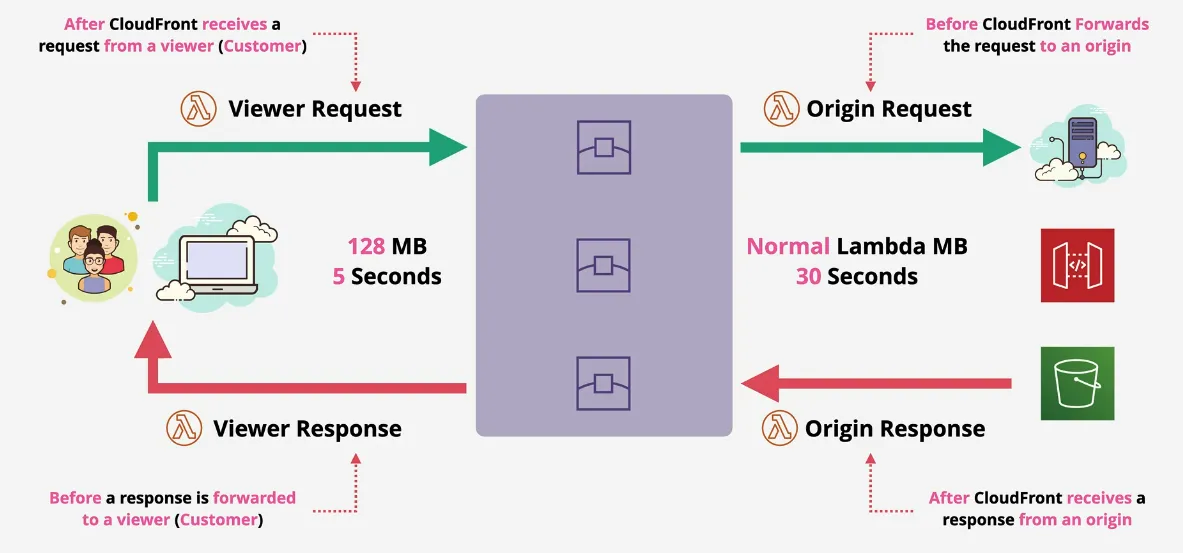
ACM - AWS Certificate Manager
- HTTP is simple and insecure
- HTTPS - SSL/TLS layer of encryption added to HTTP
- data is encrypted in-transit from an outside observer
- certificates prove identity
- certificates are signed by a trusted authority
- chain of trust from the web client to the server
- harder to spoof
- ACM makes it possible to have public or private Certificate Authority (CA)
- Private CA - applications need to trust the private CA
- Public CA - browsers trust a list of providers, which trust other providers
- can generate or import certificates
- if generated, it can automatically renew
- if imported, you are responsible for renewal
- can only deploy out to supported services (services integrated with ACM) such as CloudFront, ALB and API Gateway, but NOT ec2)
- regional service
- certs can't leave the region they are generated or imported in, once inside, they are locked
- if you need to use a cert with an ALB in ap-southeast-2, you need a cert in ACM in ap-southeast-2
- global services such as CloudFront are operated as though within us-east-1, so you need to have a certificate in us-east-1 in ACM
Global Accelerator
- the problem
- customers in other regions than the origin have decreased performance
- due to going through many hops
- solution (alternative to CF)
- provide an anycast IP
- which allows a single IP to be in multiple locations across the globe
- routing moves traffic to the closest location using the regular internet hops
- once arrived, it uses the AWS data cables to transit across the world
- better performance
- doesn't cache any content
- when and where?
- move AWS network closer to customer
- CF moves the content closer
- network product (UDP/TCP)
- CF only caches HTTP(S) content
- move AWS network closer to customer
Hybrid Environments & Migration
Border Gateway Protocol (BGP)
- Autonomous System (AS) => routers controlled by one entity = a network in BGP
- ASN are unique and allocated by IANA (0=>65535), 64512=>655534 are private
- BGP Operates over tcp/179 => reliable
- not automatic, peering is manually configured
- is a path-vector protocol, it exchanges the best path to a destination between
peers, the path is called the ASPATH
- iBGP = Internal BGP => routing within an AS
- eBGP = Internal BGP => routing between AS's
- high-level architecture
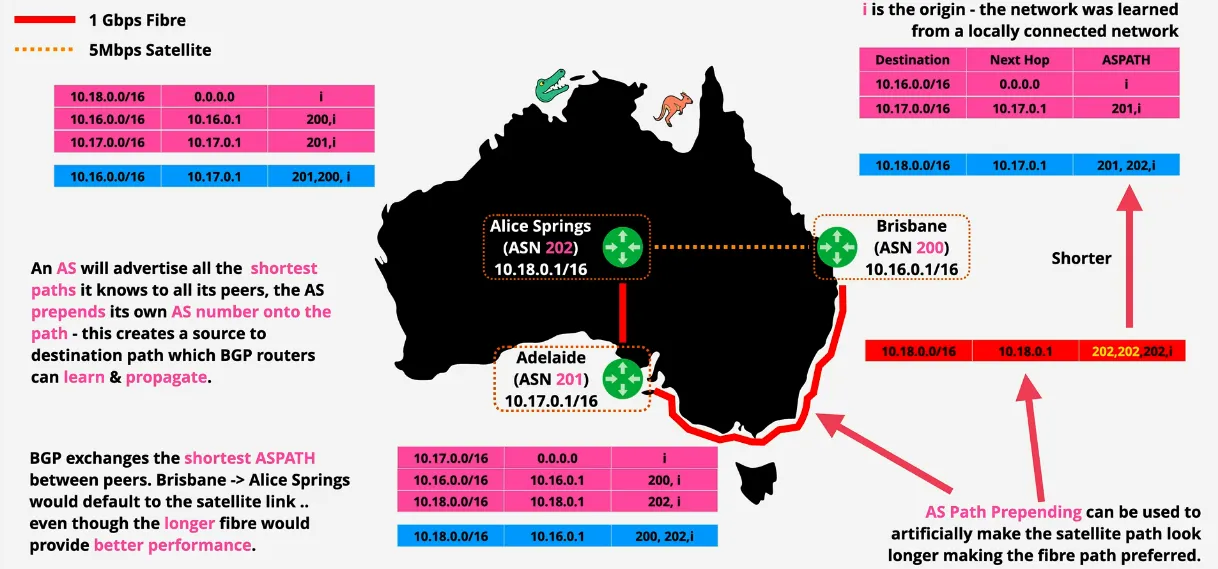
IPSec VPN Fundamentals
- group of protocols to setup secure tunnels across insecure networks
- between two peers (local and remote)
- provides authentication
- and encryption
- data is carried via the public internet, but the data inside is encrypted via a secure connection over an insecure network
- has 2 phases
- Internet Key Exchange (IKE) Phase 1 (slow & heavy)
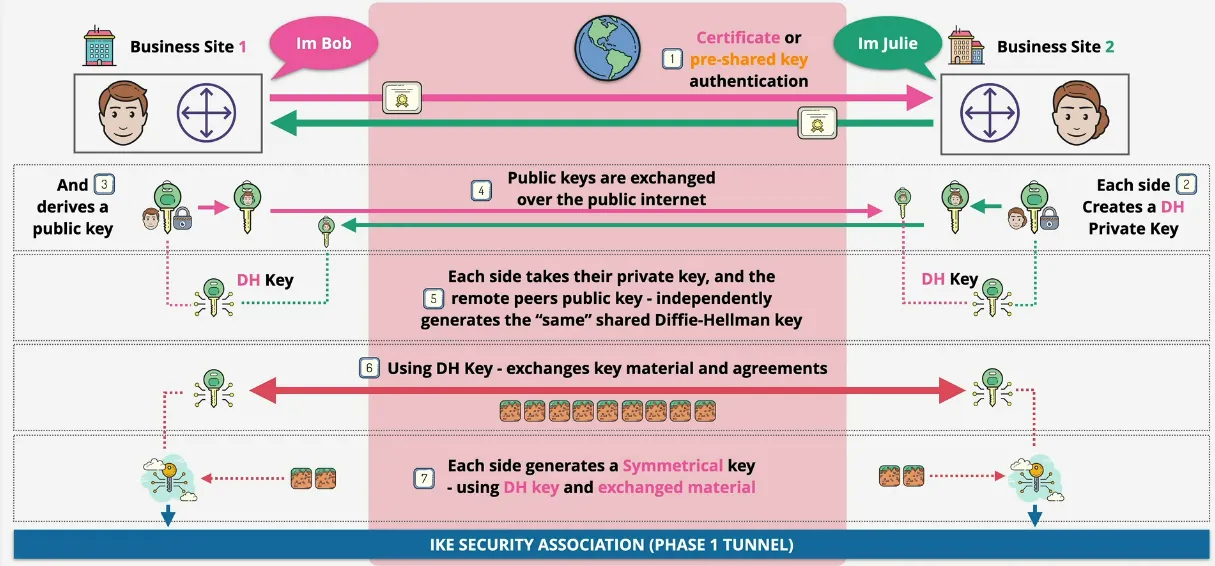
- authenticates => using pre-shared key or certificate
- uses asymmetric encryption to agree, create and shared a symmetric key in phase 2
- IKE SA is created (phase 1 tunnel)
- IKE Phase 2 (fast & agile)
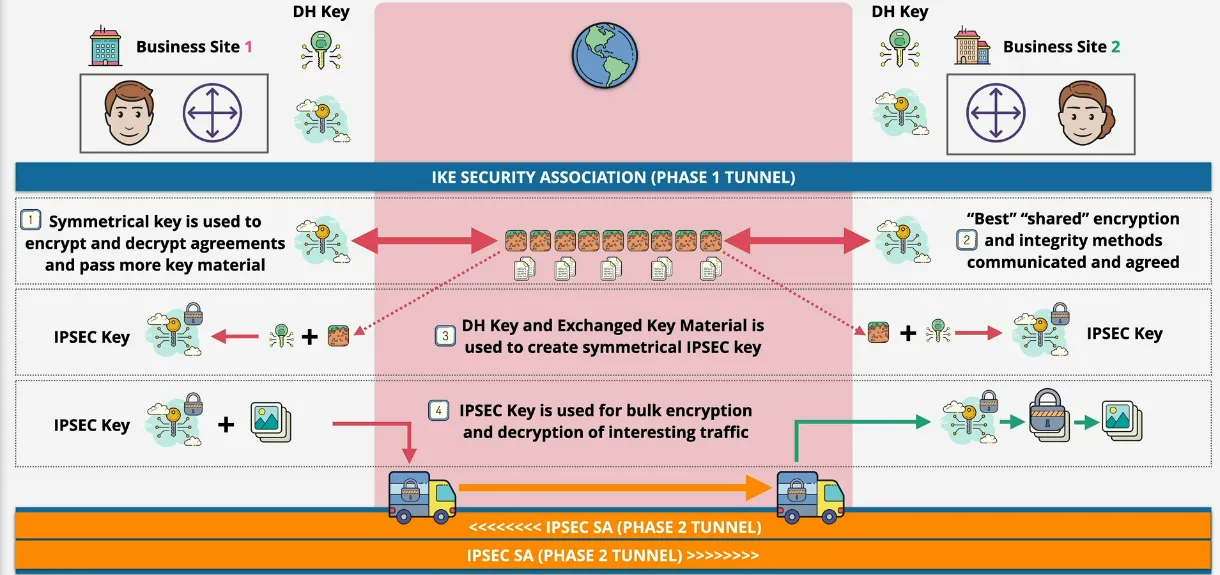
- uses agreed keys from p1
- agree on encryption method, and keys used for bulk data transfer
- Internet Key Exchange (IKE) Phase 1 (slow & heavy)
- there's two types of VPN
- policy-based
- rule sets match traffic => pair of SA (Security Associations)
- different rules security for different kind of traffic
- route-based
- target matching based on prefix
- matches a single pair of SAs
- policy-based
AWS Site-to-Site VPN
- logical connection between a VPC and on-premises network encrypted using IPSec, running over the public internet (except with Direct Connect)
- full HA, if you design and implement it correctly
- quick to provision => less than an hour
- Virtual Private Gateway (VGW) => another type of logical gateway object, and is the target on our more route tables
- Customer Gateway (CGW)
- refers to either the logical piece of configuration in AWS
- or to actual physical device on-premise (such as a router)
- VPN Connection between VGW and CGW
- high-level architecture
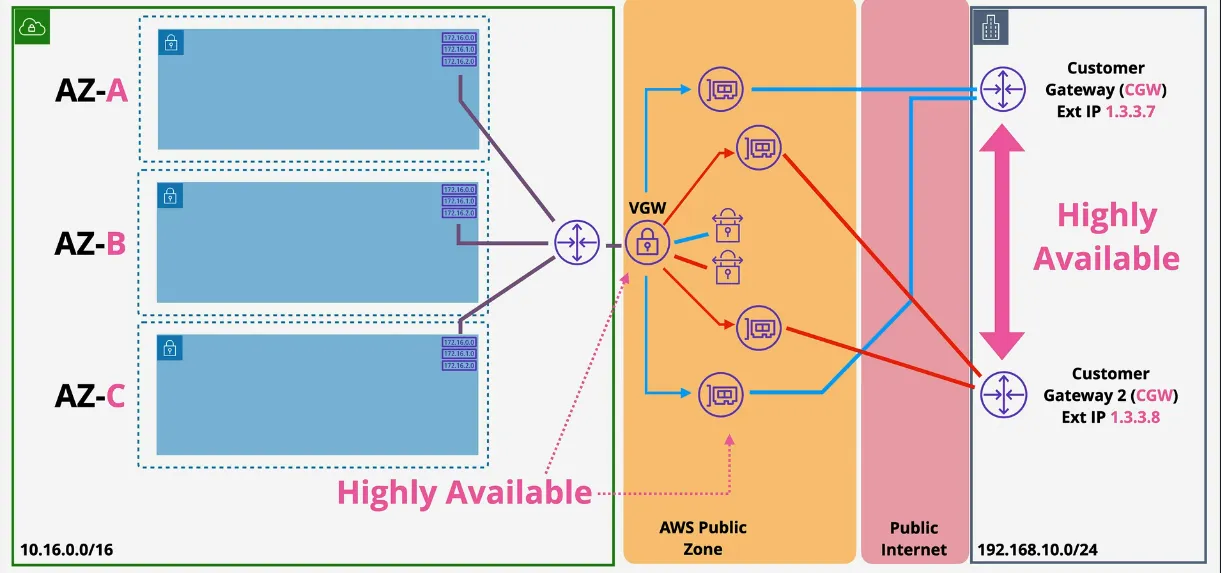
- static vs dynamic VPN (BGP)
- static
- routes for remote side added to route tables as static routes
- networks for remote side statically configured on VPN connection
- no load balancing and multi-connection failover
- dynamic VPN
- router needs to support BGP
- network information is exchanged via BGP
- multiple VPN Connections provide HA and traffic distribution
- routes for remote side are added to route as static routes
- ... or (if route propagation is enabled) are added to the RT's automatically
- static
- VPN Considerations
- speed limitations => 1.25 Gbps
- latency considerations => inconsistent, public internet
- cost
- AWS hourly cost
- GB out cost
- data cap (on-premise)
- easy to setup, a couple hours, for all software configuration
- used as a backup for Direct Connect (DX)
- can be used with Direct Connect (DX)
Direct Connect
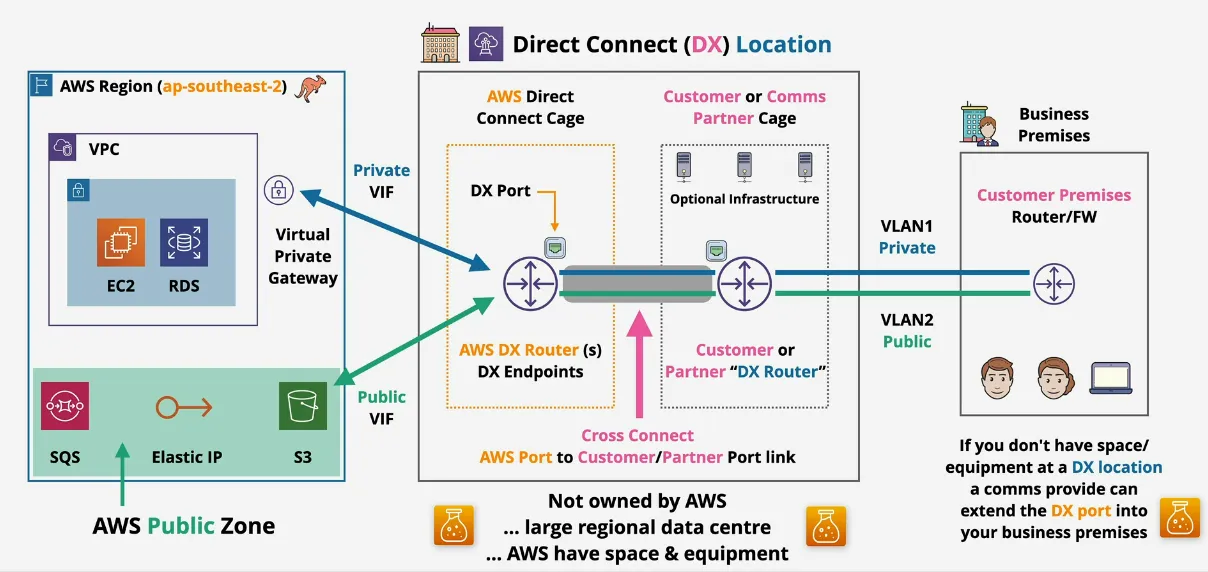
- physical connection into AWS region (1, 10, 100 Gbps)
- business premises => DX Location => AWS Region
- allocates a port at DX Location, and authorizes access to the port
- doesn't provide the physical connection from premises to DX Location
- costs
- hourly for the port
- outbound data transfer
- inbound is free
- provisioning time => physical cables & no resilience
- low & consistent latency + high speeds vs IPSec
- provides access to AWS Private Services (VPC) and AWS Public Service, but no public internet
Resilience and HA
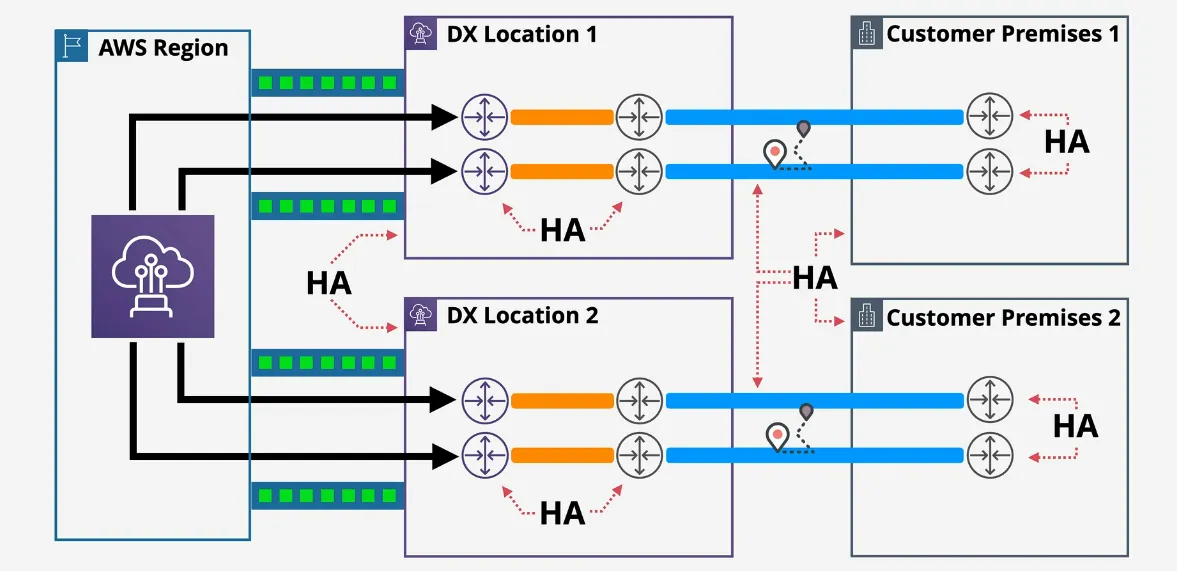
- have multiple DX ports
- which connect to multiple Customer DX Routers
- which connect to multiple on-premise routers
- if DX Location, or Customer Location fails, it will the connection
- ideally you should
- have 2 DX Locations
- going into 2 Customer Premises
- and each DX Location should have 2 DX ports
- going into 2 Customer DX Routers
- going into 2 on-premise routers
Public VIF (Direct Connect) + VPN combined
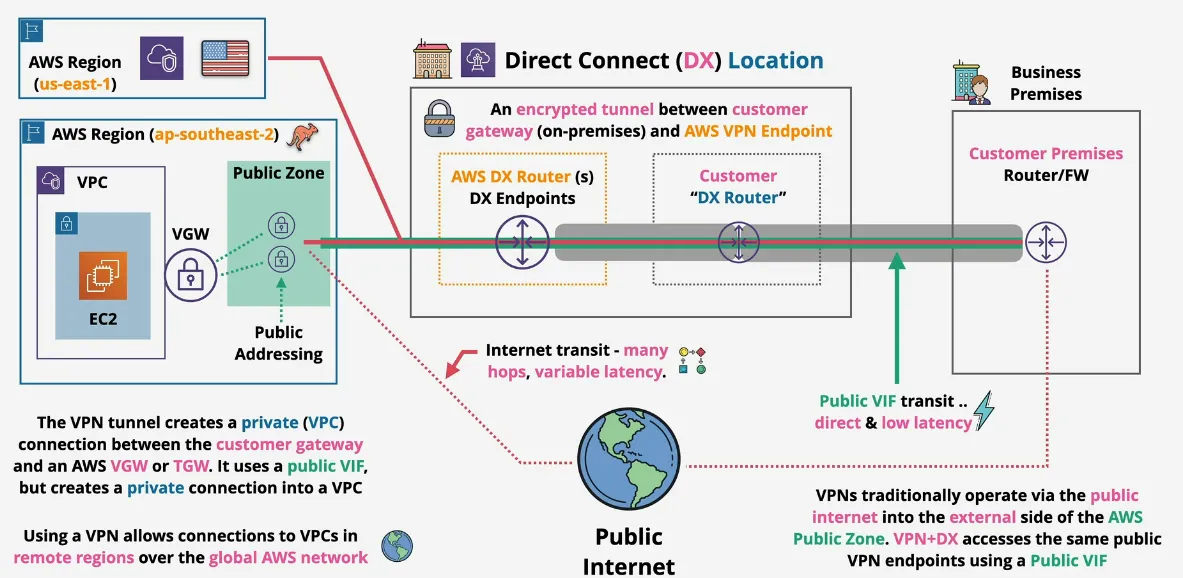
- encrypted & authenticated tunnel
- low and consistent latency (over DX)
- uses a public VIF + VGW/TGW public endpoints
- transit agnostic (doesn't matter if it's DX or Public Internet)
- e2e encrypted between CGW <=> TGW/VGW
- wider vendor support
- VPN has more cryptographic overhead vs MACsec => limits speeds
- can be used while DX is being provisioned and/or as a DX backup
- conceptually the same tunnel gets created, except the method of transmission is different as going through Public VIF, means going via a fast DX Location
- you need a public VIF, because VPN+DX accesses the same public VPN Endpoints, which are in the public zone
Transit Gateway (TGW)
- networking transit hub to connect VPCs to on-premise networks
- significantly reduces network complexity
- single network object => HA and Scalable (just like other gateways)
- ... creates attachments to other network types
- such as VPC, Site-to-Site VPN & Direct Connect Gateway
- VPC Attachments are configured with a subnet in each AZ where a service is required
- acts as a router to connect different VPC to each other (as opposed to using VPC peering)
- and provides a secure tunnel to a HA on-premise (2 routers)
- considerations
- supports transitive routing (uses route table)
- can be used to create global networks
- share between accounts using AWS RAM
- peer with different regions, same/cross-account
- less complexity than w/o a TGW (multiple VPC peers, peering to each other, then each peer needing their own secure connection to the on-premise router)
Storage Gateway
- runs as virtual machines (or hardware appliance)
- acts as a bridge for storage that exists on-premise or data center and AWS
- presents storage using iSCSI, NFS or SMB
- integrates with EBS, S3 and Glacier
- migrations, extensions, storage tiering, DR and Replacement of backup systems
- for the exam, picking the right mode is crucial
- has 3 modes
Volume
- stored mode
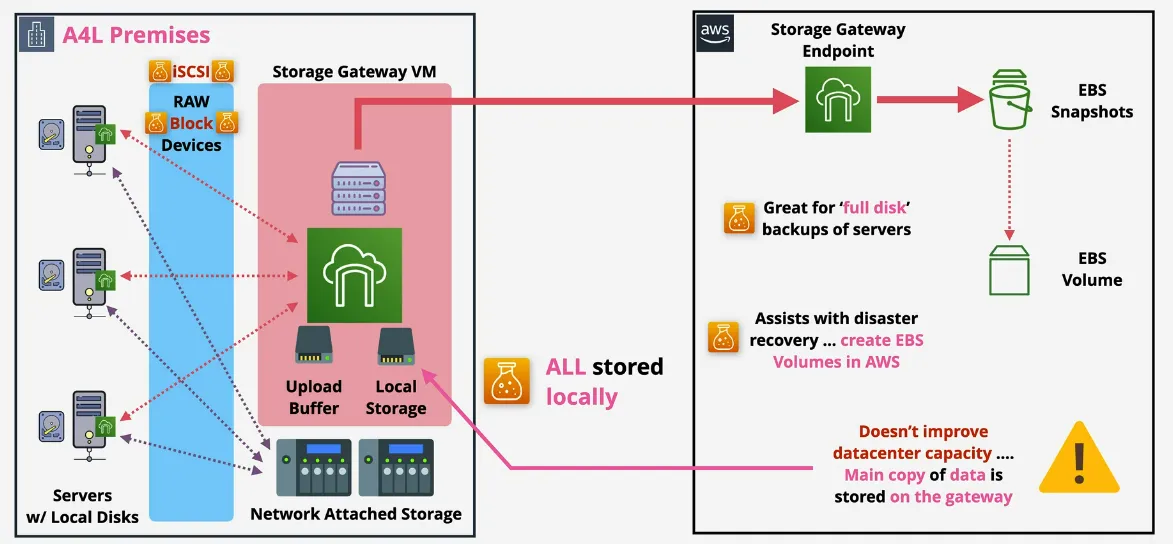
- presents virtual volumes via iSCSI to on-premise
- similar to NAS
- these volumes consume volumes from on-premise
- everything is stored locally
- all data also sits in an upload buffer, which copies the data asynchronously to AWS S3 as EBS Snapshots via the Storage Gateway Endpoint
- great for full disk backups of servers
- assists with disaster recovery due to creating EBS Volumes in AWS
- doesn't improve datacenter capacity, main copy of data is stored on the gateway (on-premise)
- cached mode
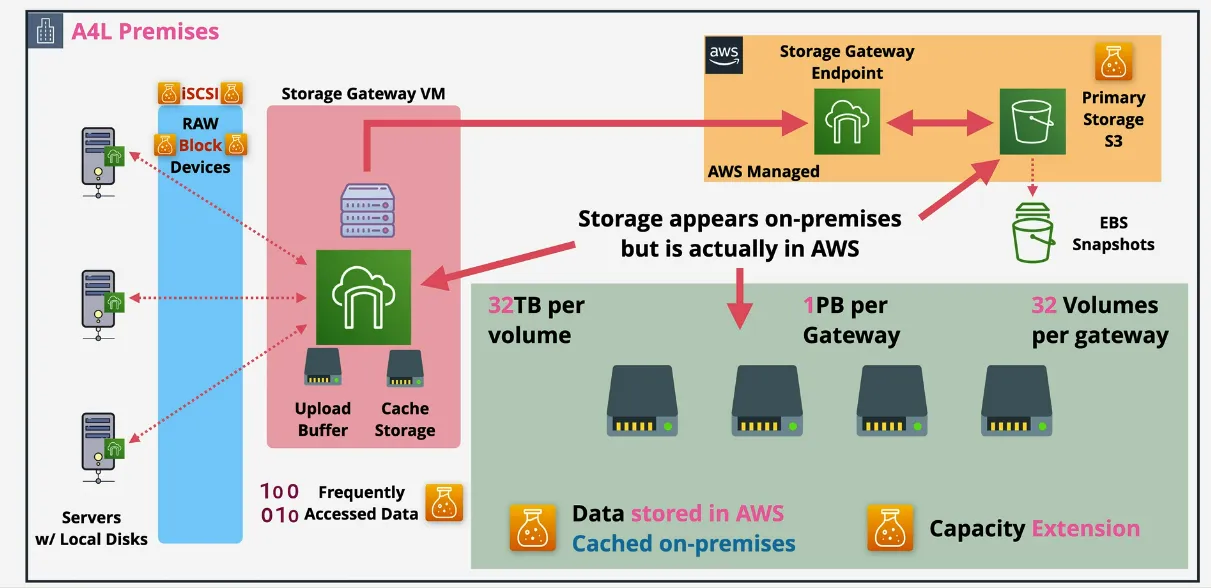
- same basic architecture
- but instead of local volume, it has local cache
- the primary storage is S3, cached locally, managed by AWS (so you can't open and see this in the S3 service, only via the Storage Gateway console)
Tape - VTL (Virtual Type Library) Mode
- large backups => tape
- LTO-9 Media can hold 24 TB of Raw Data, up to 60TB compressed
- 1 Tape Drive can use 1 tape at a time
- write as whole, or read as a whole (not possible to edit in between)
- loaders (robots) can swap tapes
- a library is 1+ drive(s), 1+ loader(s) and slots
- shelf (stored anywhere except the library, back in the day actual shelves)
- traditional tape backup
- costs a lot of money to operate on-premise due to maintenance, licensing
- transport to and from an offsite backup (usually 3rd party) is expensive
- VTL
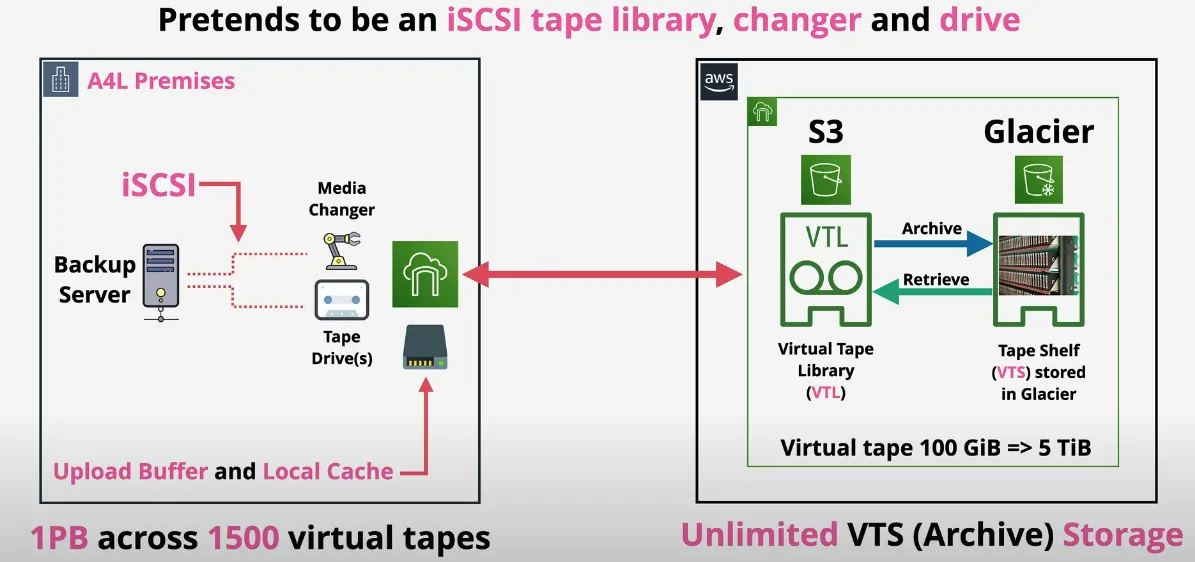
- backup server still thinks it's connecting to a tape loader
- so not much software changes needed on the backup server
- either stores is in the VTL (Virtual Tape Library) using S3, or Virtual Tapes Shelf (VTS) using Glacier
File
- most feature rich modes
- bridges on-premises file storage and S3
- create mount points (shares) available via NFS or SMB
- map directly onto an S3 bucket
- files stored into a mount point, are visible as objects in an S3 bucket
- translates between on-premises files and S3 objects
- read and write caching, ensuring LAN-like performance
- typical architecture
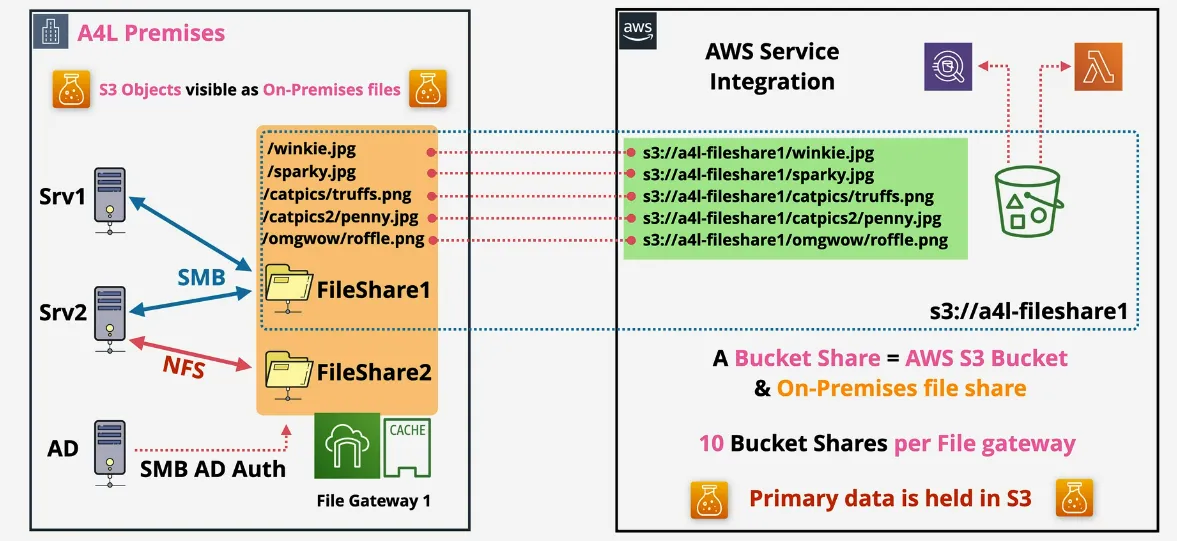
- cached locally
- primary data is on s3
- max 10 bucket shares per file gateway
- since it's stored in S3, you can integrate directly with AWS services like a lambda
- not possible to have object locking
- couple cool ways to use this mode
- multiple contributors (multiple on-premise environments)
- replication of on-premise data to another region
- since it's based on S3, you can hook into S3 lifecycle methods to place infrequent used files automatically in a cheaper storage
Snowball & Snowmobile
- move large amount of data IN and OUT of AWS
- physical storage, from suitcase to a truck
- order from AWS
- empty, load up, return
- with data, empty, return
- for the associate exam, it's important when and where to use it
- snowball
- orders from AWS, log a job, device delivered
- data encryption uses KMS
- 50TB or 80TB capacity
- 1 Gbps (RJ45) or 10Gbps (LR/SR) Network
- economical range (10 TB to 10PB) => multiple devices
- multiple devices to multiple premises
- used for data ingestion
- only storage!
- snowball edge
- both storage and compute
- large capacity
- faster networking 10Gbps (Rj45), 10/25 SFP or 45/50/100 Gbps (QSFP+)
- 3 version
- storage optimized: 80TB, 24vCPU, 32Gib Ram, (1 TB SSD, if you order it with EC2 capabilities)
- compute optimized: 100 TB + 7.68 NVME, 52 vCPU, and 208 GiB RAM
- with or without GPU
- ideal for remote sites or where data processing on ingestion is needed
- snowmobile
- portable data center within a shipping container on a truck
- literally a truck
- special order
- ideal for single location when 10PB+ is required
- up to 100PB per snowmobile
- physically plug it into the data center
- not economical for multi-site (unless huge), or sub 10PB
- portable data center within a shipping container on a truck
AWS Directory Service
- often overlooked and undervalued
- what's a directory?
- stores objects (users, groups, computers, servers, file shares) with a structure (domain/tree)
- multiple tree can be grouped into a forest
- commonly used in Windows Environments
- sign-in to multiple devices with the same username/password provided by centralized management for assets
- ... most common is Microsoft Active Directory Domain Services (AD DS)
- ... popular open-source is SAMBA (partial compatibility)
- directory service
- AWS Managed implementation
- runs within a VPC (private service)
- to implement HA, deploy in multiple AZs
- some AWS services NEED a directory (such as Amazon Workspaces => virtual desktop product AKA Citrix)
- can be isolated
- ... or integrated with existing on-premise system
- ... or act as a proxy back to on-premises
- architecture
- simple AD mode (Amazon Workspaces)
- uses open-source Sambda 4
- up to 500 users (small), or 5000 users (large)
- integrates with AWS services - EC2 instances, IAM
- not designed for existing on-premise, or super feature rich
- aws managed Microsoft AD
- similar to simple AD, except uses Microsoft AD
- such as Microsft SQL, or Sharepoint requires this
- possible to integrate with on-premise directory using a VPN
- primary location is in AWS, but trusts the on-premise directory
- so if the VPN fails, the services in AWS can still access the local directory running in the Directory Service
- similar to simple AD, except uses Microsoft AD
- AD Connector
- creates a proxy between on-premise directory and AWS services
- uses VPN to create a tunnel
- no authentication
- if VPN fails, all services which uses it will fail
- simple AD mode (Amazon Workspaces)
- when to use?
- simple AD => the default
- Microsoft AD => applications in AWS which need MS AD DS, or you need to trust AD DS on-premise
- AD connector => use aws service, which need a directory without storing any directory info in the cloud
AWS DataSync
- usually features in 2 questions
- data transfer service TO and FROM AWS
- migrations, data processing transfers, archival/cost effective storage or DR/BC
- ... designed to work at huge scale
- each agent can handle 10Gbps
- each job can handle 50 million files
- keeps metadata (permissions/timestamps)
- built-in data validation (medical records for example need to be verified once transferred)
- key features
- scaleable 10Gbps per agent (~100TB per day)
- bandwidth limiters (avoid link saturation)
- incremental and scheduled transfers
- compression and encryption
- automatic recovery from transit errors
- AWS Service integration => S3, EFS< FSx
- Pay as you use, per GB cost for data moved
- can throttle the bandwidth to reduce customer impact
- data sync agent runs on a virtualization platform such as VMWare and communicates with the AWS DataSync Endpoint
- the data sayn agent communicates with the SAN/NAS Storage via NFS or SMB
- the DataSync Endpoint can store the data in a number of different types of locations: S3 Storage Classes, EFS (FSx for Windows), NFS, SMB, ...
- components
- task => job within DataSync, defines what is synced FROM where and TO where
- agent => software used to read/write to on-premise data stores (NFS or SMB)
- location => every task has two locations, either Network File System (NFS), Server Message Block (SMB), Amazon EFS, Amazon FSx and Amazon S3
FSx for Windows File Server
- full managed native windows file servers/shares
- de-duplication
- distributed files system (DFS)
- KMS at-test encryption and enforced encryption in-transit
- designed for integration with Windows envs
- integrated with Directory Service or Self-Managed AD
- resilient and HA
- single or multi-AZ within a VPC
- on-demand and scheduled backups
- accessible using VPC, Peering, VPN, Direct Connect
- key features and benefits
- VSS => User-Driven Restores
- native file system accessible over SMB
- windows permissions mkodel
- distributed files system (DFS)
- managed => no file server admin
for Lustre
- niche product
- managed Lustre
- designed for HPC (High Performance Computing) => Linux Clients (or POSIX)
- machine learning, big data, financial modelling
- 100GB/s throughput & sub millisecond latency
- deployment types
- scratch
- highly optimized for short term, no replication, fast
- 200 MB/s per TiB of storage
- burst up to 1300 MB/s per TiB (via credit system, similar to EBS)
- persistent
- high available (in one AZ), longer term, self-healing
- 50 MB/s, 100 MB/s and 200 MB/s per TiB of storage
- burst up to 1300 MB/s per TiB (via credit system, similar to EBS)
- scratch
- accessible over VPN or Direct Connect
- the file system is where data lives while processing occurs
- data is lazy loaded from S3 (linked repository) into the file system when it's needed to start processing
- they are not actually in the file system when browsing through the file system, only when they are accessed for the first time they are loaded into the file system
- data can be exported back to S# with
hsm_archive
- metadata stored on Metadata Targets (MST)
- objects are stored on Object Storage Targets (OSTs) (each is 1.17TiB)
- baseline performance based on size
- size is min 1.2 TiB, then increments of 2.4 TiB
- architecture
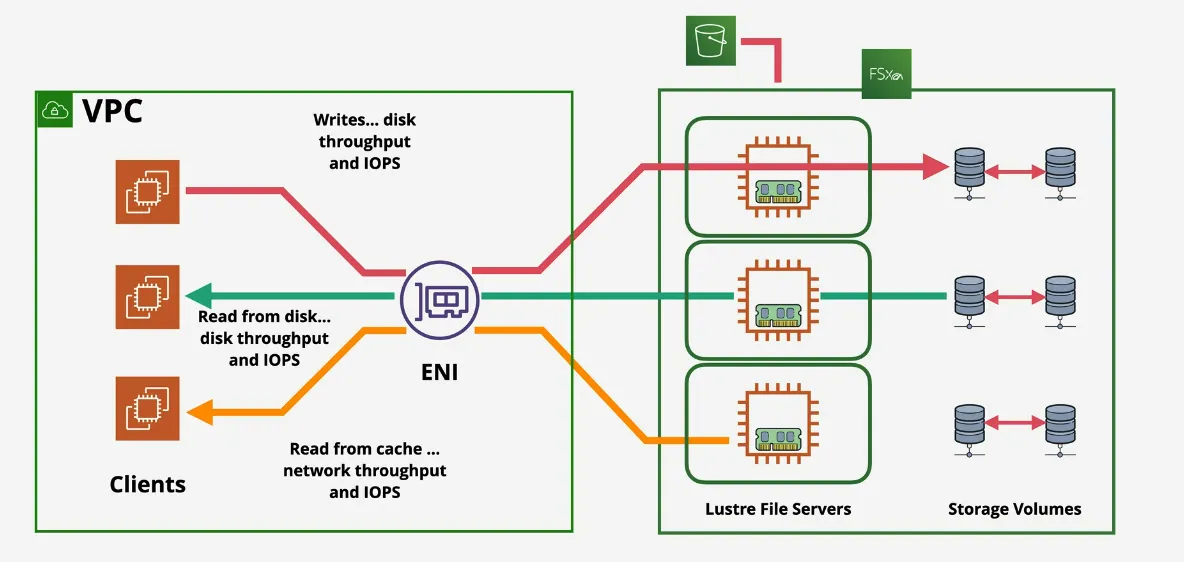
AWS Transfer Family
- managed file transfer service => supports transferring TO or FROM S3 AND EFS
- provides managed "servers", which support protocols
- File Transfer Protocol (FTP) => Unecrypted file transfer
- FTP Secure => FTP with TLS Encryption
- Secure Shell FTP => File Transfer over SSH
- Application Statement 2 (AS2) => Structured B2B Data
- payment workflows
- supply chain logistic processes
- integrations with enterprise resource planning (ERP), or CRM systems
- quite niche
- Identities => service managed, directory service, custom (lambda/APIGW)
- Managed File Transfer Workflow (MFTW) - serverless file workflow engine
- notifications
- or tagging when a file gets uploaded
- architecture
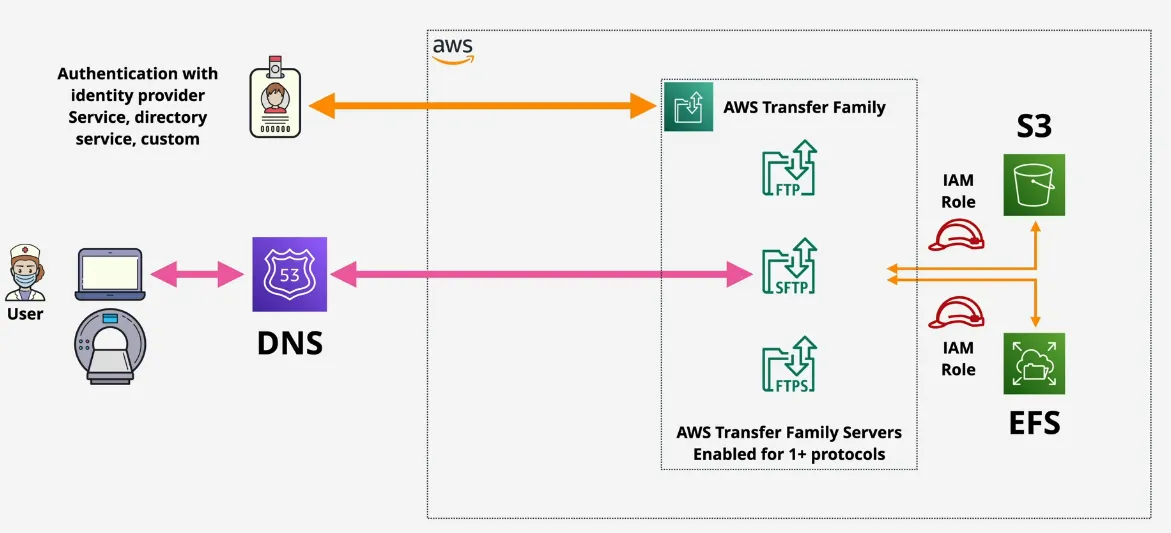
- endpoint types
- public
- nothing to configure (but only SFTP can be used)
- dynamic IP (can change)
- managed by AWS (use DNS to access)
- can't control access via IP lists
- no access to internal VPC
- VPC with internet
- SFTP, FTPS, and AS2 can be used
- accessible via DX/VPN
- provided static private IPs with SG and NACL to control access
- allocated with an Elastic IP (EIP) => static public IP making it accessible via the internet + from within the VPC
- VPC without internet
- SFTP, FTPS, FTP and AS2 can be used
- FTP is unencrypted, so that makes sense
- accessible via DX/VPN
- provided static private IPs with SG and NACL to control access
- public
AWS Secrets Manager
- does share functionality with Parameter Store
- specifically designed for secrets (passwords, API keys, ...)
- usable via console, CLI, API, or SDK's (integration)
- supports automatic rotation of secrets (using lambda)
- directly integrates with some AWS products (RDS, ...)
- encrypted at rest via KMS
- integrates with IAM
- architecture
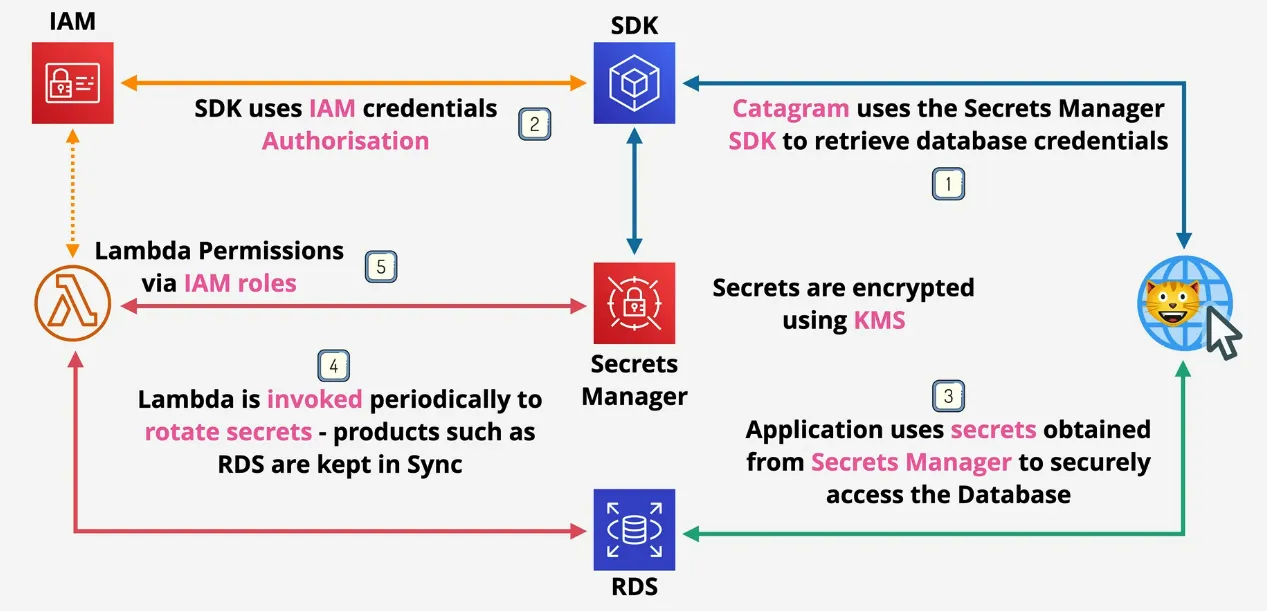
AWS Web Application Firewall (WAF)
Application (Layer 7) Firewall
- normal firewalls (3/4/5)
- requests from laptop to server, and responses from server to laptop
- layer 3/4 operate on packets and segments, so requests and responses are different and unrelated
- session capabilities (layer 5) understands that a response is part of the same session (communication channel) of the original request, which reduces admin overhead by making it statefull
- neither can understand the data of layer 7 (Headers, or any of the other data over HTTP)
- layer 7 firewalls protect against malicious data being sent
- it understand all previous firewall layers
- has additional capabilities
- understands layer 7 protocols => HTTP, DNS, Content, Headers, ...
- identify normal or abnormal attacks
- HTTPS connections are terminated (become not encrypted) at firewall, and then a newly encrypted connection is made between FW and Backend
- data can be inspected, then either blocked, replaces or tagged (adult, spam, off-topic) => for example uploading sheep pictures on catagram
- ability to block specific applications such as Facebook, and even prevent data from leaving business services onto dropbox
AWS WAF
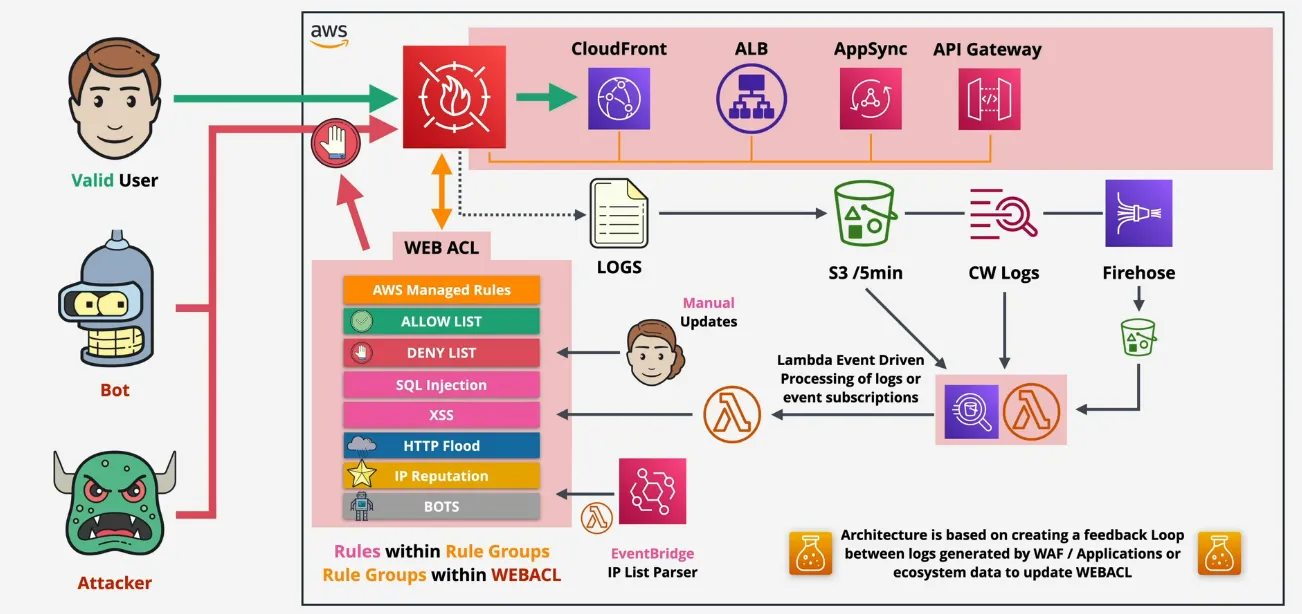
- WEB ACL (Access Control Unit)
- main control unit
- default action => Allow/Block, and is not matched by anything
- create for either CloudFront (global), or a regional service (ALB, APIGW, AppSync)
- on their own don't do anything, you need rule groups, or rules, which are processed in order, and need compute in order to filter through them
- Web ACL Capabity Units (WCU), which default to 1500 indicates how much compute the rules take (complexity), can be increased with support ticket
- WEBCLS's are associated with resources (and can take time), but adjusting an WEBACL takes less time
- 1 resource = 1 WEBACL, but 1 WEBACL can be associated with many resources
- Rule Groups
- contain rules
- don't have default actions, actions are only defined when groups or rules are added to WEBACL's
- are either managed (AWS, or Marketplace), Yours, or Service Owned (Shield Firewall Manager)
- are free for when using WEBACL's AWS customers, except for bot and fraud control rule groups have extra fee
- rule groups can be referenced by multiple WEBACL's
- have MCU capacity (defined upfront, max 1500)
- Rules
- structure: type, statement, action
- type determines high level how it works, statements match traffic, and action is what WAF does when matched
- types: regular or rate-based
- statement: (What to Match), or (Count ALL) or both
- ... origin country, ip, label, header, cookies, query parameters, URI path, query string, body (first 8192 bytes only), HTTP method
- ... exact matches, contains, multiple statements (using AND,OR, NOT)
- action
- normal rules => allow/block, count, captcha
- rate rules => block (no allow), count, captcha
- when blocking can send a custom response, or a custom header
- the rest can also send a custom header ONLY
- possible to add label (internal to AWF only), for complicated flows
- ... allows for multi-stage flows, like one rule which adds a label, then only match if this label was added
- ... but only happens when actions continue (for example allow & block stops processing), count/captcha actions continue
- pricing
- monthly 5$/month (remember can be re-used)
- rule on WEBACL (monthly $1/month)
- per request per WEBACL (monthly 0.60$/1 million request)
- understand in detail: https://calculator.aws/#/
- optional
- intelligent threat mitigation
- bot control (10$/month & $1/1mil requests)
- captcha (0.40$/1000 challenge attempts)
- fraud control / account takeover (10$/month & $1/1000 login attempts)
- marketplace rule groups
AWS Shield
- DDOS Protection
- networking volumetric attacks (L3) => saturate capacity
- networking protocol attacks (L4) => TCP SYN Flood (most common)
- ... leave connections open, prevent new ones
- ... usually combined with volumetric component
- application layer attacks (L7) => flooding web requests
- ... query.php?search=allthecatimagesever
- ... are easy to request, takes time to process
- Shield Standard
- free
- protection at the perimeter
- ... region/VPC or at the AWS Edge (when using CloudFront, or Global Accelerator)
- protects against common network (L3), or Transport (L4) layer attacks
- best protection using R53, CloudFront or AWS Global Accelerator
- Shield Advanced
- additional cost
- cost3000$/month (per ORG), 1 year lock-in
- data(OUT)/m
- covers the same as standard, but anything associated with EIPs (ex: EC2), ALBs, CLBs, NLBs
- not automatic => must be explicitly enabled in Shield Advanced or AWS Firewall Manager Shield Advanced policy
- cost protection => if incurred costs for unmitigated attacks => can charge it back
- pro-active engagement & AWS Response Team (SRT) they will contact you when they detect attacks
- WAF Integration (includes basic AWS WAF fees for web ACLs, rules and requests)
- real time visibility of DDOS events and attacks
- health-based detection => application specific health checks, used by proactive engagement team
- protection groups => groups of resources which are covered automatically by shield
- additional cost
CloudHSM
- KMS
- AWS managed
- shared across AWS, but separated from other users
- for compliance reasons, might not be possible to do
- uses a HSM (Hardware Security Module), which an industry standard piece of hardware to manage keys and perform cryptographic operations
- CloudHSM
- true "single-tenant" equivalent of running your own HSM
- AWS provisioned, and provide maintenance, fully managed by the customer
- AWS does not have access
- can't reach into the secure area of key material
- Fully FIPS 140-2 Level 3 compliant (KMS is L2 overall, some L3)
- only accessible via industry standard APIs => PKCS#11, Java Cryptography Extensions (JCE), Microsoft CryptoNG (CNG) libraries
- KMS can use CloudHSM as a custom key store, CloudHSM integration with KMS
- deployed in a custom AWS managed VPC, where we don't have visibility in
- runs within 1 AZ => need a cluster to create HA
- are injecting to your own VPC with an ENI, meaning the EC2 instances itself also need to be highly-available to have redundancy across AZ's
- EC2 needs one of the standard client API installed on the system
- use-cases
- no native integration with rest of AWS (for example S3)
- offload SSL/TLS processing for web servers
- oracle db's, where you can enable Transparent Data Encryption (TDE)
- highly regulated environments
- protect private keys for an issuing certificate authority (CA)
AWS Config
- records configuration changes over time on resources
- auditing of changes, checking compliance with standards
- is NOT protection, doesn't prevent changes from happening
- doesn't prevent breaches of the compliance
- regional service, supports cross-region and account aggregation
- change can generate SNS notifications and near-realtime events via EventBridge & Lamdbda to change the modification
- standard features
- all config of supported resources are constantly tracked
- recording in a standard and save in S3
- 1 piece of recorded change is called a Configuration Item (CI)
- advanced features
- config rules
- AWS managed ones, ot custom ones
- resource are evaluated against Config Rules, and are either Compliant or Non-Compliant
- uses lambda to check the rule
- can use other AWS service to automate remediation
- config rules
Amazon Macie
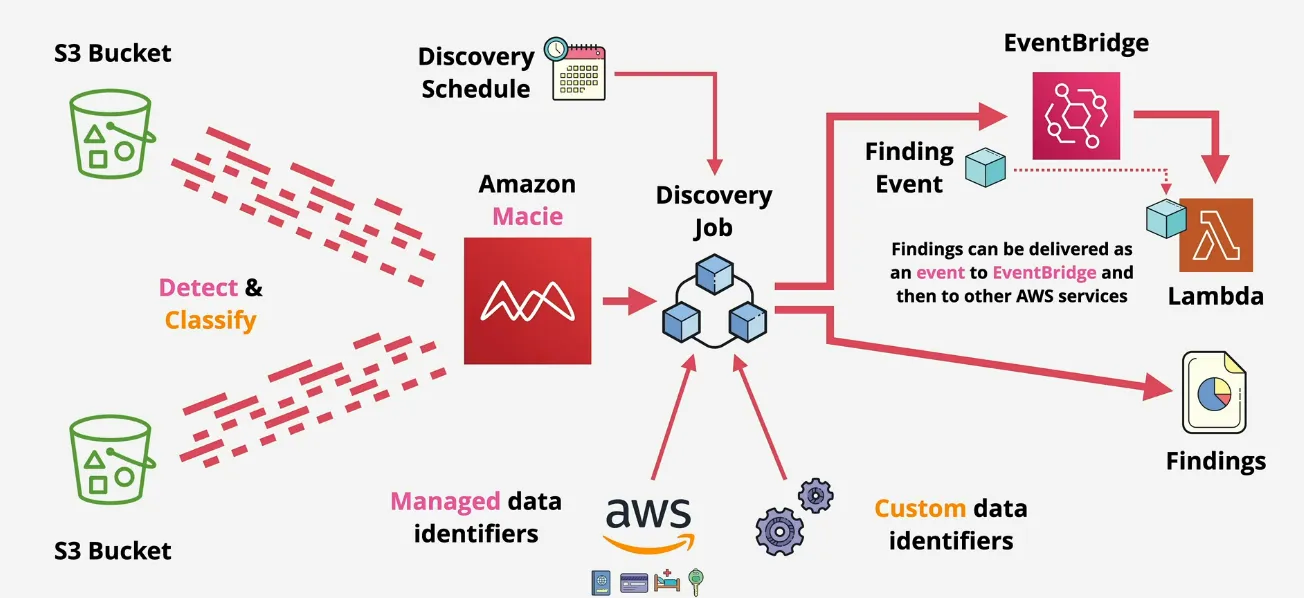
- data security and data privacy service
- discover, monitor and protect data stored in S3 buckets
- automated discovery of data, such as PII (Personal Identifyable Information), PHI (Personal Health Information), Finance, or various others
- managed data identifiers => built-in ML and Pattern Matching
- growing list of common sensitive data types
- credentials, credit cards, finance, health, personal identifiers
- custom data identifiers => proprietary (regex based)
- pattern based
- possible to add keywords that need to be in proximity to regex match (maximum match distance)
- ignore words
- integrates with Security Hub & 'finding events' to EventBridge
- centrally managed, either via AWS org, or explicitly Macie Account Inviting
- findings
- policy findings
- changes to S3 security
- S3BlockPublicAccessDisabled, S3BucketEncryptionDisabled, S3BucketPublic, S3BucketSharedExternally
- there's way more tho
- sensitive data findings
- Credentials
- S3Object/CustomIdentifier, /Multiple, /Personal
- again there's way more
- policy findings
Amazon Inspector
- scans EC2 instance & instance OS
- ... also container
- ... vulnerabilities and deviations against best practice
- run the inspection for a certain time, to check what might be configured wrong
- provides a security report of findings ordered by priority
- rule packages determine what's checked
- networking assessment (can be agentless)
- but agent can provide additional OS visibility
- checks reachability e2e EC2, ALB, DX, ELB, ENI, IGW, ACLs, RT's, SG's, Subnets, VPCs, VGWs & VPC Peering
- checking certain ports
- host assessment (needs an agent)
- Common Vulnerabilities and Exposures (CVE)
- Center for Internet Security (CIS) Benchmarks
- Security best practices for Amazon Inspector
- password checks
- disabling root login
- ...
Amazon GuardDuty
- continuous security monitoring service
- analyses supported data sources
- ... plus AI/ML, plus threat intelligence feeds
- identifies unexpected and unauthorized activity
Amazon Comprehend
- Natural Language Processing (NLP)
- Input = DOcument (think text)
- Output = Entities, phrases, language, PII (personal identifyable information), sentiments, ...
- pre-trained or custom models
- real-time analysis for small workloads
- async jobs for bigger ones
- via console, or cli, or interactive, or use APIs to build in applications
Amazon Kendra
- intelligent search service
- designed to mimic interacting with a human export
- supports wide range of question types
- factoid => who, what, where
- descriptive => How do I get my cat to eat milk?
- keyword => What time is the keynote address (Address doesn't always have the same meaning => can be speech, or an actual address)
- kendra helps with intent
- index => searchable data organised in effeicient way
- data source => where your data lives
- such as S3, Confluence, Google Workpace, Kendra Web Crawler, Workdocs, FSX,
- synchronise with index based on schedule
- documents => either unstructured (HTML, PDF) or structured (FAQs)
- integrates with a ton of AWS services (IAM, Identity Center(SSO), ...)
- no interaction via console
Amazon Lex
- text or voice conversational interfaces
- powers the alexa service
- automatic speech recognition (ASR) => speech to text
- natural language understanding (NLU) => intent (action user wants to perform)
- based on utterances ("Can I order", "I want to order", "give me a")
- using lambda to fulfill the intend
- require parameters (called slots) to fulfill the intend (small/medium, extra cheese)
- build understanding into your application
- scales well, integrates with rest of AWS, quick to deploy, pay as you go pricing
- chatbots, voice assistants, Q&A bots, info/interprise bots
- no possible to interact via console
Amazon Polly
- converts text into life-like speech
- no translations
- standard TTS = concatenative (phonemes)
- neural TTS = phonemes => spectrograms => vocoder => audio (human-like)
- outputs: mp3, ogg, pcm
- uses speech synthesis markup language (SSML) => give context how Polly
generates speech
- emphasis
- whisper
- pronounciation
- newcaster speaking style
- not possible to use in console, for example could be possible to generate speech for wordpress blog posts
Amazon Rekognition
- deep learning image and video analysis
- identify object, people, text, activities, content moderation, face detection, face analysis, face comparison, pathing (movements => post game analysis) & much more
- per image or per minute video pricing
- integrates with applications & event-driven
- analyses live video stream via kinesis video streams
- architecture
Amazon Textract
- detect and analyse text contained in input docs
- input = JPEG, PNG, PDF or TIFF
- output = extracted text, structure and analysis
- possible to use via AWS console
- most documents => synchronous (real-time)
- large docs => asynchronous (say 100 page pdf)
- pricing
- pay per use
- custom pricing for large volumes
- use-case
- detection of text
- ... relationship between text
- ... generates metadata (where text occurs)
- document analysis (names, address, birthdate)
- receipts analysis (prices, vendor, line items, dates, ...)
- identity documents (abstracts fields => ie DocumentID field)
Amazon Transcribe
- automatic speech recognition (ASR) service
- input = audio, output => text
- language customisation, filters for privacy, appropriate language, speaker identification
- custom vocabs and language models
- can be used in the console
- pay per use (per second of transcribed audio)
- use-cases
- full-text indexing of audio
- meeting notes
- subtitles/captions
- call analytics
- integrates with other AWS services
Amazon Translate
- text translation service (ML based)
- translates text from native language to other language one word at a time
- ecoder reads source => semantic representation (meaning)
- decoder reads meaning => write in target language same meaning
- attention mechanism ensure the meaning is translated, not just literal
- possible to auto-detect source text language
- use-cases
- multi-lingual user experience
- meetings notes, posts, communications
- emails, in-game chat
- translate incoming data (social media/news)
- create language independence for other AWS services
- commonly integrates with other services or applications
- multi-lingual user experience
Amazon Forecast
- not weather forecast
- time-series data
- predicting retail demand, supply chain, staffing, energy, server capacity, web traffic,...
- any type of large amount of historical data
- import historical & related data, and then understand what's normal
- output = forecast and forecast explainability (goes into more depth)
- managed service
- interaction via the web console (visualization), CLI, APIs and Python SDK
Amazon Fraud Detector
- fully managed fraud detection service
- ... new account creations, payments, guest checkout
- upload historical data, choose model type
- ... online fraud => little historical data eg new customer account
- ... transaction fraud => transactional history, identifying suspect payments
- ... account takeover => indentify phishing or another social based attack
- things are scored (based on rules), and then decision logic allows to react to these scores based on the business activity
- not usually via console
Amazon SageMaker
- fairly niche product
- not really useful on a high level only, but still useful for the exam
- full-managed machine learning (ML) service
- fetch, clean, prepate, train, evaluate, deploy, monitor/collect
- Sage Maker Studio => build train, debug, and monitor ML model (IDE for ML lifecycle)
- Sagemaker Domain => EFS Volume, Users, Apps, Policies, VPCs (isolated groupings per project)
- Containers => docker containers deployed to ML EC2 instances (ML env = OS, Libs, Tooling)
- Hosting => deploy endpoints for your models
- Sagemaker has no cost => the resources it uses, and creates, DO have a cost => complex pricing and usually significant cost
AWS Local Zones
- without Local Zones
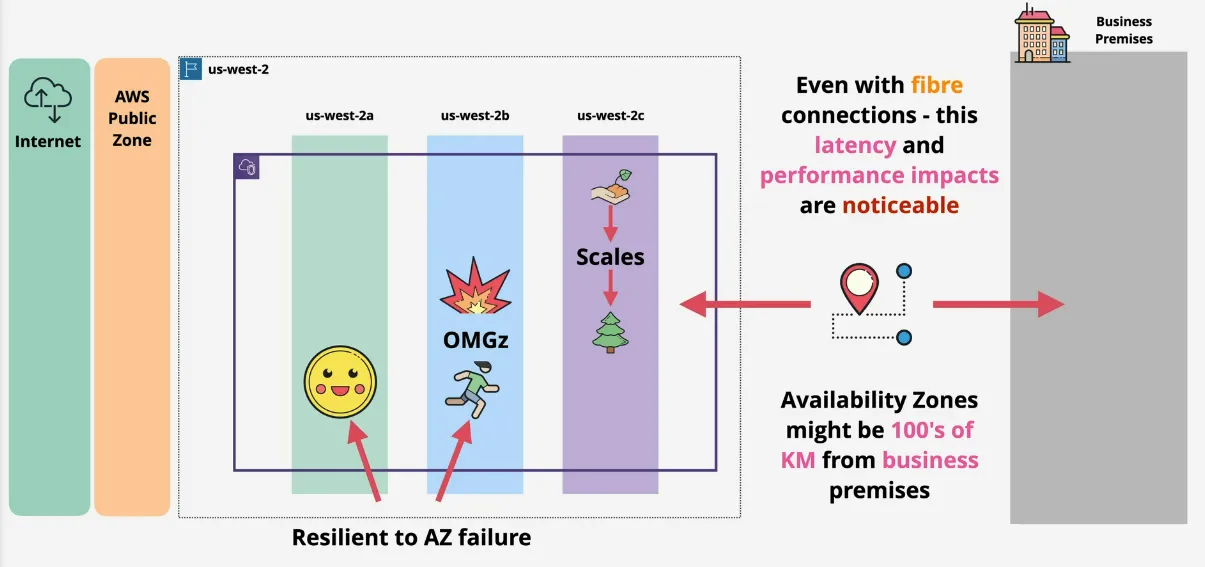
- even with fibre, connections can have latency and perf impacts if the business is far away from the AWS region
- financial trading applications are sensitive to small latency differences
- with local zones
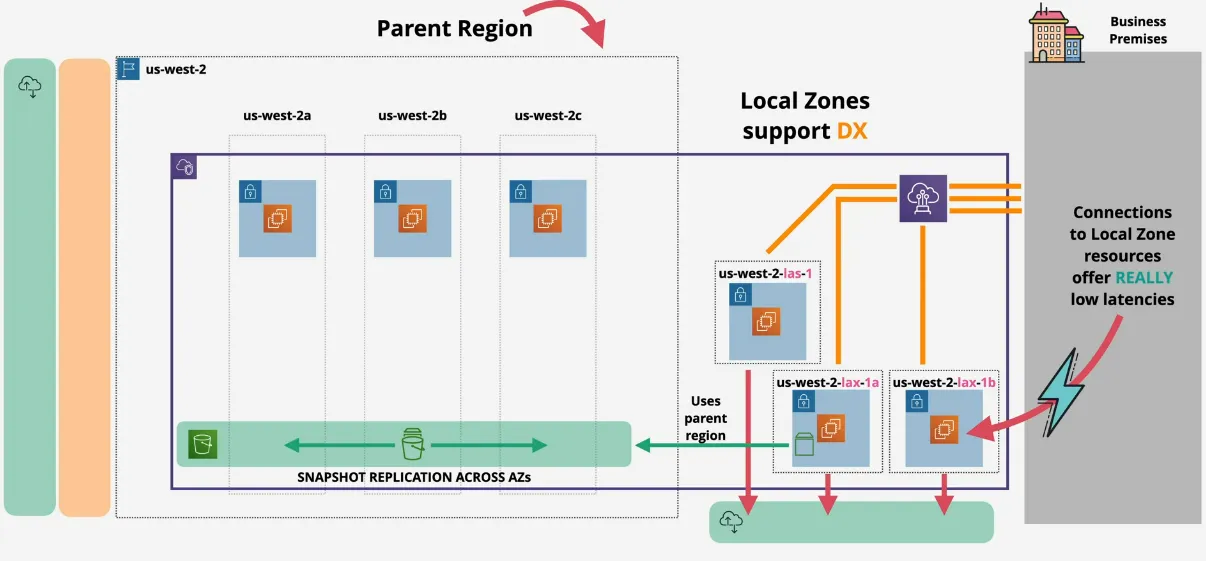
- usually support DirectConnect (DX)
- each are connected to the internet themselves
- name structure: <region>-<localzone>, for example
us-west-2-lax-1a - different services use local zones in different ways
- EC2 and VPC is simply extended by creating subnets in those local zones, and in these subnets, you can create resources as normal (low latency EC2)
- local zones have private networking with the parent region
- creating EBS snapshots adds these snapshots in S3 of the parent region (remember not all services are fully in local zones)
- summary
- 1 zone => so no built-in resilience
- think of them as an AZ, but near location, lower latency
- not all products support them, many are opt-in and with limitations
- use local zones when you need highest level of performance
Exam Technique
3-Phase Approach
- around 25% easy, 50% medium, and 25% hard Q's
- scattered randomly
- phases
- phase 1
- go through 65 question and answer the ones you know instantly
- within 10s
- phase 2
- identify which are the super hard questions, skip
- answer the medium questions
- they need some amount of thinking, but don't scare you
- phase 3
- if you have time (for example 40min left) go do the red questions
- if no time, just guess, or click at random
- possibly review quickly
- phase 1
- assume you will run out of time
- 2min to read Q, answer and make a decision => kinda hard
- don't guess until the end
- later questions may remind you of something important from earlier
- use mark for review!
- take all the practice tests
- after following the course
- practice test of the course
- review
- use practice tests from TD
- additional study if required
- schedule exam
- use the timed exams from TD
Associate Level Question Technique
- questions have 1-2 lines of preamble (scenario) => skip these
- then the question itself
- 4-5 answers, multi-choice or multi-select (generally it says how many to pick)
- generally answers are simple right or wrong, occasionally "most suitable"
- generally there's 1 or 2 answers, you can immediately exclude
- most questions have an overall criteria or restriction
- cost effective
- best practice => do what AWS want you to do
- high performance
- timeframe => for example, 1 week to deploy something
- highlight and remove any question fluff
- identify what matters in the answers
- ideally what remains, is correct
- worst case, quickly select between what remains
- DON'T PANIC, mark for review and come back later
- most people fail the exam, because of exam technique, not knowledge
---------------------------------------
High Availability vs Fault Tolerance vs Disaster Recovery
- HA: aims to ensure and agreed level of operational performance, usually uptime, for a higher than normal period => slight user inconvenience's like having to log in again, is better than a complete outage => not meant to prevent user disruption, but is about fast or automatic recovery when an issue occurs
- FT: the ability which enables a system to continue operating properly in an event of the failure of some (one or more faults within) of its components => operating through failure, and much more complex than HA, and thus more expensive
- DR: set of policies, tools and procedures to enable the recovery, or
continuation of vital technology infrastructure and systems following a
natural or human-induced disaster => pre-planning vs dr process
- perhaps have a backup premise
- have IT infra ready at the other location
- take regular back-ups and store off-site (at the backup location)
- run periodic tests for the dr processes
CDK - Cloud Development Kit
- similar to Pulumi, but AWS specific
- create CloudFormation templates
- AWS CDK Reference
Metadata
- Creator(s)
Adrian Cantrill
adamdotdev
I'd like to do something else during my work with clients, and understand AWS services in order to guide them. There is also Amazon Q, where companies pay money for you to help them out and the certifications help getting clients.